OPERATIONS MANUAL
+1 215 785 2338 www.tescometering.com
support@tescometering.com
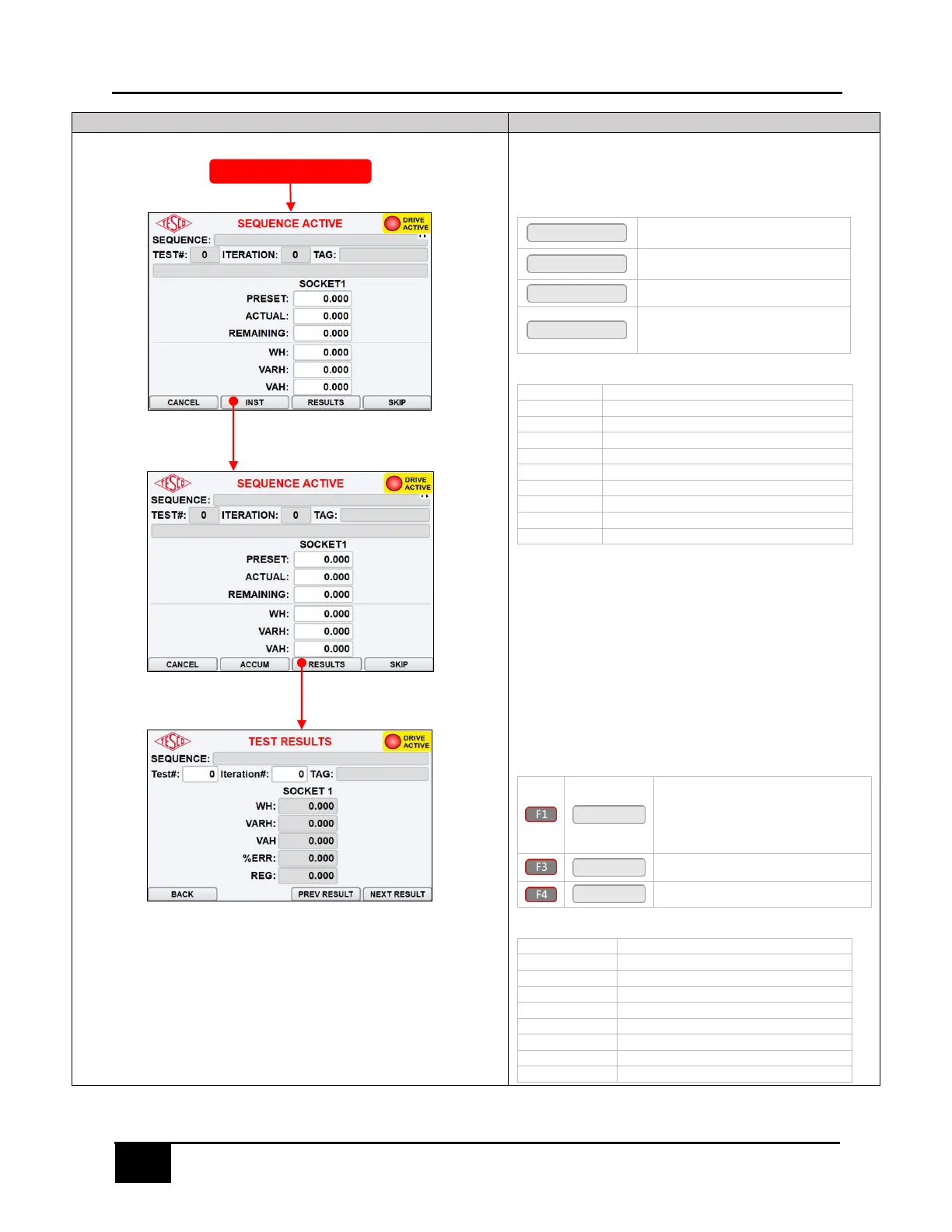
3.3.6.3 SEQUENCE ACTIVE
This screen shows the live results of the tests.
KEYPAD & FUNCTION KEYS
Press to cancel the test process and
return to SEQUENCE SETUP screen
Press to open the MEASUREMENTS
screen
Press to show test results
Press to skip the ongoing test and
proceed to the next test in the
sequence
Current test number in sequence
Current repeat of test number
Alias or brief description of the test
3.3.6.4 TEST RESULTS
This screen shows the results and it can be accessed during a test.
KEYPAD & FUNCTION KEYS:
Press to return to:
- SEQUENCE ACTIVE screen (during
a test)
- SEQUENCE SETUP screen (when
tests complete)
Press to show the previous test result
Press to show the next test result
Current test number in sequence
Current repeat of test number
Alias or brief description of the test



 To Next Page