OPERATIONS MANUAL
+1 215 785 2338 www.tescometering.com
support@tescometering.com
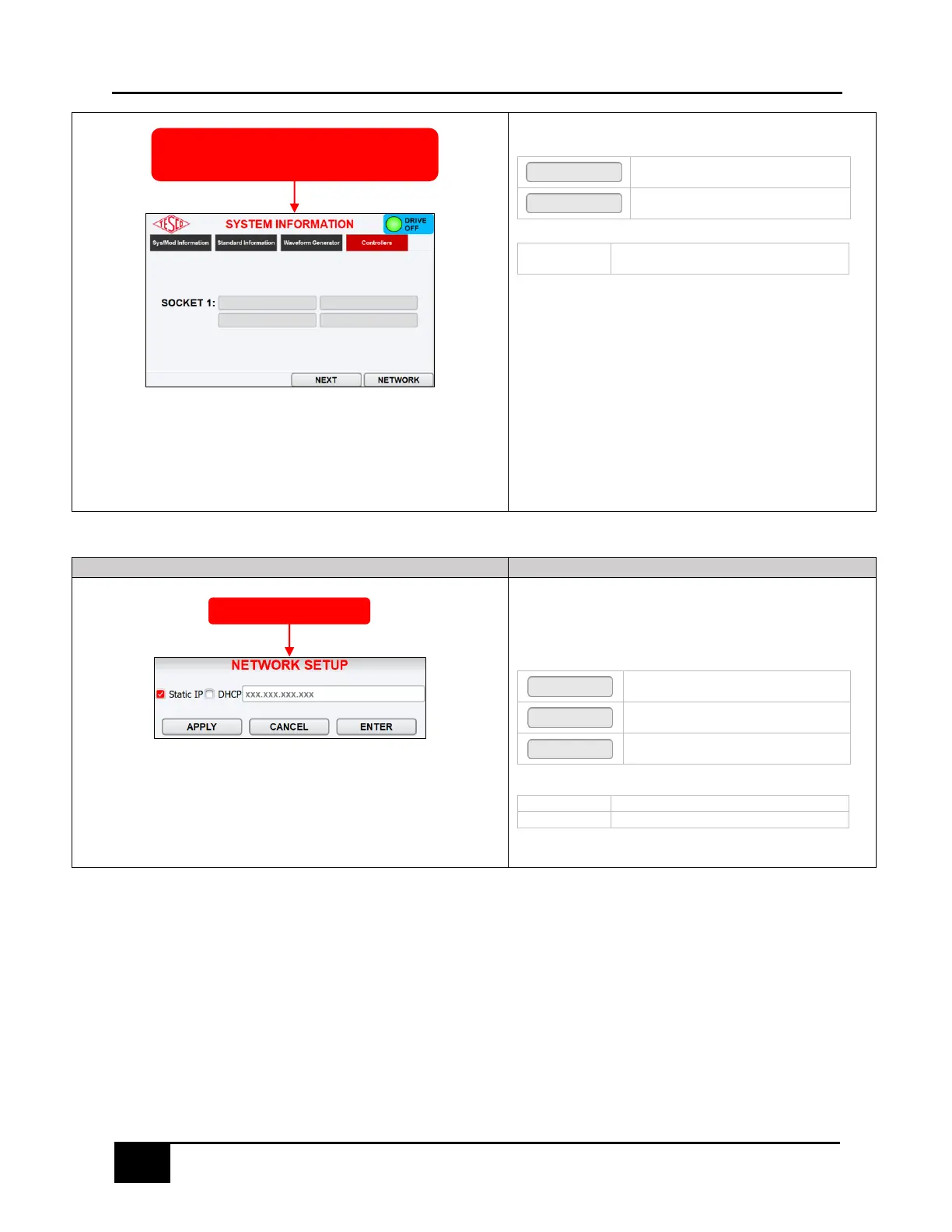
CONTROLLERS TAB
KEYPAD &FUNCTION KEYS
Proceeds to the SYSTEM INFORMATION
tab
Press to open the NETWORK SETUP
dialog box
Displays the serial number and software
version of the socket
3.3.11 NETWORK SETUP
3.3.11.1 NETWORK SETUP
Display and edit required network settings.
KEYPAD & FUNCTION KEYS
Press to apply current configuration
without closing network dialog box
Press to close dialog box without saving
changes
Press to save current configuration and
close dialog box
Select for user specified IP address
Select for network assigned IP address
3.4 Optical Pickup Alignment
Plug the optical pickup into the OPTICAL PICKUP port. Mount the meter into the socket and attach
magnetic optical pickup to optical port of meter. For meter insertion and extraction, refer to section 2.5
Utility Meter Insertion/Extraction.
To remove the optical pickup, hold it by the body and gently pull away from the meter. There is an
indicator light showing that the pickup has power. If alignment is difficult to achieve, the PULSE ALIGN
feature is available to assist with alignment.
SYSTEM INFORMATION
(WAVEFORM GENERATOR)



 To Next Page