Page 2
2.3 PARTS GUIDE
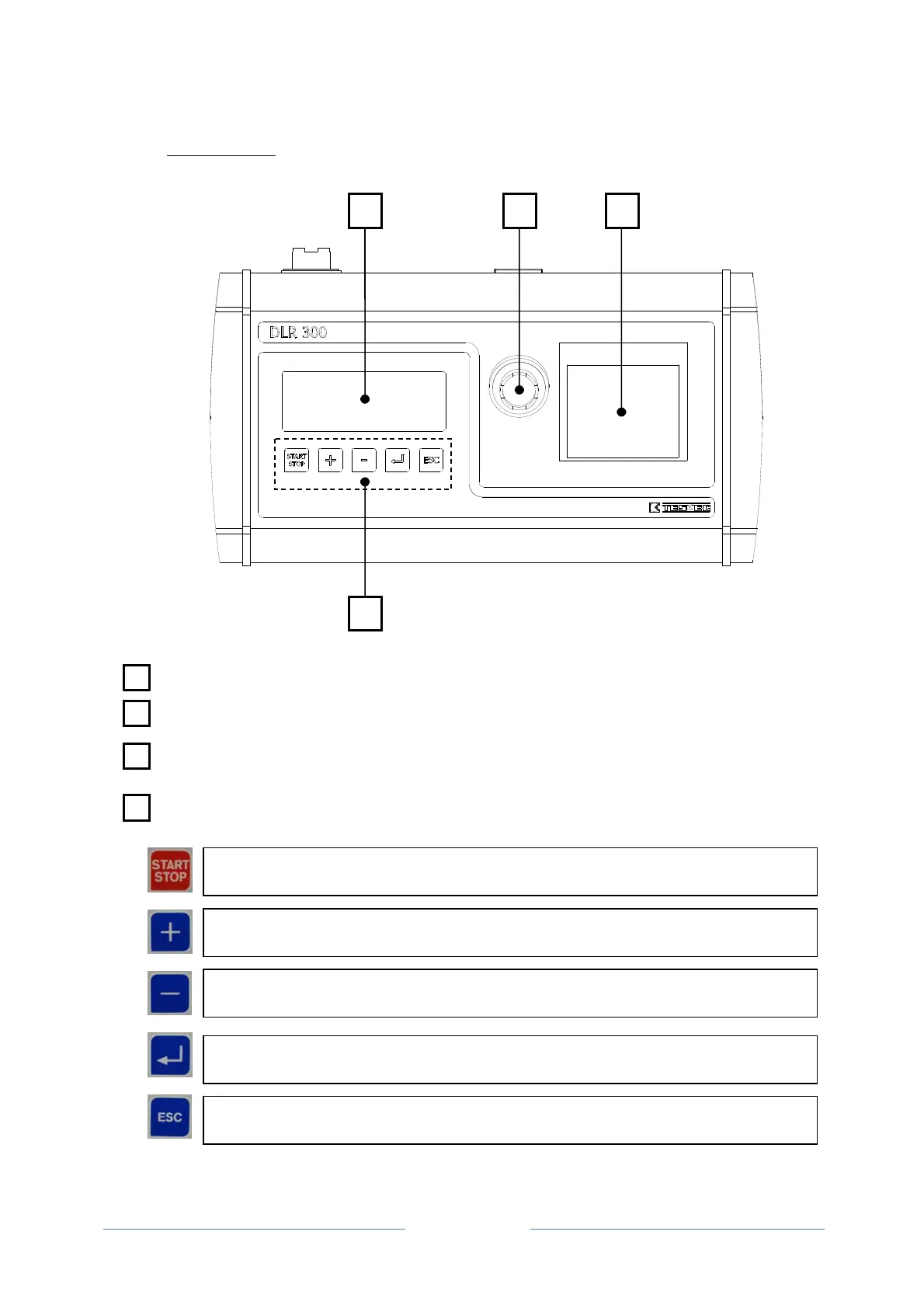
2.3.1 UPPER PANEL
DISPLAY: Backlit LCD with 8 rows of 24 characters each.
TYPE-A USB FLASH SOCKET
PRINTER: Thermal, which allows the real time cable laying data to be printed or recalled
from the internal memory of the recorder.
FUNCTION BUTTONS: These are the controls that provide access to the recording
programme and the management menus of the cable stringing or laying operations:
4
1 2 3
1
2
4
START/STOP BUTTON: Press this button twice to start or stop the pull recording
operations
+ BUTTON: This allows the user to scroll the functions of a menu, choose from the
o
tions available or enter al
hanumeric values
- BUTTON: This allows the user to scroll the functions of a menu, choose from the
o
tions available or enter al
hanumeric values
SEL BUTTON: This provides access to the management menus and is also used to
confirm and save the data entered
ESC BUTTON: This allows the user to exit the menus and to exit without saving after
havin
chan
ed parameters.



 To Next Page