Page 3
The and buttons are used to increase or decrease a numerical value, as
follows:
¾ briefly press one of the two buttons to change the numerical value by
one unit each time
¾ keep one of the two buttons pressed for the numerical value to change as
follows:
• by one unit up to 10
• it then changes in 10s up to 100
• then in 100s up to 1000
• then in 1000s up to 10,000
Release the pressed button once the desired value is reached. If the numerical
value must be corrected, repeat the steps described above.
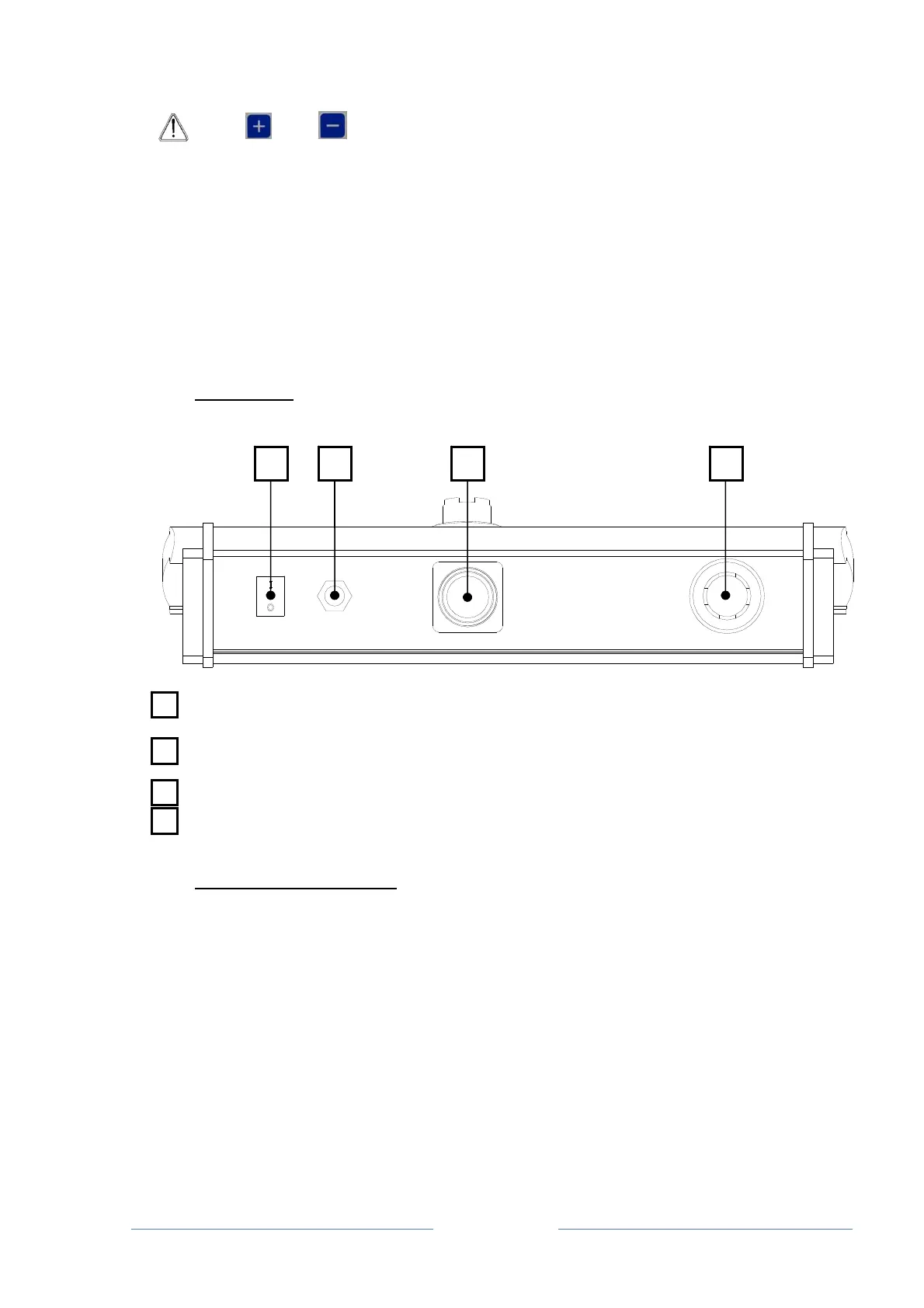
2.3.2 REAR PANEL
ON BUTTON: main switch
POWER INPUT: socket for the multi-voltage plug
16-PIN FEMALE CIRCULAR CONNECTOR: socket for the machine interface cable
TYPE-B USB SOCKET: to update the firmware or to add optional languages.
2.3.3 STANDARD ACCESSORIES
BOX: to transport the DLR300
WIRE: to connect the DLR300
PLUG: multi-voltage plug
USB FLASH DRIVE
TRANSPARENT POCKET: to protect the DLR300 in case of rain
PAPER ROLL: to print the cable laying operations
1 2 3 4



 To Next Page