Short instructions
35
Short instructions for testo 325 M / XL
Please also follow instructions in Instruction manual
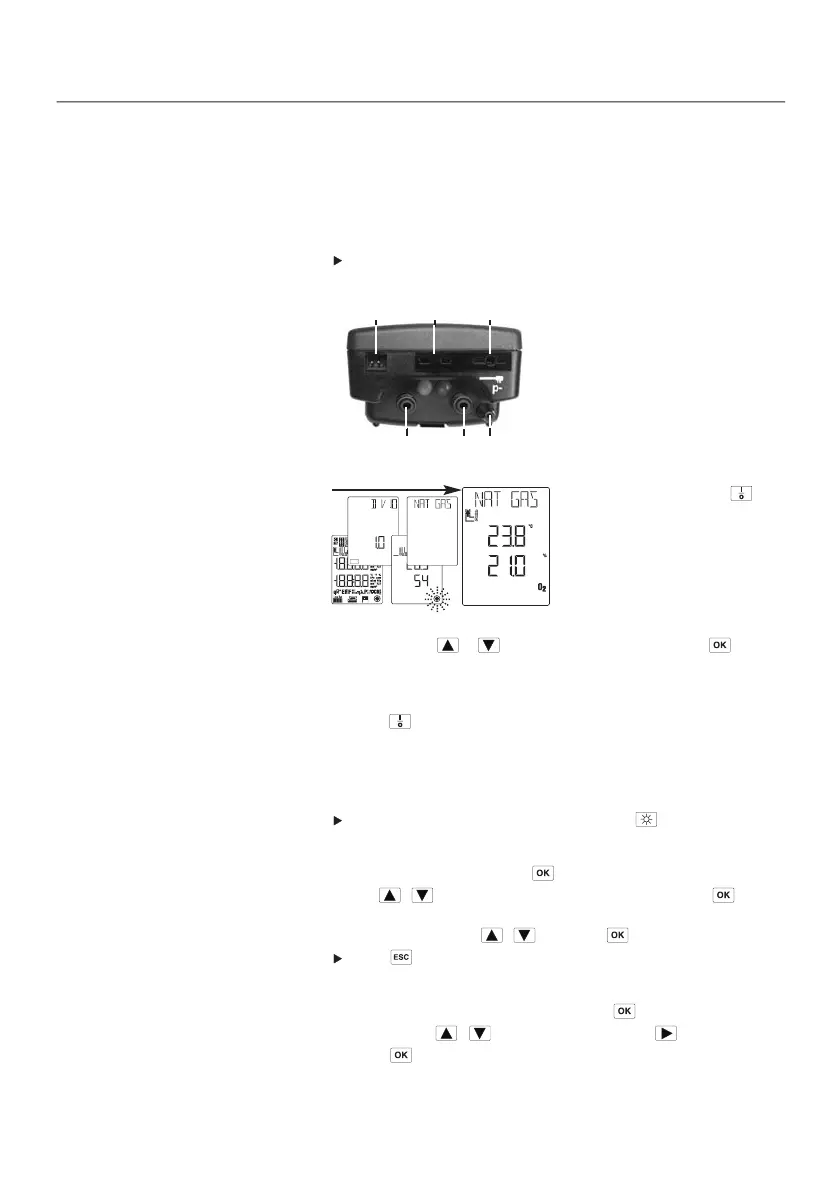
Connections
➀ Mains unit
➁ Probes: Ambient air
temperature (AT) / temperature T2
➂ Probes: Flue gas temperature
(FT) / Temperature T1
➃ Flue gas inlet (red)
➄ Pressure + (blue)
➅ Pressure - (p-)
Switching on instrument and selecting fuel
1 Switch on analyser via .
- The following appear:
display test, software version/
power, zeroing phase.
- Instrument changes to fuel
selection.
2 Set fuel using or and confirm selection by pressing .
- Instrument changes to measurement menu and is ready to operate.
Switching off analyser
1 Press to switch off analyser.
2 Wait on automatic rinse.
-
OFF is displayed for 5 s and then the analyser switches off.
Switching background light on/off
Switch background light on or off by pressing .
Selecting menu item
1 Open main menu by pressing .
2 Use / to select menu item and confirm selection via .
If sub-menu is available:
3 Select menu item via / and press to confirm.
Press to go back one menu level.
Setting date/time
1 Select Dat/Clk in main menu and press to confirm.
2 Set value via / , change to next value via .
3 Press to confirm settings.
➂
➃
➁
➄
➀
➅



 To Next Page