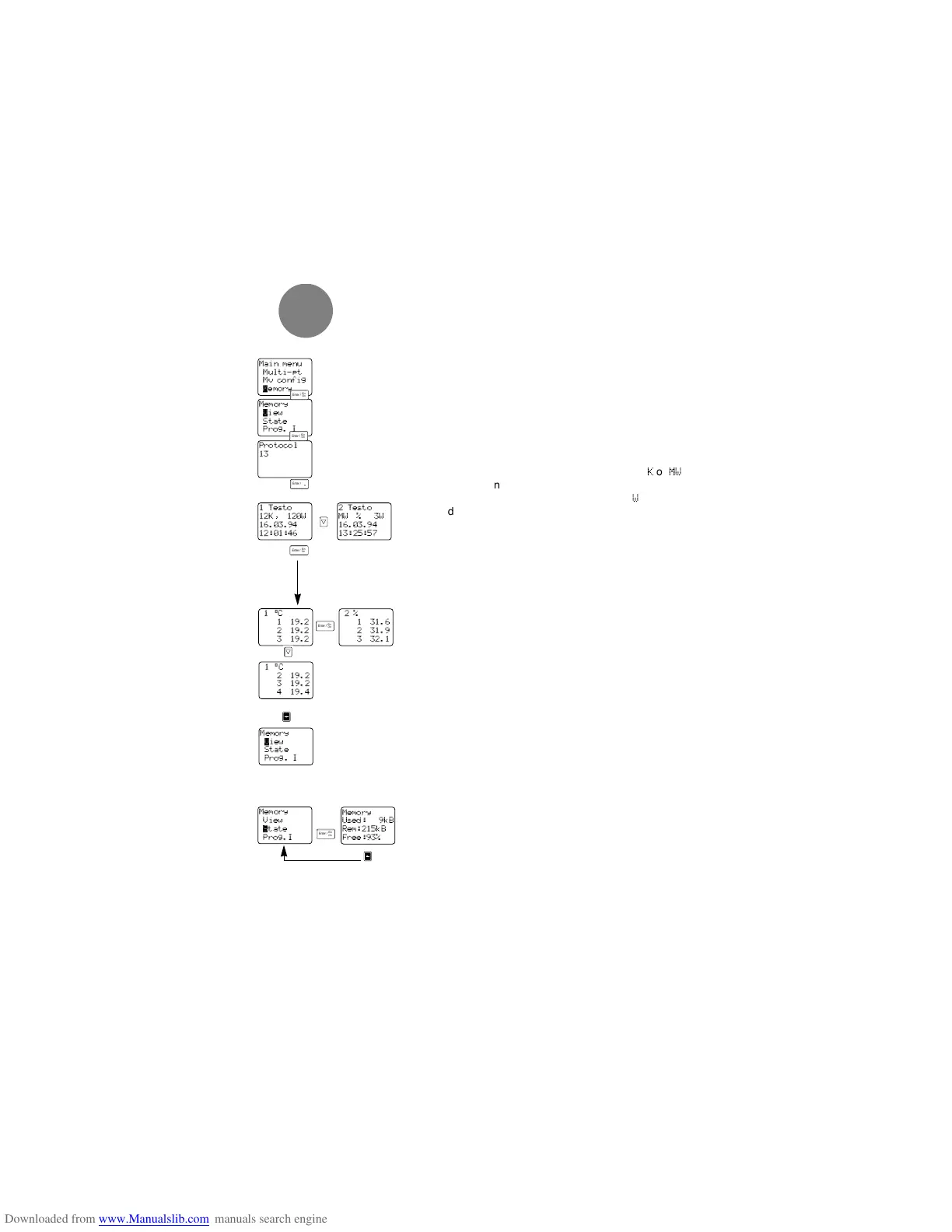
8.3 Memory
8.3.1 View
All of the completed measuring programs and aver-
ages are saved in numerical order.
Via the menu point “M
EMORY: VIEW”
an information mask appears which shows you the
number of protocols (“
PROTOCOLS
”) already available.
In the following masks you will see the protocol head-
ings of the saved protocols:
1st line: - Protocol number and measuring location
2nd line: - Number of measuring channels (
K
or
MW
in average protocols
- Number of measured values (
W
)
3rd line: - Date
4th line: - Time (start of protocol)
Select a heading via the <up><down> keys and call it
up via <Enter>.
The 1st line of the protocol contains information on
the channel and the parameter of the listed meas-
ured values. The other channels are reached via
<Enter>.
You can scroll through the measuring protocol to the
last measuring value via <up><down> keys.
You can return to the “M
EMORY: VIEW” menu by
pressing the <arrow> key.
8.3.2 State
Select the “S
TATE” menu point from the “MEMORY”.
The following display includes:
2nd line: - used kByte
3rd line: - free kByte
4th line: - free memory in %
Your testo 454 has a memory capacity of
224 kByte which corresponds to 110,000 measured
values. Return to the “MEMORY” menu by pressing the
<arrow> key and go to the measuring menu via
<Enter>.
8Main menu
16
Protocol
13
Main menu
Multi-pt
Mv config
µemory
Memory
√iew
State
Prog. I
Memory
√iew
State
Prog. I
1 Testo
12K, 120W
16.03.94
12:01:46
1°C
1 19.2
2 19.2
3 19.2
1°C
2 19.2
3 19.2
4 19.4
2%
1 31.6
2 31.9
3 32.1
2 Testo
MW % 3W
16.03.94
13:25:57



 To Next Page