8Main menu
8.7 Probes
8.7.4 Adjust
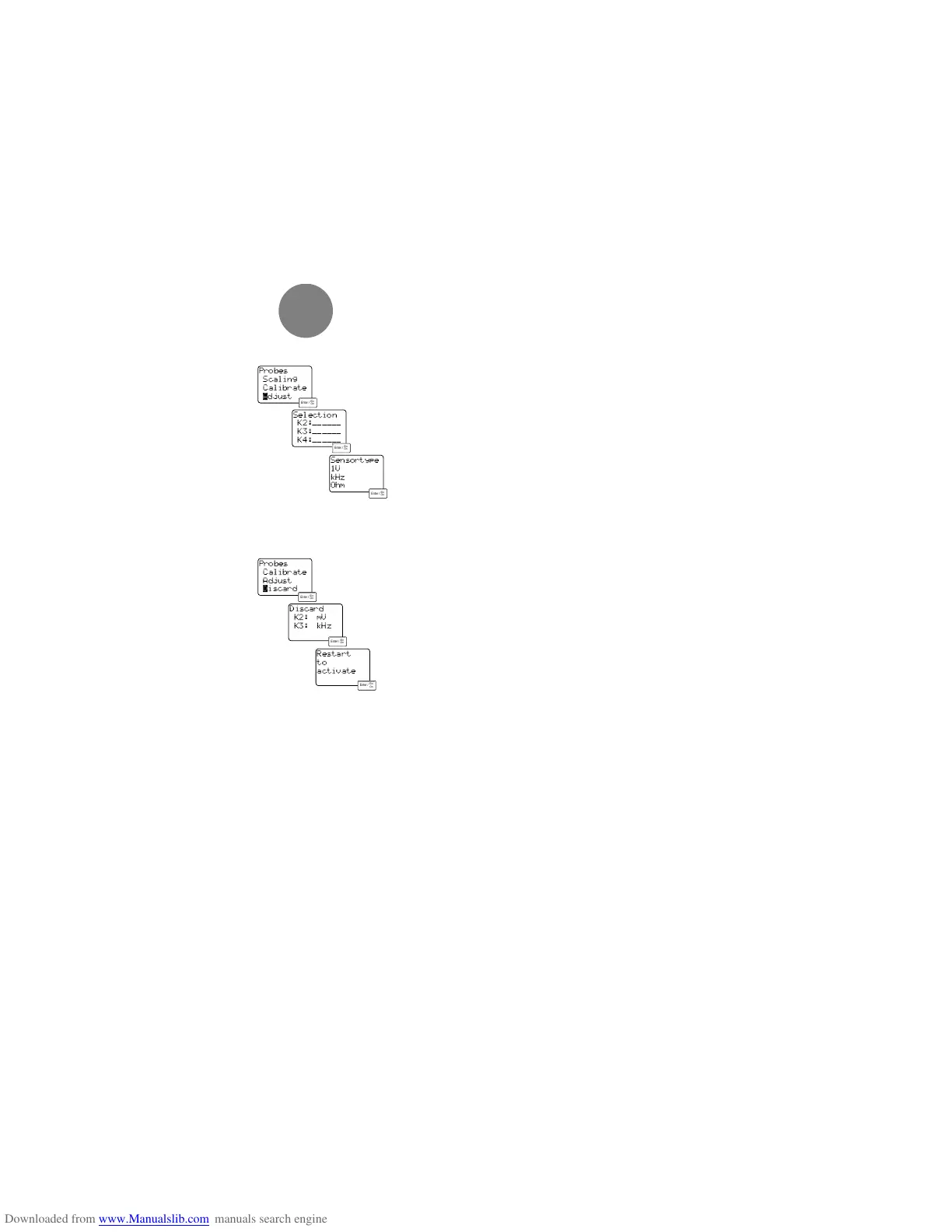
When using the adapter cable no. 0554.0013 the
instrument has to be told what parameter is to be
measured. You can choose between voltage, fre-
quency and resistance. Select an input channel from
the non-assigned socket and confirm with <Enter>.
After this you can assign the required parameter to
the channel selected.
Now the corresponding unit can be determined in the
“UNIT” menu and the upgrade in the “SCALING” menu.
8.7.4 Discard
Probes which were defined under “ADJUST” must be
discared before a new configuration. Otherwise the
set unit is displayed on the channel selected. (even
if the probes are not connected). If a probe is con-
nected which is different to that defined the display“-
Invalid configuration” appears after the instrument is
switched on and all of the settings are erased.
Confirm the channel input whose definition you wish
to erase in the “DISCARD” menu. The instrument
restarts and you then find yourself in the measuring
menu.
30
Selection
K2:______
K3:______
K4:______
Sensortype
1V
kHz
Ohm
Probes
Scaling
Calibrate
ådjust
Probes
Calibrate
Adjust
∂iscard
Discard
K2: mV
K3: kHz
Restart
to
activate



 To Next Page