© 1999 T
EXAS
I
NSTRUMENTS
I
NCORPORATED
TI-30X ÙS: A Guide for Teachers
29
TI-30X
Ú
S Basic Operations
1
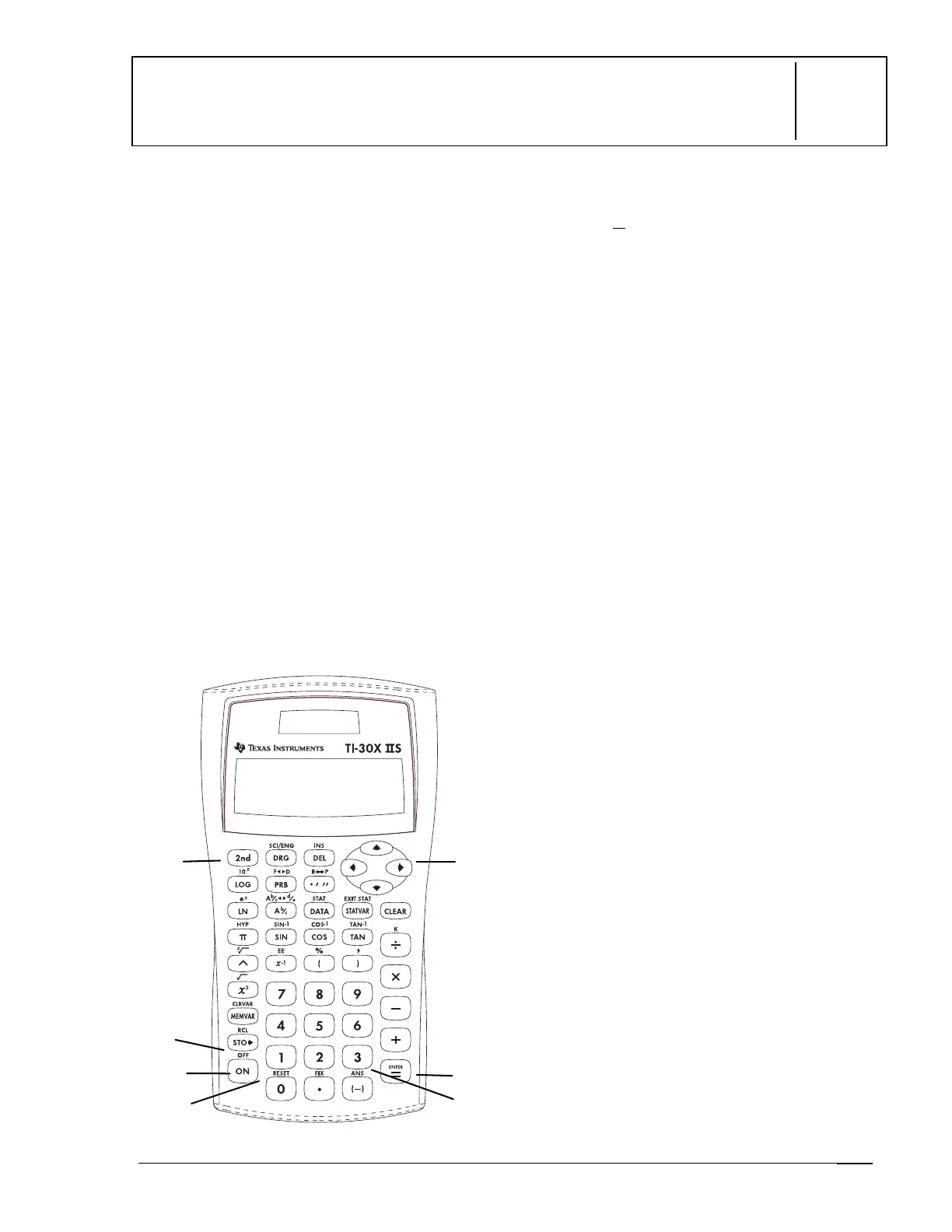
Keys
1.
&
turns on the calculator.
2.
%
turns on the
2nd
indicator and
accesses the function shown above the
next key you press.
3.
%
'
turns off the calculator and
clears the display.
4.
<
completes the operation or executes
the command.
5.
%
i
recalls the most recently
calculated result and displays it as
Ans
.
6.
!
and
"
move the cursor left and right to
scroll the entry line. Press
%
!
or
%
"
to scroll to the beginning or end of
the entry line.
#
and
$
move the cursor up and down
through previous entries.
%
#
or
%
$
scroll to the beginning or end of history.
7.
%
displays the
RESET
menu.
RESET: N Y
•
Press
<
when
N
(no) is
underlined to return to the previous
screen without resetting the
calculator.
•
Press
<
when
Y
(yes) is
underlined to reset the calculator.
The message
MEM CLEARED
is
displayed.
Note
: Pressing
&
and
-
simultaneously
resets the calculator
immediately. No menu or message is
displayed.
Notes
•
The examples on the transparency masters
assume all default settings.
•
Resetting the calculator:
Returns settings to their defaults:
floating decimal (standard) notation
and degree (
DEG
) mode.
Clears memory variables, pending
operations, entries in history,
statistical data, constants, and
Ans
(Last Answer).
•
The entry line can contain up to 88
characters. When
¸
or
¹
appear in the
display, the entry line contains more
characters to the left or right. When
º
or
»
appear, more characters are located above
or below the entry line.
•
Press
&
after Automatic Power Down
é
(APD
é
). The display, pending operations,
settings, and memory are retained.
1
3
4
2
5
6



 To Next Page
 Loading...