© 1999 T
EXAS
I
NSTRUMENTS
I
NCORPORATED
TI-30X ÙS: A Guide For Teachers
81
Trigonometry
13
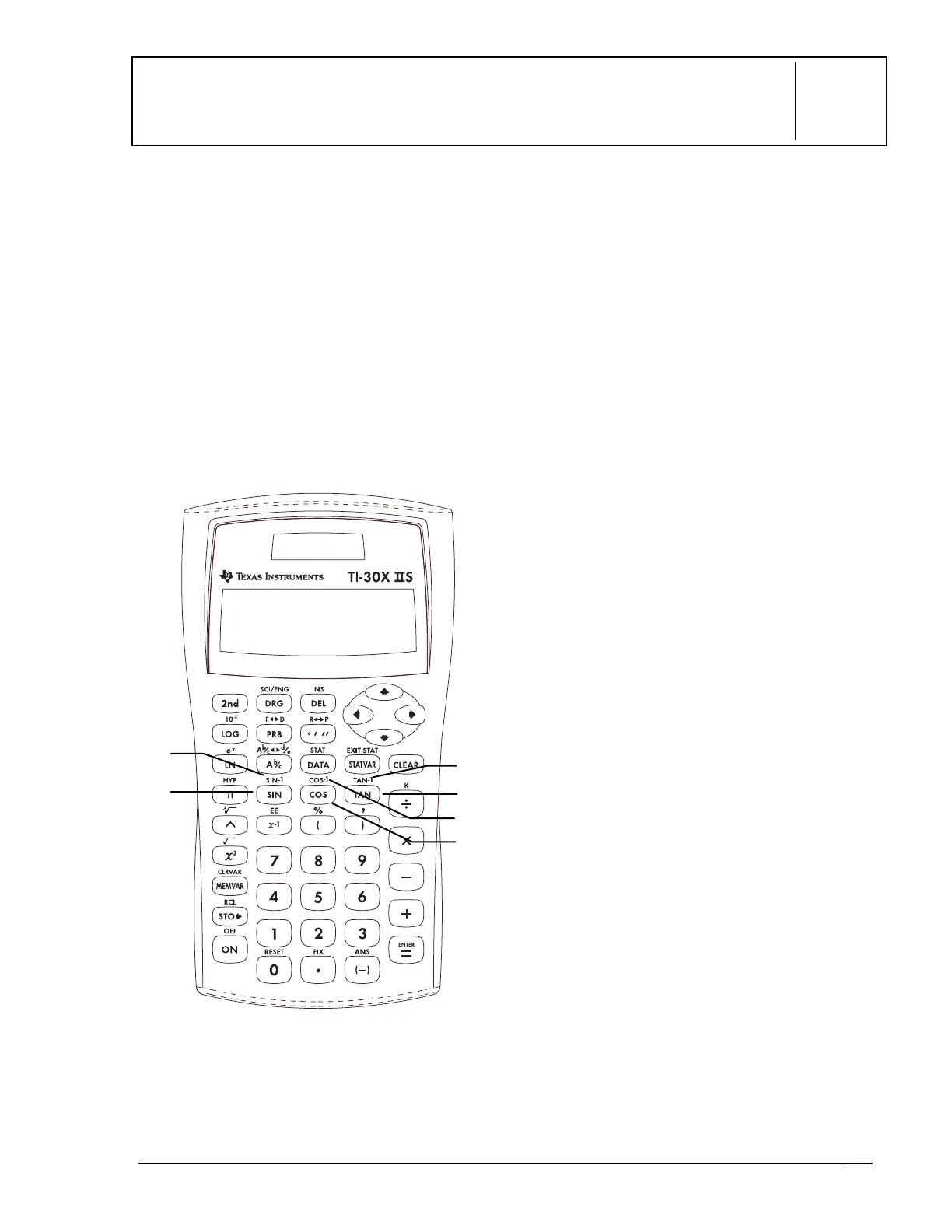
Keys
1.
@
calculates the tangent.
2.
%
\
calculates the inverse tangent.
3.
?
calculates the cosine.
4.
%
[
calculates the inverse cosine.
5.
>
calculates the sine.
6.
%
Z
calculates the inverse sine.
Notes
•
The examples on the transparency masters
assume all default settings.
•
Before starting a trigonometric
calculation, be sure to select the
appropriate angle mode setting (
degree,
radian,
or
gradient
—See Chapter 16,
Angle Settings and Conversions). The
calculator interprets values according to
the current angle-unit mode setting.
•
E
ends a trig function.
1
2
3
4
5
6



 To Next Page
 Loading...