© 1999
T
EXAS
I
NSTRUMENTS
I
NCORPORATED
TI-30X ÙS: A Guide For Teachers
94
Angle Settings and Conversions
16
Keys
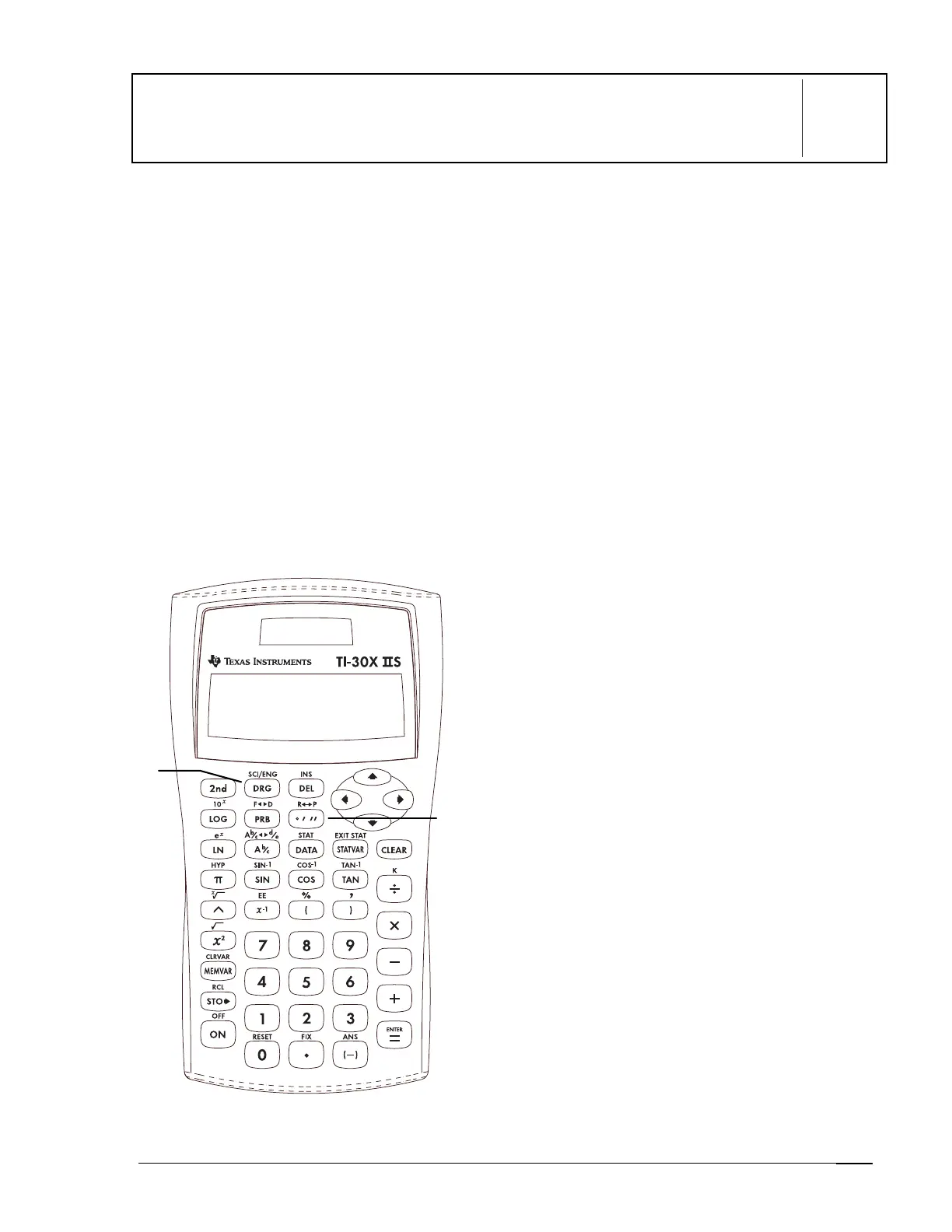
1.
I
displays the following menu that lets
you change the
angle
mode setting to
DEG
,
RAD
, and
GRD
without affecting the value
in the display.
DEG
Sets degree mode.
RAD
Sets radian mode.
GRD
Sets gradient mode.
When you turn on the TI30X
Ö
S, it is
always in the
DEG
mode.
2.
=
displays a menu that lets you specify
the unit of an angle.
º
Specifies degrees.
r
Specifies radians.
g
Specifies gradients.
DMS
Specifies degrees (
º
), minutes
(
´
), and seconds (
´´
). It also lets
you convert an angle from
decimal degrees to
DMS
notation.
Notes
•
The examples on the transparency masters
assume all default settings.
•
Angles with a trig function ignore the angle
mode setting and display results in the
original unit. Otherwise, angles (without a
trig function) are converted and displayed
according to the angle mode setting.
•
You enter decimal-degree angles the same
as you would any other number.
•
For decimal/
DMS
conversions, the
calculator interprets all values as degrees,
regardless of the angle-unit setting.
• DMS
angles are entered as
º
(degrees),
´
(minutes), and
´´
(seconds).
1
2



 To Next Page
 Loading...