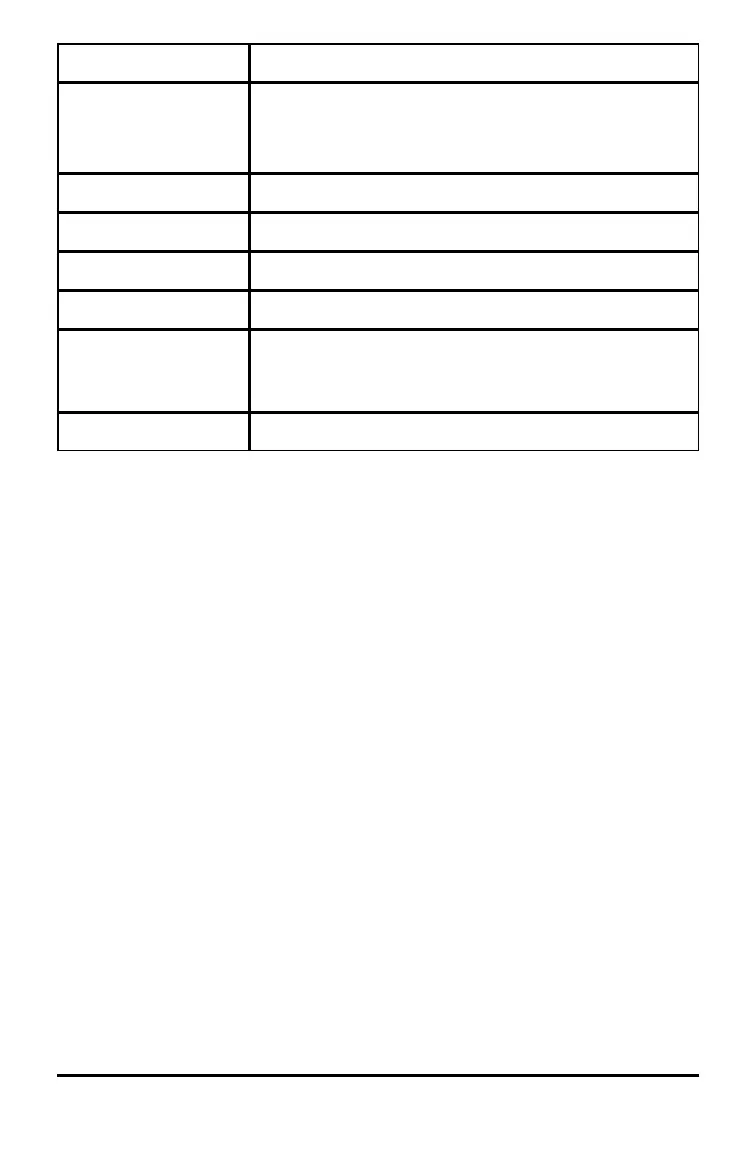
Variable Type Names
Graphical databases GDB1, GDB2, ... , GDB9, GDB0
Save current equations from Y= and Window settings to
re-use.
Pictures Pic1, Pic2, ... , Pic9, Pic0
Strings Str1, Str2, ... , Str9, Str0
Apps Applications
AppVars Application variables
Groups Grouped variables
Save a group of calculator files for sharing or to re-use when
setting up a classroom.
System variables Xmin, Xmax, and others
* Once a list contains a complex number, it is designated as a complex list. To change
a list to Real numbers, delete the list and enter the Real values.
Notes about Variables
• You can create as many list names as memory will allow.
• Programs have user-defined names and share memory with variables.
• From the home screen or from a program, you can store to matrices, lists, strings,
and system variables such as Xmax, TblStart, and all Y= functions.
• From an editor, you can store to matrices, lists, and Y=functions.
• From the home screen, a program, or an editor, you can store a value to a matrix
element or a list element.
• You can use DRAW STO menu items to store and recall Pic Vars.
• Although most variables can be archived, system variables including r, T, X, Y, and q
cannot be archived.
• Apps are independent applications that are built-in the TI-84 Plus T. Apps cannot be
deleted. Additional Apps cannot be loaded.
Storing Variable Values
Storing Values in a Variable
Values are stored to and recalled from memory using variable names. When you
evaluate an expression that contains a variable name, the graphing calculator
substitutes the value currently stored in that variable.
Working with Variables 37




 To Next Page