Battery Information
The TI-84 Plus T uses five batteries:
• Four AAA alkaline batteries
-plus-
• One LR44 Alkaline 1.5 V backup battery (or equivalent)
- The backup battery provides auxiliary power to retain memory while you
replace the AAA batteries.
When to Replace the Batteries
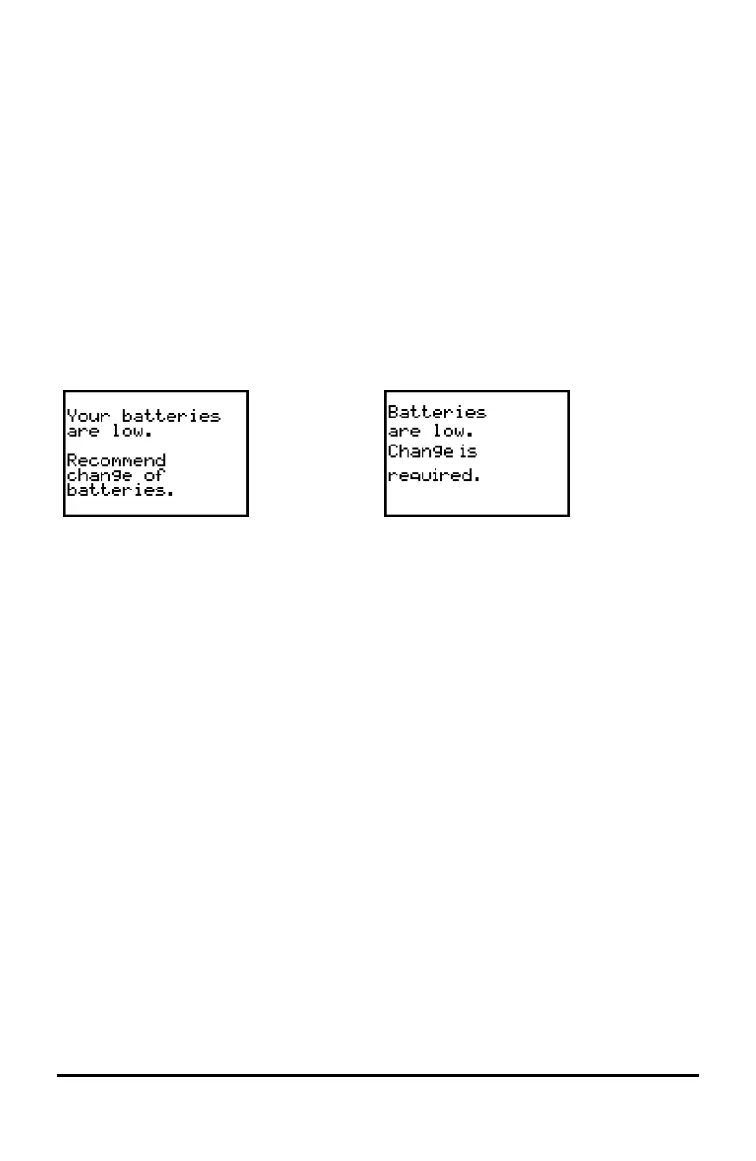
When the battery voltage level drops below a usable level, the TI-84 Plus T:
Displays this message when you turn on
the unit.
Displays this message when you attempt
to download an application.
Message A Message B
• After you first see Message A, you can expect the batteries to function for about
one to two weeks, depending on how often you use the graphing calculator. (This
one- to two-week period is based on tests with alkaline batteries; the
performance of other types of batteries may vary.)
• If you see Message B, you must replace the batteries immediately to successfully
download an application.
Note: Replace the backup battery every three or four years.
Effects of Replacing the Batteries
• Do not remove both types of batteries (AAA and the backup battery) at the same
time.
• Do not allow the batteries to lose power completely.
If you follow these guidelines and the steps for replacing the batteries, you can replace
either type of battery without losing any information in memory.
Battery Precautions
Take these precautions when replacing batteries:
• Do not leave batteries within reach of children.
• Do not mix new and used batteries.
Battery Information 49










 To Next Page