• If APD™ turns the graphing calculator off, it will return as you left it, including the
display, cursor, and any error.
Note: To prolong battery-life, turn off Exam Mode after an exam and make sure the
Exam LED is not blinking. (See section on Exam Mode and Exam LED.)
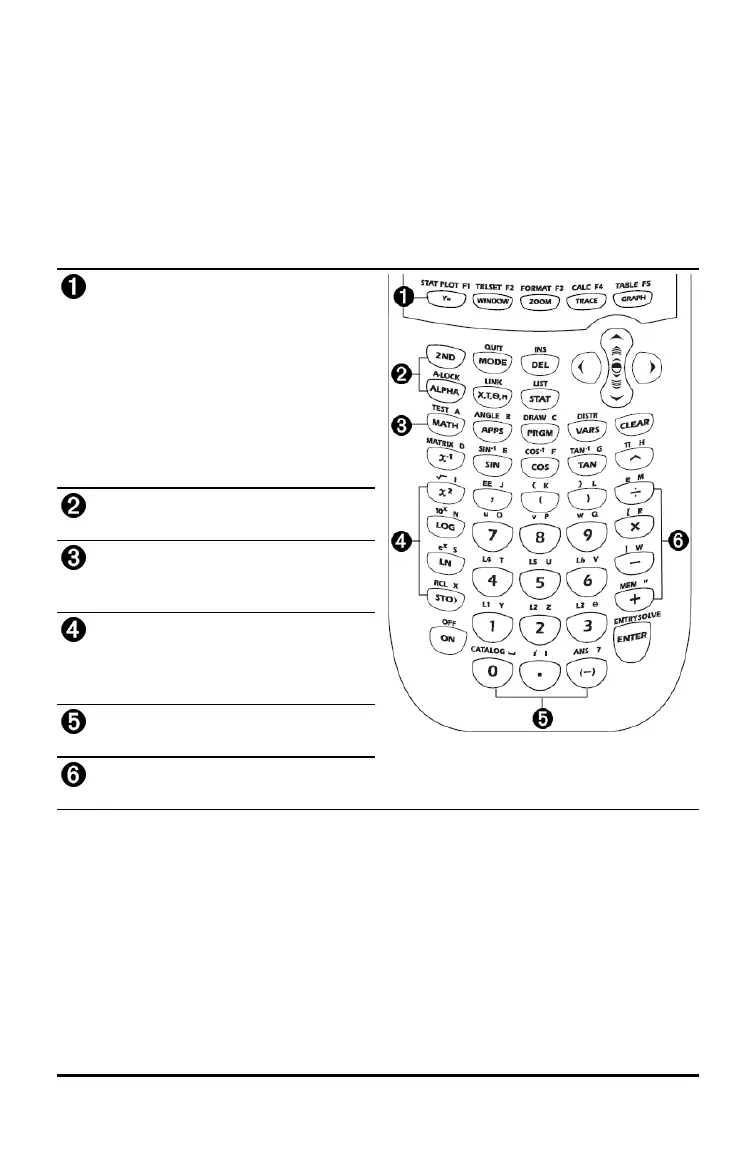
Using the TI-84 Plus T Keyboard
This section describes the functions of specific keys on the graphing calculator
keyboard.
TI-84 Plus T Keyboard
Graph/Plot Setup Keys allow access to
interactive graphing features.
Editing Keys allow you to edit
expressions and values.
Math and Statistics Keys display
menus that access math, statistics, and
other basic functions.
Scientific Keys allow access to the
capabilities of a standard scientific
calculator—including trigonometric
functions.
Number Keys allow you to enter
numbers.
Common Math Functions allow you to
divide, multiply, subtract, and add.
Keyboard Basics 3













 To Next Page