116
Connecting MobileMapper to an External
Power Source
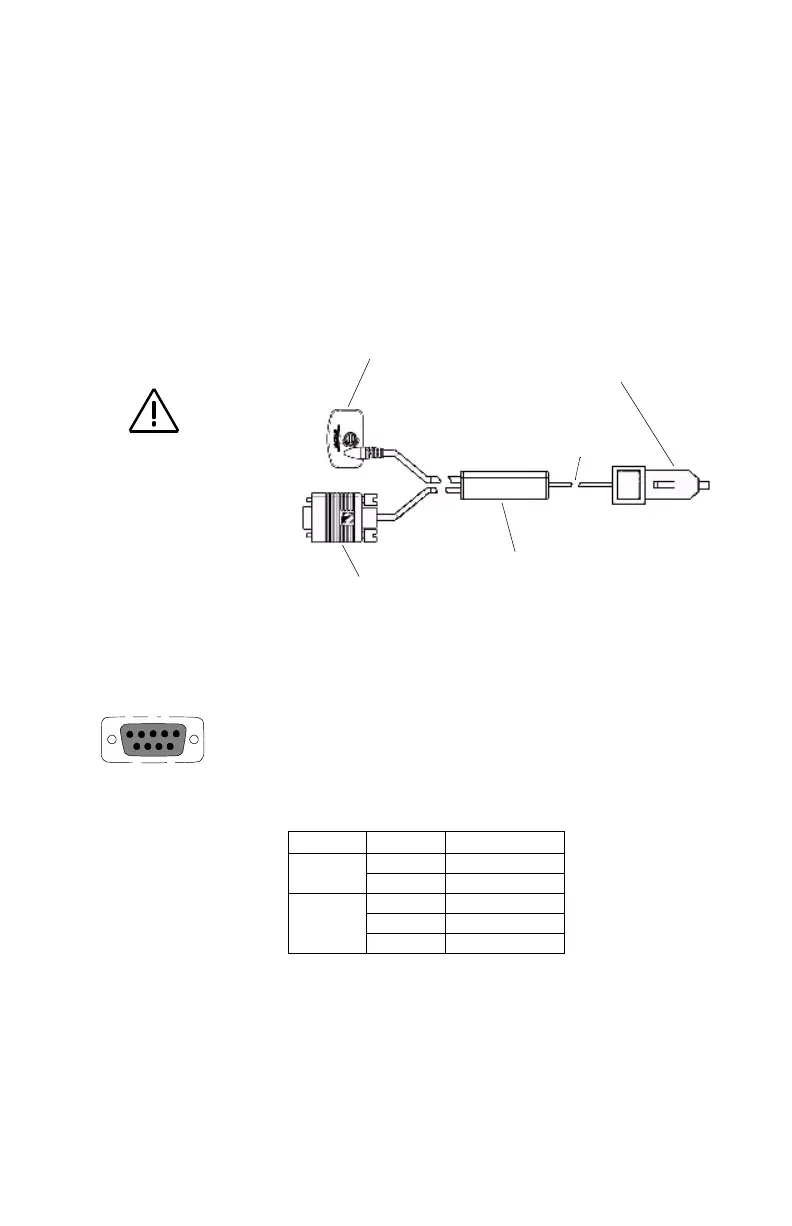
If using the cable that comes with the cigarette lighter adapt-
er, simply connect it to the cigarette lighter outlet. If you
wish to make a permanent mount to a power supply, cut the
cable between the power supply box and the cigarette lighter
adapter. Attach the red (+) and black (-) wires to your exter-
nal power source. The input voltage range for external power
is 9-16 VDC.
Data connection pinout is as shown opposite if you look into
the 9-pin female connector:
Pin 2: Data Out
Pin 3: Data In
Pin 5: Ground
Cable Wiring Color Code
Plug Color Signal
Power
Red Power +
Black GND
Data
Yellow Data In
Orange Data Out
Black GND
Cut Here
Cigarette Lighter Adapter
Power Supply Box
9-pin Connector
Power Plug
Do not bypass the
power supply box or
you will damage your
unit and void the war-
ranty.
9-Pin Connector Pinout
352
69


 To Next Page