36
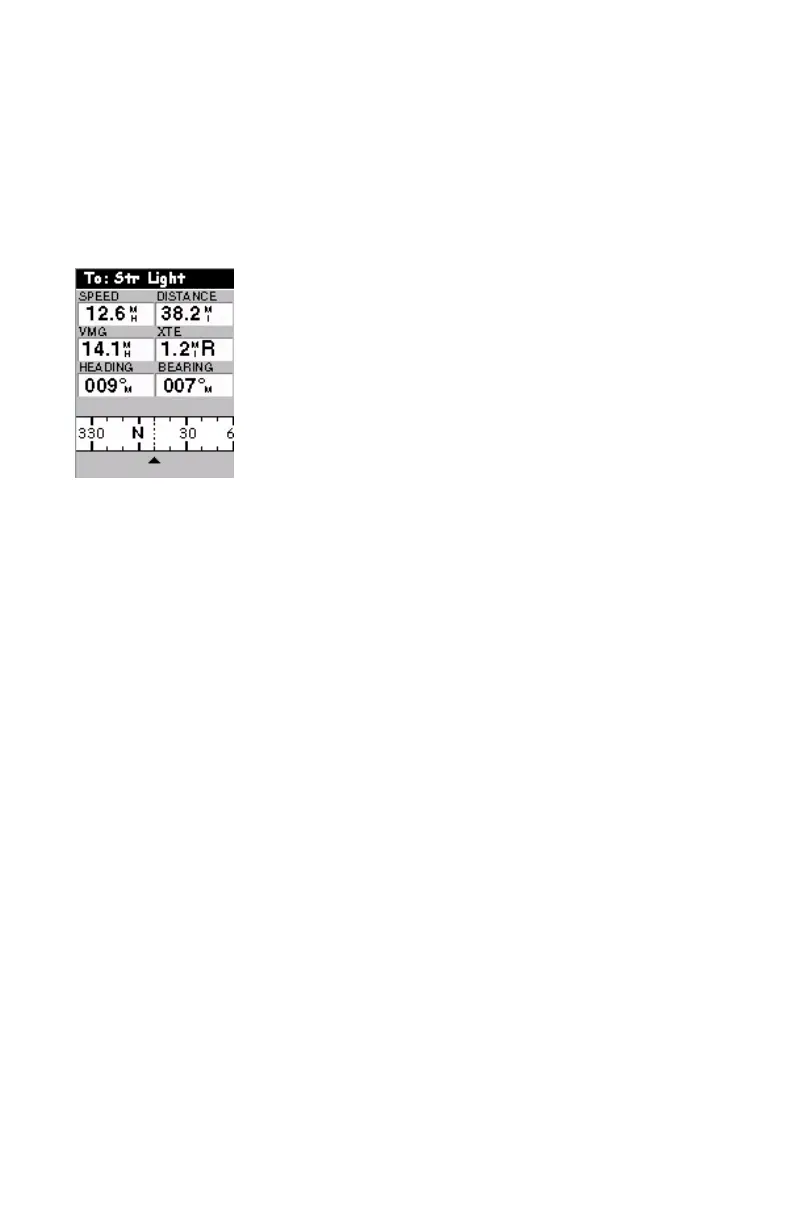
Data Screen
When you need to see a lot of information in one place then
you will appreciate the Data screen. The Data screen pro-
vides you with six data fields and an active compass that is
the same as the one used on the road screen. You have the op-
tion of customizing this screen by selecting what data is dis-
played in the upper six fields. The lower portion of the
screen is occupied by a compass providing your heading.
The Data screen contains the following information, from
top to bottom:
- In the title bar: destination name if you are using the
Goto function
- Data Fields: customizable data fields (see
Customize
option below). Some of the data displayed requires you
to be moving to be computed. Invalid data is indicated by
dashes.
- Compass: Displays your heading in a familiar compass
format.
To customize the Data screen, use the function described be-
low. This context-sensitive function is prompted when you
press the MENU button while the Data screen is displayed.
Customize
See page 38.
Data Screen


 To Next Page