76
Using the Feature Library Editor
Introduction
MobileMapper Office allows you to create new feature li-
braries using the Feature Library Editor.
Feature libraries are used by field operators as a common ba-
sis for describing the features they visit in the field.
A feature library describes a number of features that Mo-
bileMapper operators will have to visit in the field. Each fea-
ture is defined as a set of attributes. In fact, it will be the task
of field operators to provide an attribute value for each at-
tribute of a feature, depending on what they see or measure
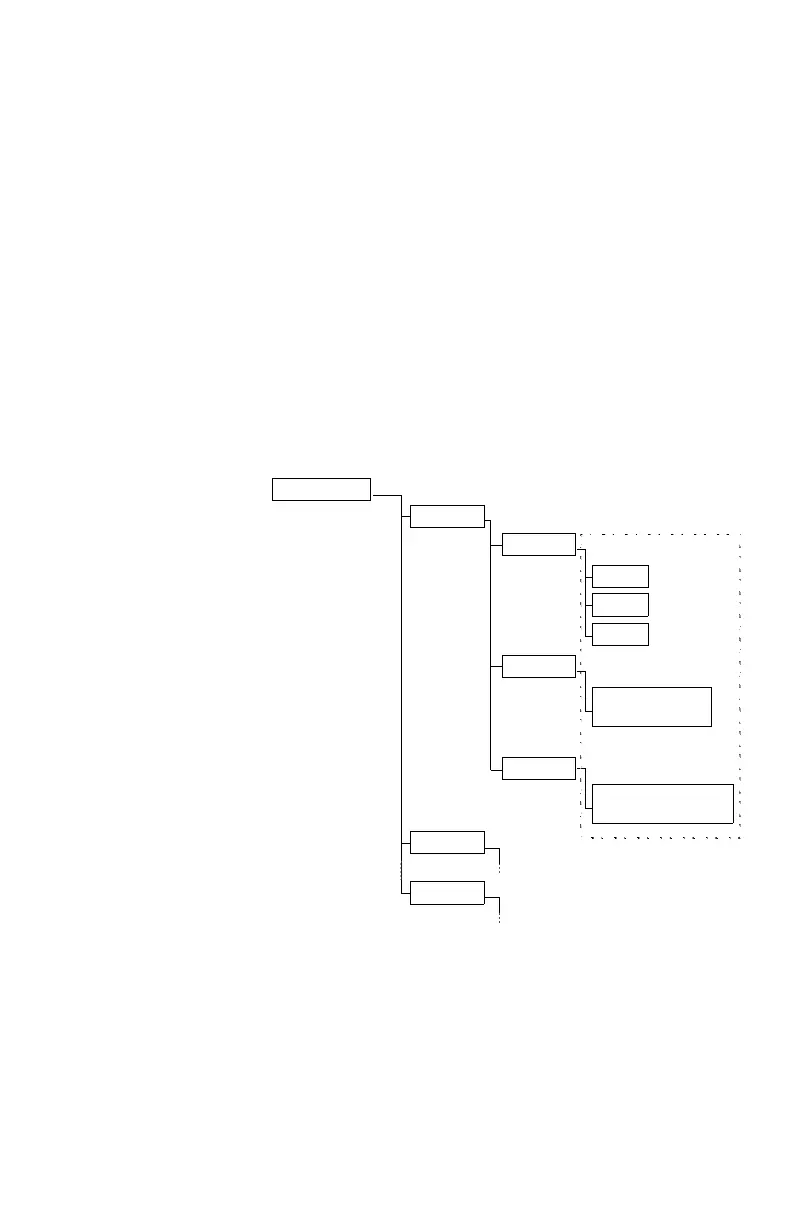
when they are near this feature. The diagram below shows
the general architecture of a feature library through a simple
example.
Note the following limits
for feature libraries:
No. of feature types:
15 max.
No. of attributes
per feature: 10 max.
No. of attributes values
per Menu-style attribute:
5 max.
Feature Library
Hydrant
xxx...
xxx...
Color
Height
Address
Red
(Attribute #1)
(Feature #1)
Orange
Any value between
(Attribute #2)
(Numeric type)
(Street Address)
Gray
(Menu type)
0.0 and 1.5 m
(Attribute #3)
(Text type)
Any character string
20 char. max. in length
Options in the menu
(Feature #2)
(Feature #n)
(Attribute values)


 To Next Page