3
1. MobileMapper Field Unit
Keypad Description
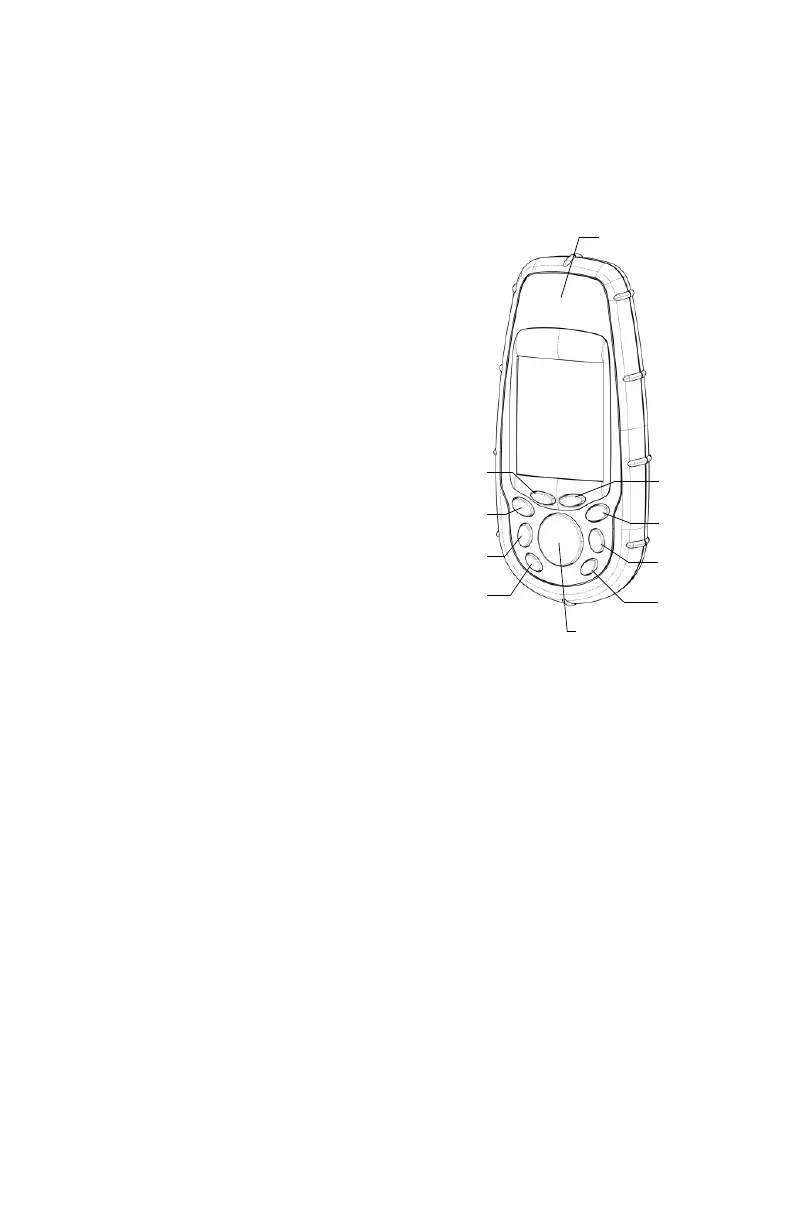
Under the screen you will see 8 buttons located around a
large oval “scrolling” button with 4 directional arrows on it.
IN/OUT: Use these but-
tons to zoom in and out
when viewing a screen
with a map displayed.
ESC: Takes you back to
the previous screen with-
out effecting any changes.
NAV: Takes you to the
various navigation
screens where you can lo-
cate yourself and navigate
to waypoints and GIS fea-
tures.
LOG: Lets you create a
new job or open an exist-
ing one. With a job and a
feature already open,
pressing LOG takes you to
the feature attribute screen. With an open job, but no open
feature, pressing LOG takes you to the feature selection
screen.
ENTER: Use this button to accept highlighted input and to
initiate various unit functions.
MENU: Provides access to a variety of functions such as set-
ting up and initializing the receiver, selecting targets to nav-
igate to and various GIS logging features.
PWR button: Turns on and off the unit. Also turns the back-
light on if you hold it down for two seconds (until the back-
light level changes).
IN
OUT
ESC
MENU
PWR
LOG
NAV
ENTER
Display
GPS antenna (inside the housing)
Screen
Scrolling button
The scrolling button
has three different
functions:
• It is used to move the
cursor in the chosen
direction, from a data
field to another, from an
option in a menu to the
previous or next option.
• In a highlighted field,
the left/right arrow
moves the cursor back-
ward/forward; The up/
down arrow increments/
decrements the high-
lighted figure or string.
• On the Map screen, a
navigation screen, this
button allows you to
switch to cursor mode
and then to move the cur-
sor in ALL directions, not
only the left, right, up
and down directions.


 To Next Page