Need help?
Do you have a question about the Thales Mobile Mapper and is the answer not in the manual?
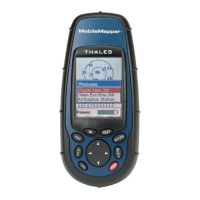
Describes the buttons and their functions on the MobileMapper unit.
Initial setup process for the MobileMapper receiver upon first use.
Step-by-step guide for recording new GPS and GIS data in the field.
Detailed process for logging and describing point features with attributes.
Guide for logging and describing linear features, including interval settings.
Procedure for logging and describing area features using different methods.
Mapping features in areas with poor GPS reception using bearing and distance.
Using the grid utility to log data at evenly spaced waypoints.
Information on expected accuracy levels and factors affecting them.
How to review and update previously collected GIS data.
Overview of the different navigation screens available on the device.
Detailed explanation of the Map screen functionality and modes.
Details on Position Screens 1 and 2 for displaying location data.
How to navigate to a selected destination point.
Guide to selecting a logged GIS feature as a navigation destination.
Process for selecting a Point of Interest (POI) as a destination.
Information on creating and managing routes.
Defining a simple one-leg route for navigation.
Creating routes with multiple waypoints.
Accessing the main setup options for the device.
The procedure to initialize the MobileMapper receiver.
Defining coordinate systems for data display and processing.
Selecting map datums for accurate positioning and calculations.
Step-by-step guide for installing the software on a PC.
Instructions on how to start the MobileMapper Office application.
Overview of the main application window layout and components.
Managing layers and data visibility within the map display.
Procedures for managing job files, including creation and transfer.
Steps to create a new job file for field data collection.
Establishing a physical and software connection between the handheld and PC.
Transferring job data from the PC to the handheld device.
Retrieving completed job data from the handheld to the PC.
Converting job data into standard GIS formats like SHP, MIF, DXF.
Tools and procedures for creating and managing feature libraries.
Process for creating a new, independent feature library file.
Adding new features and their types to a library.
Creating attributes for features within a library.
Utility for logging data in grid patterns and managing grid features.
Configuring grid features within a library, including properties.
Creating and managing waypoints and routes using the editor.
Adding waypoints onto the map display area.
Creating routes by connecting waypoints graphically.
Purpose and procedures for creating and using background maps.
Initiating a new background map project with layers and settings.
Explains map projections, coordinate systems, and datums.
Details on defining horizontal and height systems in the software.
Choosing from available geodetic or grid coordinate systems.
Procedure for creating custom geodetic or grid coordinate systems.
Technical specifications of the MobileMapper receiver.
Steps for installing or removing an SD card from the device.
Connecting the device to external hardware using data cables.
Connecting the device to an external power supply.
Definitions of key terms used throughout the manual.
 General
| Model | MobileMapper |
|---|---|
| Type | GPS Receiver |
| Humidity | 95% non-condensing |
| Waterproof | IPX7 |
| Data Storage | Internal memory |
| Antenna Type | Internal |

 To Next Page