83
The representation of a line or area feature on the map is
based on line properties that you can define as explained be-
low:
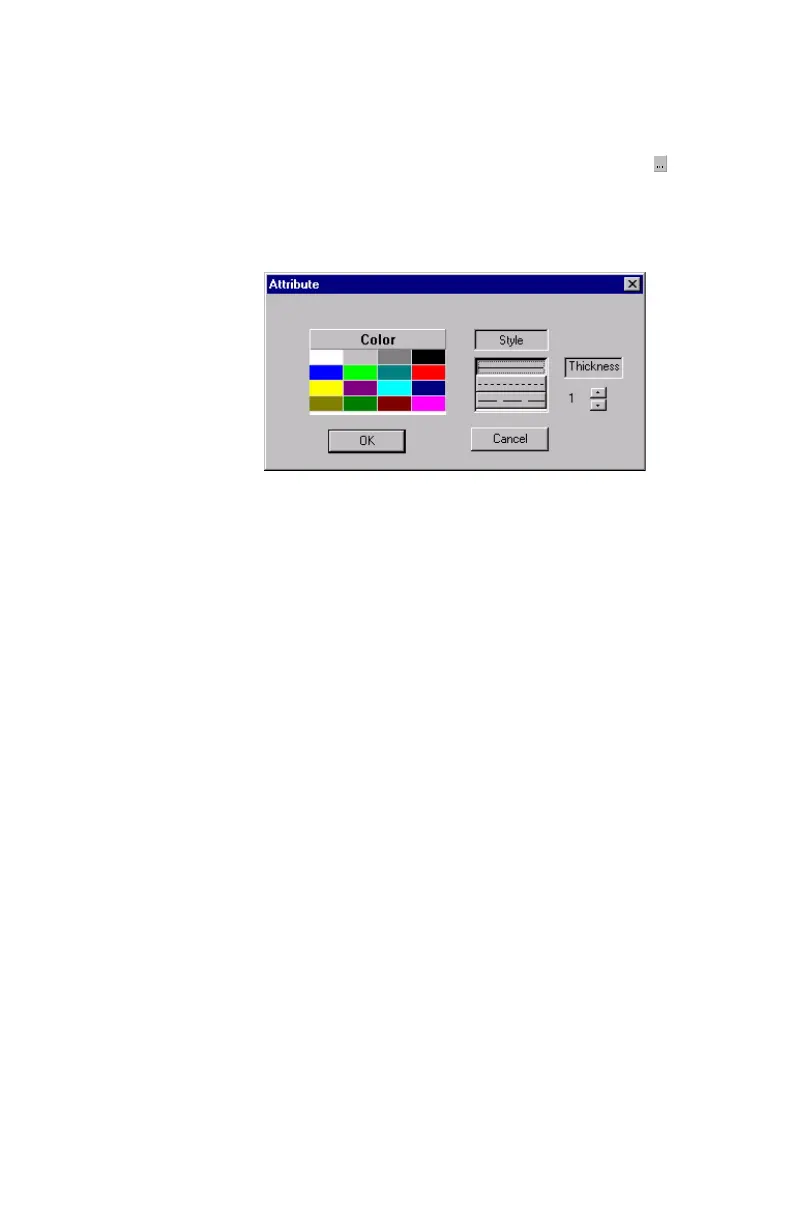
- In the Style/Color/Width row of this table, click . A
new dialog box opens in which you can define the prop-
erties of the line representing the line feature or the con-
tour of the area feature (color, style and width):
Deleting Features, Attributes or Attribute Values
The Feature Library Editor lets you delete, in a very simple
manner, any feature, attribute or attribute value option from
the open Feature Library.
- To delete a feature, you just select its name and you press
the Del key on your keyboard. Deletion is immediate as
MobileMapper Office does not require user confirma-
tion. By deleting a feature, you also delete all attributes
and attribute values attached to this feature.
- To delete an attribute from a feature, expand that feature
in the left-hand pane of the Feature Library Editor win-
dow, select the attribute you want to delete and press Del
on your keyboard. Deletion is immediate as MobileMap-
per Office does not require user confirmation. By delet-
ing an attribute, you also delete all attribute values
attached to this attribute.
Possible choices: 16 for
color, 3 for style and 3
for width. The choices
you make here will be
used on the receiver’s
Map screen during field
operations dealing with
features of this type.


 To Next Page