1
Introduction to the MobileMapper System
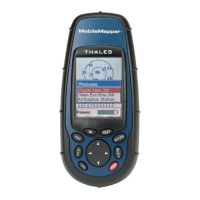
The MobileMapper system from Thales Navigation is com-
posed of two main elements: the MobileMapper receiver and
MobileMapper Office software running on a PC-type com-
puter.
The MobileMapper receiver is a handheld navigation and
positioning device that enables you to describe the features
being mapped and then format the data so that later it can be
uploaded to a GIS. It offers an easy-to-use and easy-to-de-
ploy solution for general mapping and for asset manage-
ment.
MobileMapper combines all the navigation capabilities of a
recreational handheld with feature attributing software to
support GIS data collection in the field.
The MobileMapper receiver and its main functions are fully
described in Section 1 in this manual.
MobileMapper Office is an office software suite that inter-
faces the MobileMapper receiver with your GIS system. Mo-
bileMapper Office allows you to prepare GIS jobs, feature
libraries and waypoint files, build background maps from
GIS data files and manage the information logged in the field
(upload/download functions).
The MobileMapper Office software and its mains functions
are fully described in Section 2 in this manual.
All functions relative to data exchange between MobileMap-
per and MobileMapper Office are also detailed in Section 2.
Finally, the Appendices section in this manual covers a num-
ber of topics such as product specifications, SD card instal-
lation, connectors & cables and glossary of terms used.
Please note that a printed Getting Started Guide is included
in your MobileMapper system. This short, multilingual
guide, which is presented in a tutorial form, is intended to
help you complete your first job. Practising with this guide
will allow you to understand the essentials of the system.


 To Next Page