23
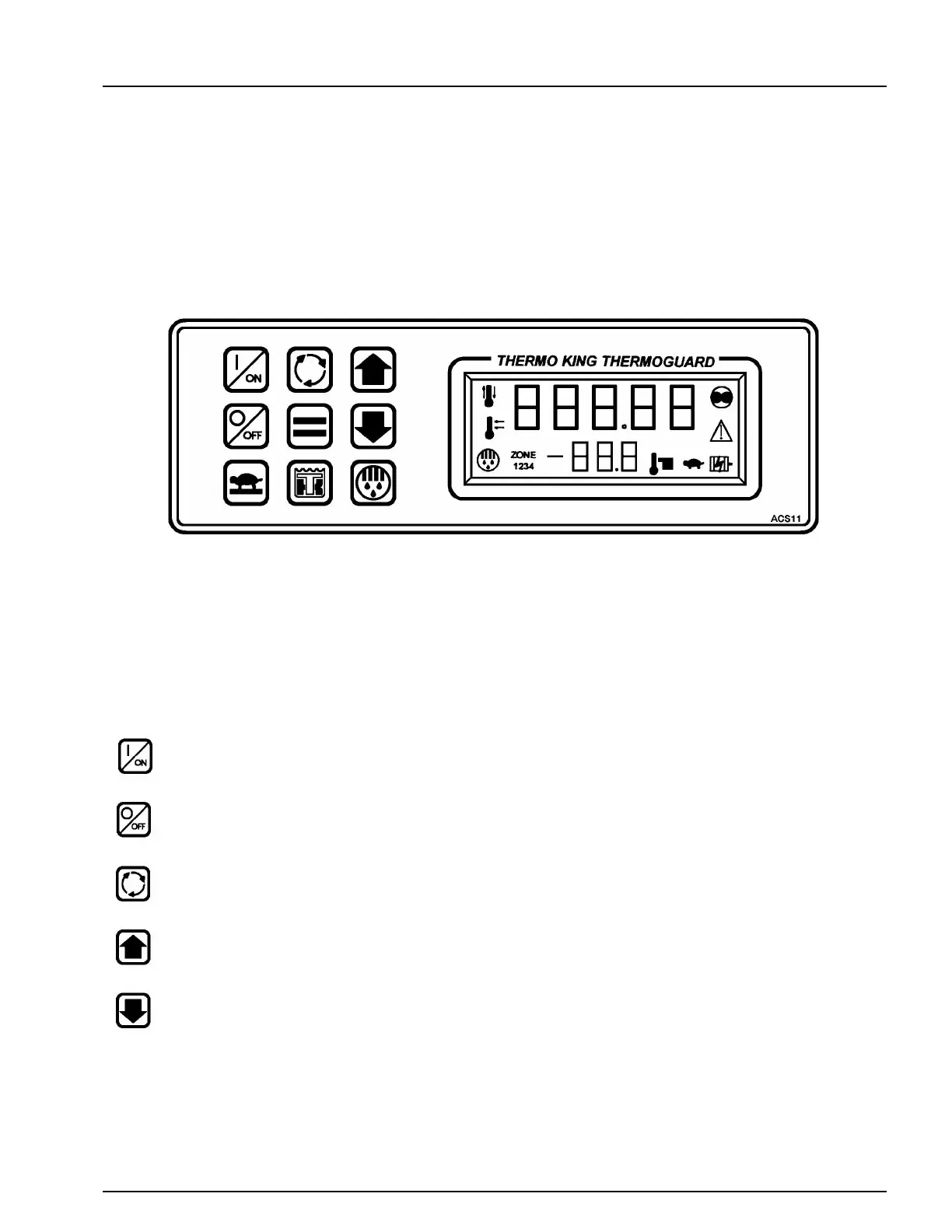
Remote Control Panel Features
The remote panel is connected to the microprocessor and is used to operate the unit. It may be located in the truck dashboard
using the supplied DIN mounting ring, under the dashboard using the supplied under dash mounting kit or on the dashboard
using the supplied plastic mounting strips. An optional body mount enclosure kit is available to mount the remote control
panel on the truck box.
KEYPAD KEYS
ON KEY. Turns the unit ON.
OFF KEY. Turns the unit OFF
SELECT KEY. Scrolls through the prompt and display screens.
UP ARROW KEY. Chooses prompt screen actions or increases setpoint or other setting.
DOWN ARROW KEY. Chooses prompt screen actions or decreases setpoint or other setting.
KEYPAD
hese nine touch sensitive keys are used to turn the
nit ON and OFF, change the setpoint and control or
hange the units operation.
DISPLAY
The display normally shows the Standard Display
return air temperature and setpoint. The displa
shown here has all possible segments lighted.



 To Next Page