2. Overview of Instruments and Controls
29
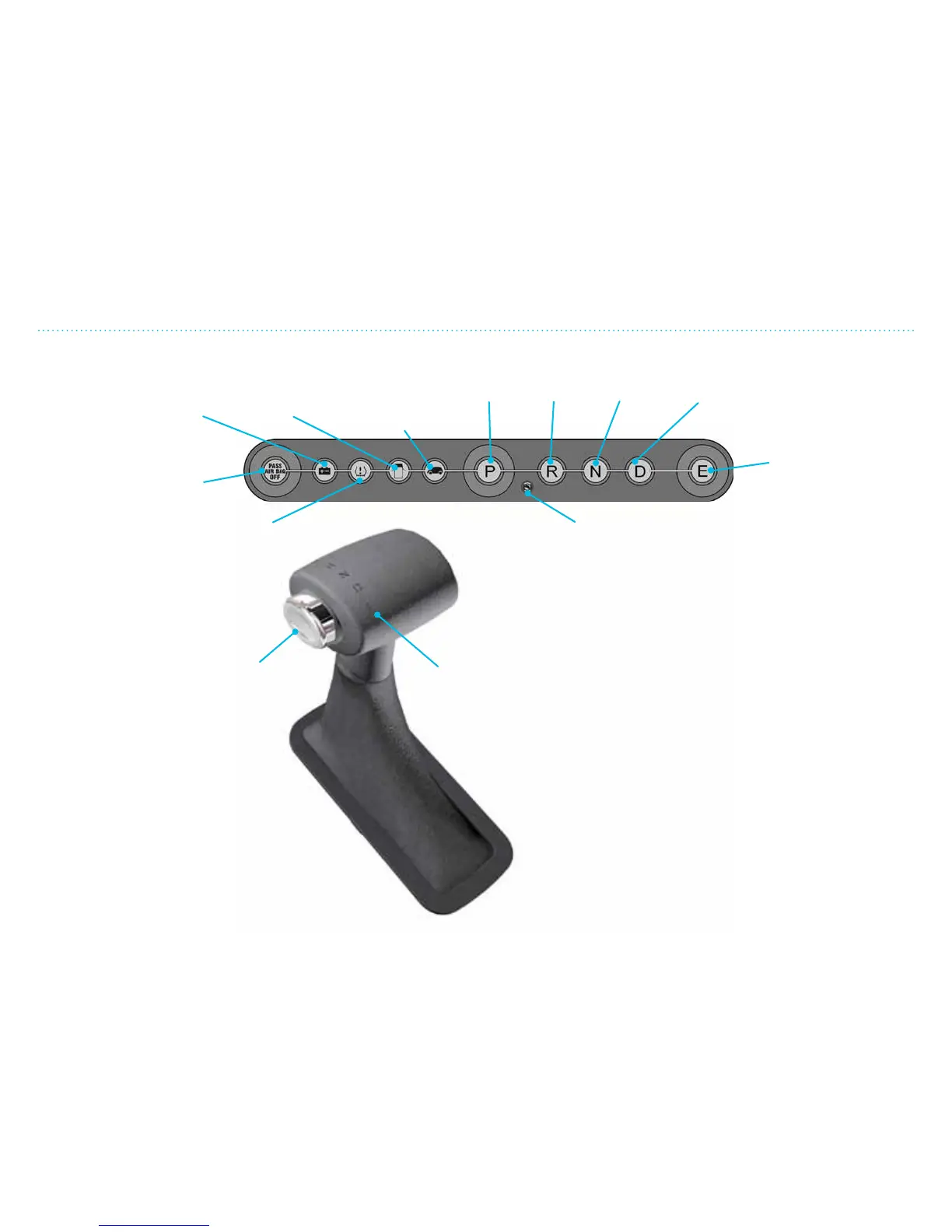
Gear Selector and Indicator
Brake-shi Interlock Feature
There is a gear lock which stops the
gear selector from moving into or out
of P (PARK), unless the brake pedal is
engaged. The vehicle will not move when
it is put in P (PARK).
This parking lock function will disengage
automatically when the gear selector is moved
out of P (PARK).
Warning lamp that
indicates insufficient
charge in the 12V
battery
Warning lamp
for open doors
Telltale lamp
to indicate the
vehicle is ON
Warning lamp for tire pressure
monitoring system (TPMS)
Gear lock
release
button
Gear
selector
EFFICIENCY DRIVING
Indicator shows that the gear selector is
locked until the brake pedal is pressed down.
DRIVENEUTRALREVERSEPARK
Warning lamp for
disconnected air bags
on passenger side
Gear Selector Positions
• Hold the brake pedal down and press on the gear lock
release button before moving the gear selector from P
(PARK) to another gear.
• P (PARK) – The vehicle must be stationary before it is put
into P. The vehicle must be in P to remove the ignition key.
If the doors are open and the gear selector is not in P,
there is a repeated warning beep. Gear selector cannot be
shied to/from P unless the ignition key is in position.
• R (REVERSE) – When the gear selector is in R, the vehicle
will move backward when the brakes are released.
• N (NEUTRAL) – When the gear selector is in N, the vehicle
can be started and will move freely. Apply the brakes to
stop the vehicle.
• D (DRIVE) – With the gear selector in D, the vehicle will
move forward.
• E (EFFICIENCY DRIVING) – Limits power output and
increases regenerating level to allow for more energy-
ecient driving.
Gear Selector and Indicator


 To Next Page