2. Overview of Instruments and Controls
210
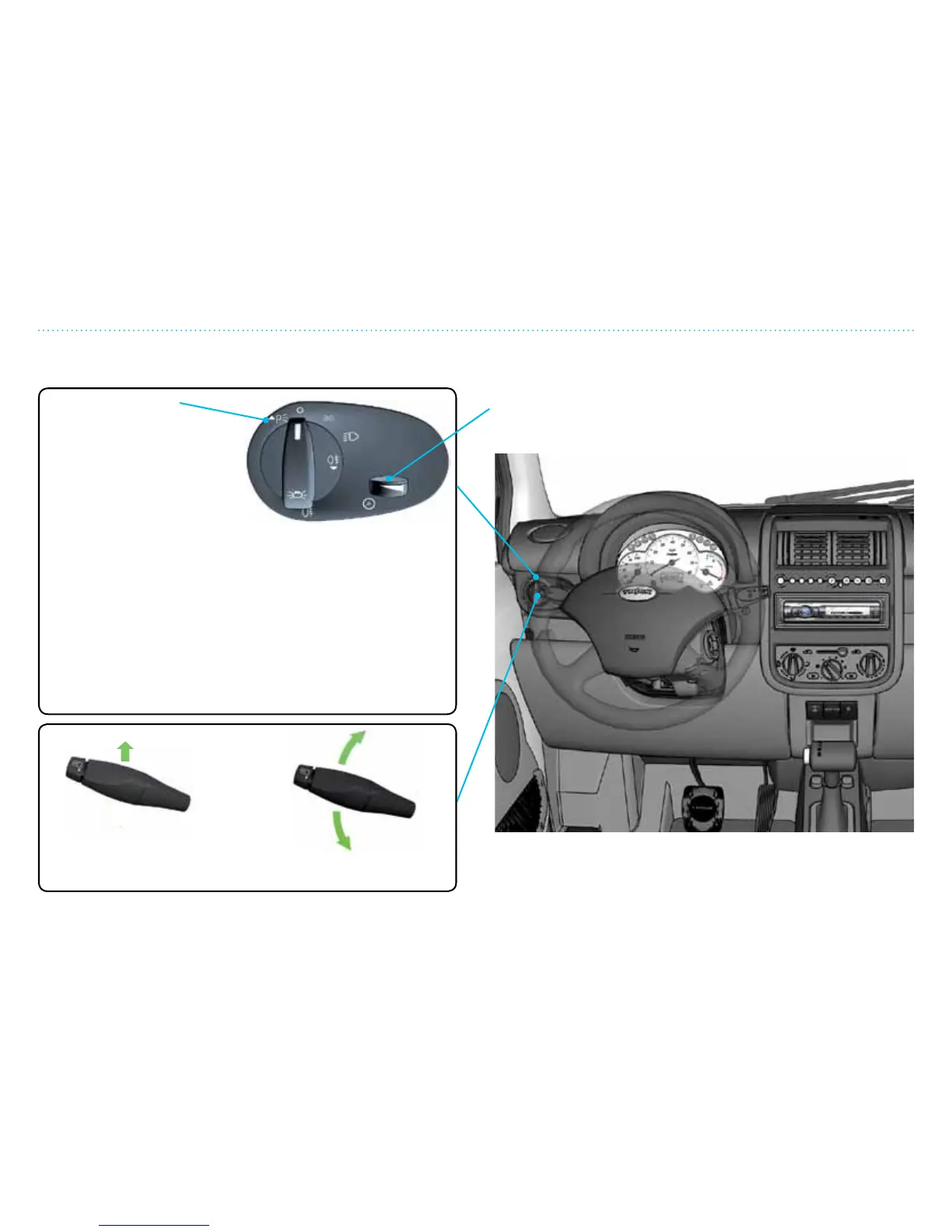
Main Light Switch, Turn Signal and Instrument Panel Lights
Instrument Panel Lights
The brightness of the lights are adjusted by turning the
adjusting wheel le or right. The instrument panel lights work
only when the main or parking lights are on.
Main Light Switch
One click to the left turns on
front and back parking lights
only. Will work when ignition
is off or on.
One click to the right turns
on parking lights, license
plate light and instrument
panel lights. Will work when ignition is off or on.
Two clicks to the right turns on front head lamps (low beam),
license plate light, back lights and instrument panel lights.
If equipped with fog lights, when you pull the switch out while
in this position, the fog lights at the left rear illuminate. The
symbol under the switch will illuminate to indicate the lights
are on.
You can switch to high beams by pulling the stalk on the
left side of the steering wheel towards the steering wheel.
To return to low beams, pull the stalk again towards the
steering wheel.
Headlamp Flasher
Pull the lever slightly
towards the steering wheel
Turn Signal
Push the lever up/down to
signal for right/left turn
Main Light Switch, Turn Signal and Instrument Panel Lights


 To Next Page