EasyManua.ls Logo

ThinkPad Edge E440 - Backup and Recovery Operations

ThinkPad Edge E440
132 pages
Print Icon
To Next Page IconTo Next Page
To Previous Page IconTo Previous Page
Loading...
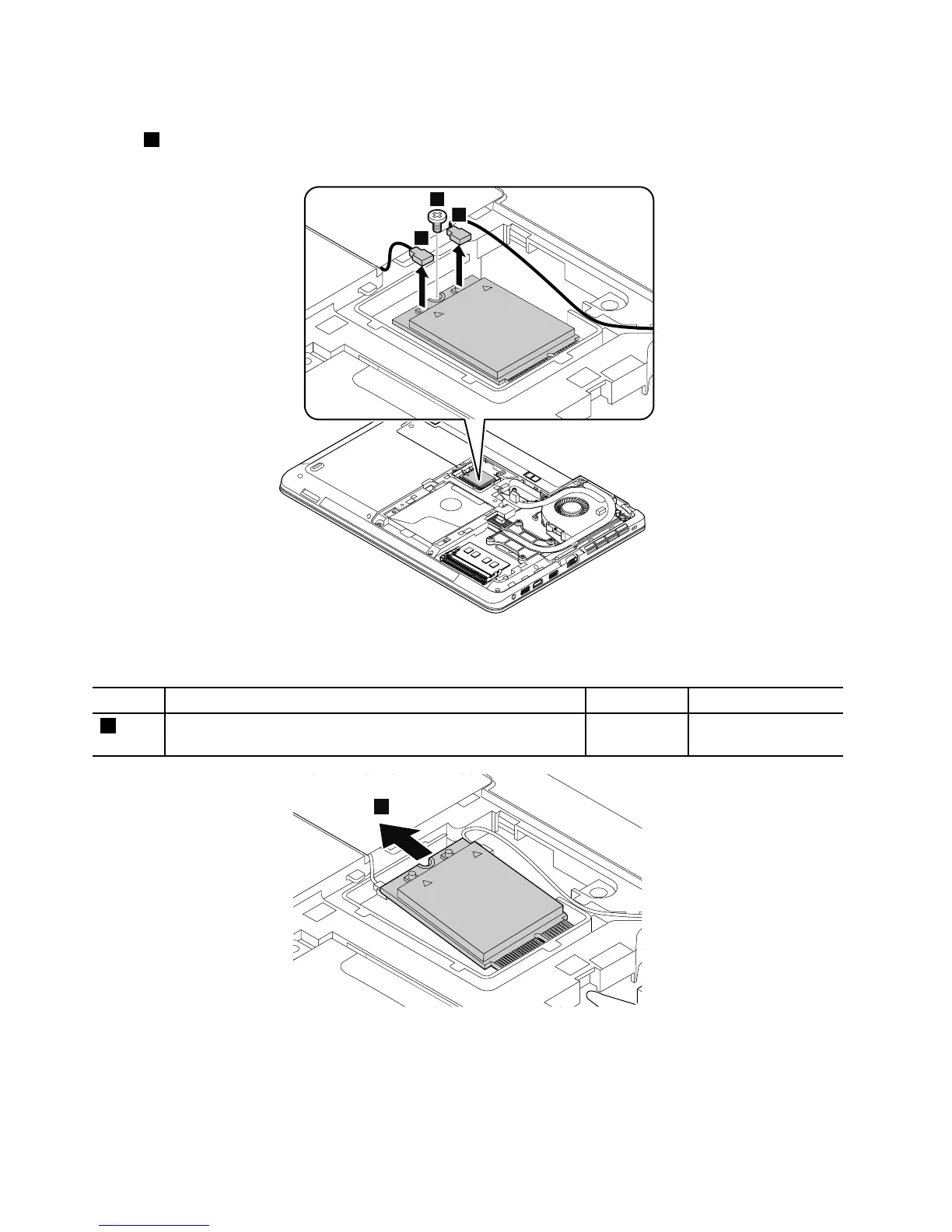
Removalstepsofthewireless-WANcard
Instep1,unplugtheconnectorsbyusingtheantennaRFconnectorremovaltoolorpicktheconnectors
withyourngersandgentlyunplugthemasshown.
2
1
1
Wheninstalling:PlugtheredcableintotheconnectormarkedMAIN,andthebluecableintotheconnector
markedAUXonthecard.
StepScrew(quantity)Color
Torque
2
M2×3.5mm,wafer-head,nylon-coated(1)
Black0.181Nm
(1.85kgf-cm)
3
RemovalstepsoftheM.2solid-statedrive
Attention:
Donotdropthedriveorapplyanyphysicalshocktoit.Thedriveissensitivetophysicalshock.Improper
handlingcancausedamageandpermanentlossofdata.
72HardwareMaintenanceManual

Table of Contents

Other manuals for ThinkPad Edge E440

Related product manuals