EasyManua.ls Logo

ThinkPad X131e - Chapter 7. Locations; Computer Controls and Indicators

ThinkPad X131e
94 pages
Print Icon
To Next Page IconTo Next Page
To Previous Page IconTo Previous Page
Loading...
Chapter7.Locations
Thischapterintroducesthelocationsofthecomputerhardwarecomponents.
Locatingcomputercontrols,connectors,andindicators
Thistopicintroducesthelocationsofthecomputercontrols,connectors,andindicators.
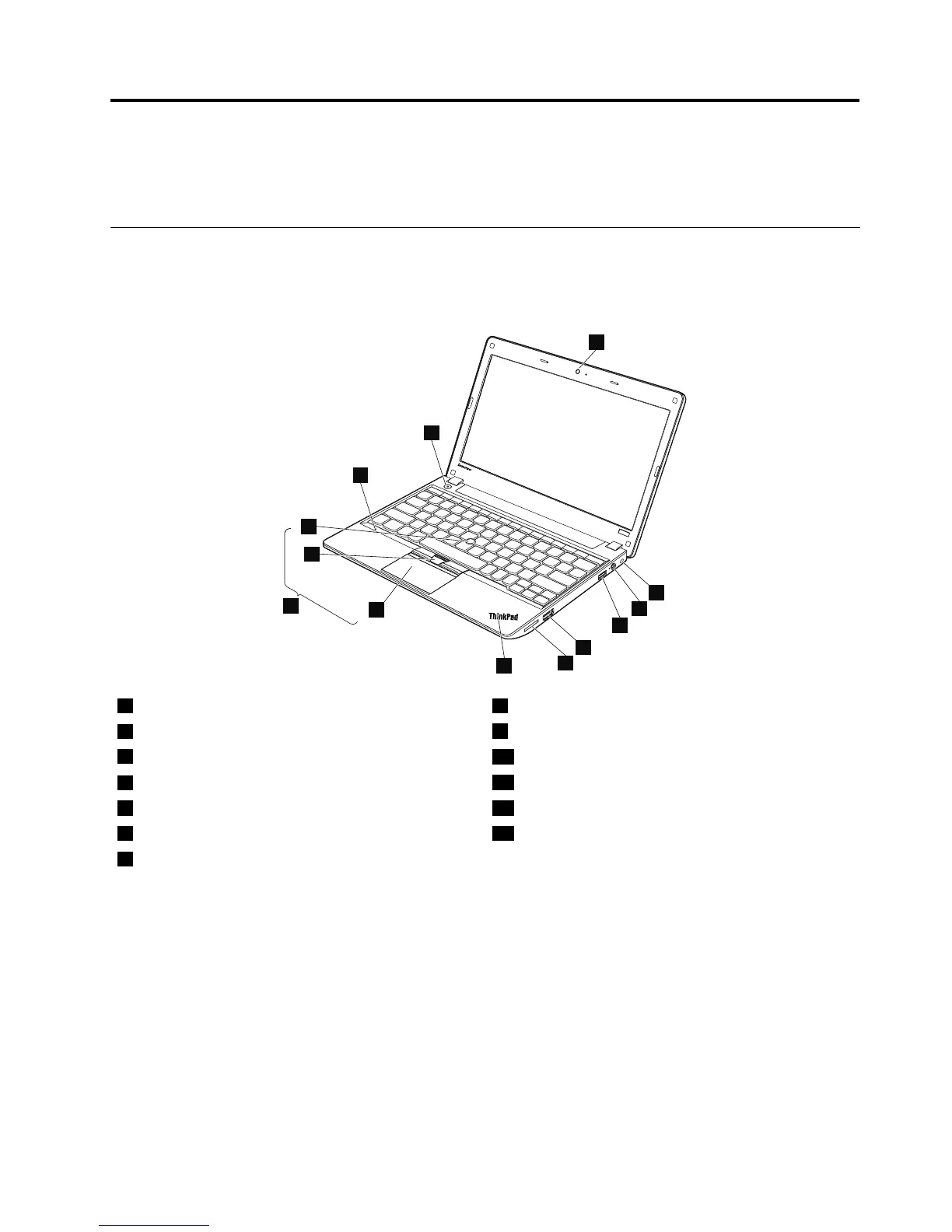
Frontview
1
8
9
10
11
13
12
2
3
4
5
6
7
1Integratedcamera8Touchpad
2Securitykeyhole
9TrackPointbuttons
3acpowerconnector
10TrackPointpointingstick
4AlwaysonUSBconnector
11UltraNav
®
pointingdevice
5HDMIconnector12Built-indigitalmicrophone
6Mediacardreaderslot13Powerbutton
7Systemstatusindicator
Forthedescriptionofthesystemstatusindicator,seeChapter5“Statusindicators”onpage39.
©CopyrightLenovo2012
43

Table of Contents

Related product manuals