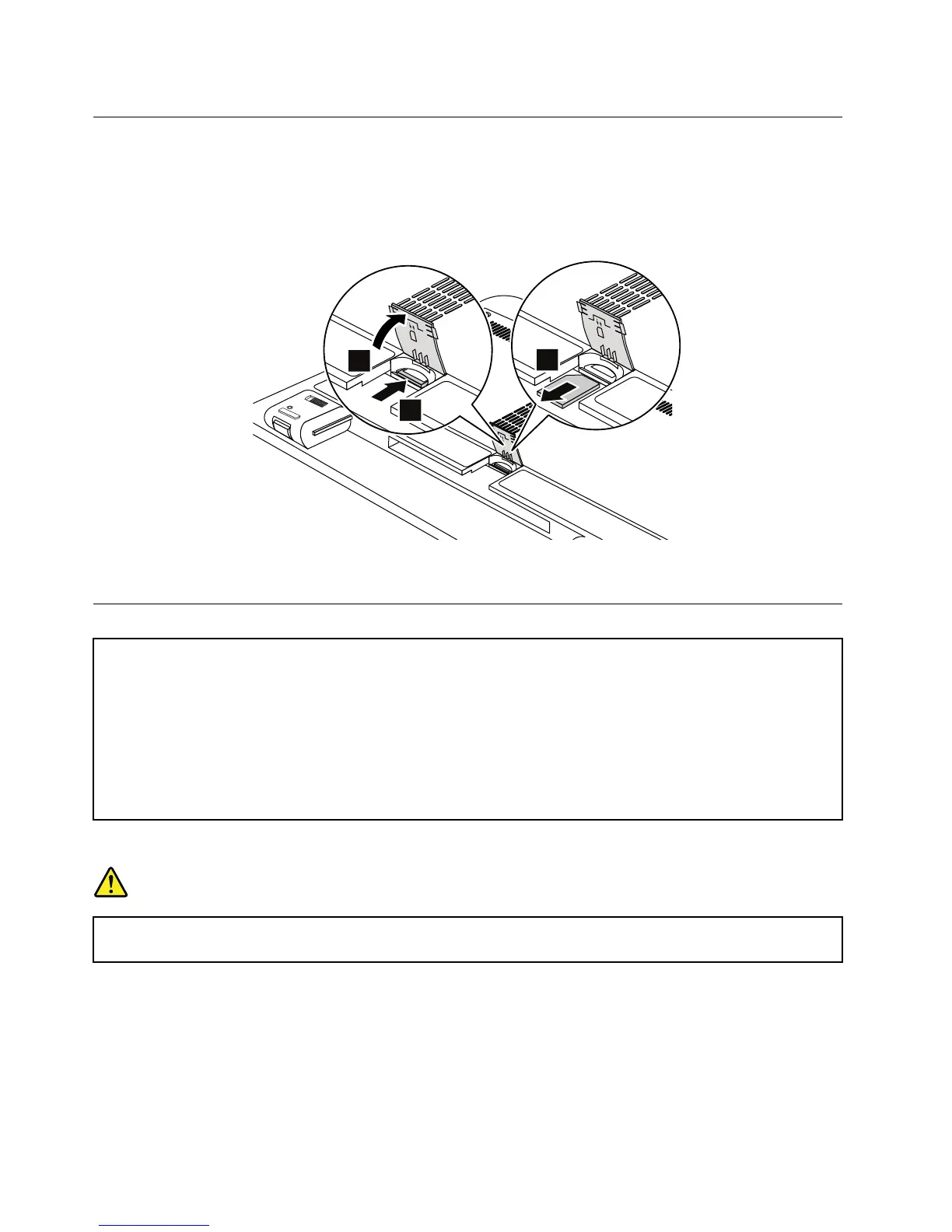
RemovingtheSIMcard
Dependingonthemodel,thecomputeryouareservicingmighthaveaSIMcardslot.Ifthecustomerhas
installedaSIMcardintheslot,removeitbeforeservicing.
ToremovetheSIMcard,youneedtoremovethebatterypackrst.See“1010Batterypack”onpage56.
Afteryounishtheservicing,ensurethatyouinsertthecardbackintotheslotrmly.
1010Batterypack
Importantnoticesforreplacingabatterypack:
•TheLenovoSolutionCenterprogramprovidesanautomaticbatterydiagnostictestthatdeterminesifthebattery
packisdefective.AbatterypackFRUshouldnotbereplacedunlessthisdiagnostictestshowsthatthebattery
isdefective.
•Theonlyexceptiontothisisifthebatterypackisphysicallydamagedoracustomerisreportingapossible
safetyissue.
•IftheLenovoSolutionCenterprogramisnotinstalledinthecomputer,thecustomershoulddownloadthisprogram
beforeanon-physicallydamagedbatterypackisreplaced.Notethataphysicallydamagedbatterypackisnot
coveredbythewarranty.
Removalstepsofbatterypack
DANGER
Useonlytheauthorizedbatteryspeciedforyourcomputer.Anyotherbatterycouldigniteor
explode.
56HardwareMaintenanceManual



 To Next Page