Wheninstalling:Ensurethattheconnectorisattachedrmly.
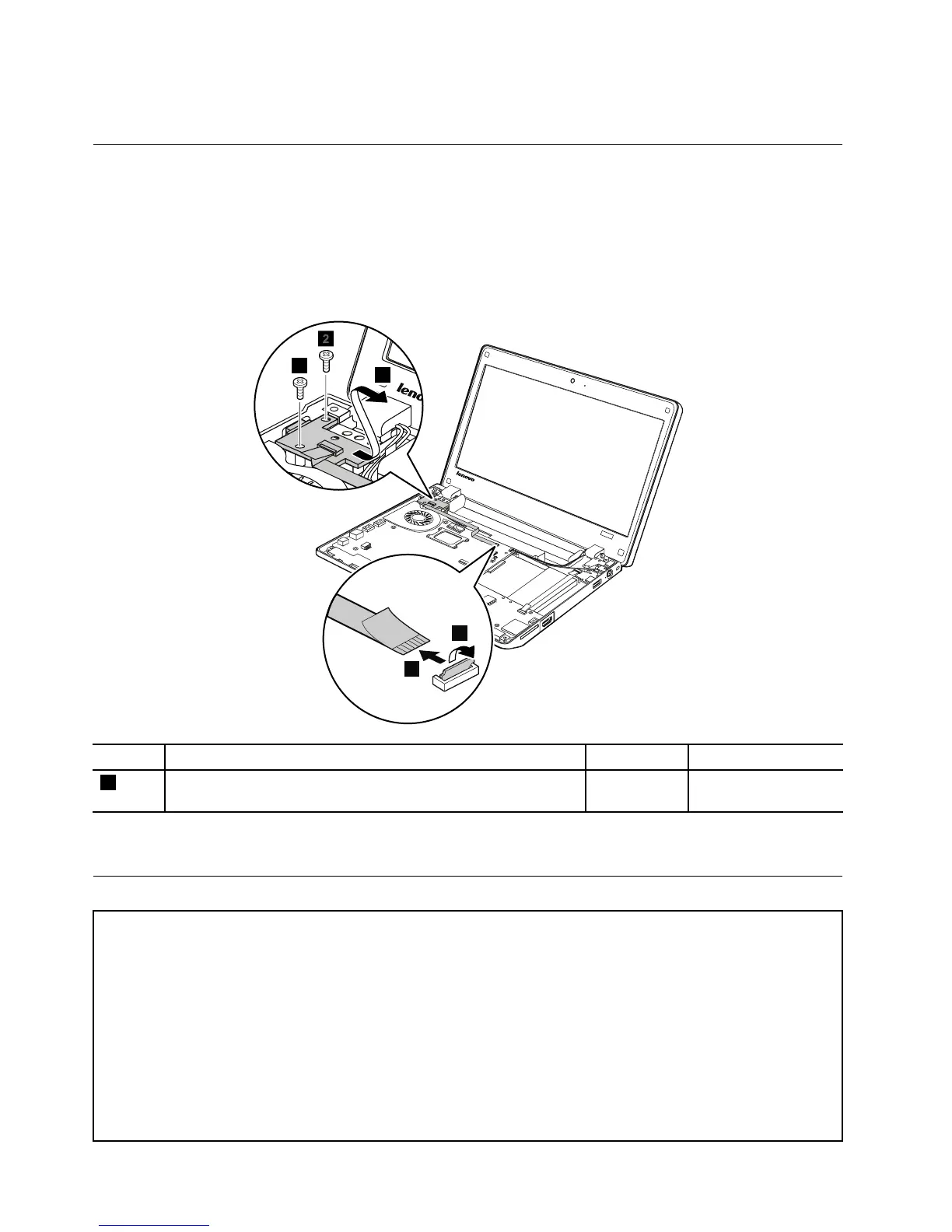
1120CRTboardassembly(withcable)
Foraccess,removetheseFRUsinorder:
•“1010Batterypack”onpage56
•“1020Bottomslotcover”onpage57
•“1070Keyboard”onpage64
•“1080Keyboardbezelassembly”onpage67
RemovalstepsofCRTboardassembly
StepScrew(quantity)Color
Torque
3
M2×3mm,wafer-head,nylon-coated(2)
Black0.181Nm
(1.85kgf-cm)
Wheninstalling:Ensurethattheconnectorisattachedrmlytothesystemboard.
1130Systemboardassembly,thermalfanassembly,andbackupbattery
Importantnoticesforhandlingthesystemboard:
Whenhandlingthesystemboard,bearthefollowinginmind:
•Thesystemboardhasanaccelerometer,whichcanbebrokenbyapplyingseveralthousandsofG-forces.
Note:Droppingasystemboardfromaheightofaslittleassixinchessothatitfallsatonahardbenchcansubject
theaccelerometertoasmuchas6,000G'sofshock.
•Becarefulnottodropthesystemboardonabenchtopthathasahardsurface,suchasmetal,wood,orcomposite.
•Ifasystemboardisdropped,besuretodocumentthedropinanyrejectreport,andreplacethesystemboard.
•Avoidroughhandlingofanykind.
•Ateverypointintheprocess,besurenottodroporstackthesystemboard.
72HardwareMaintenanceManual



 To Next Page