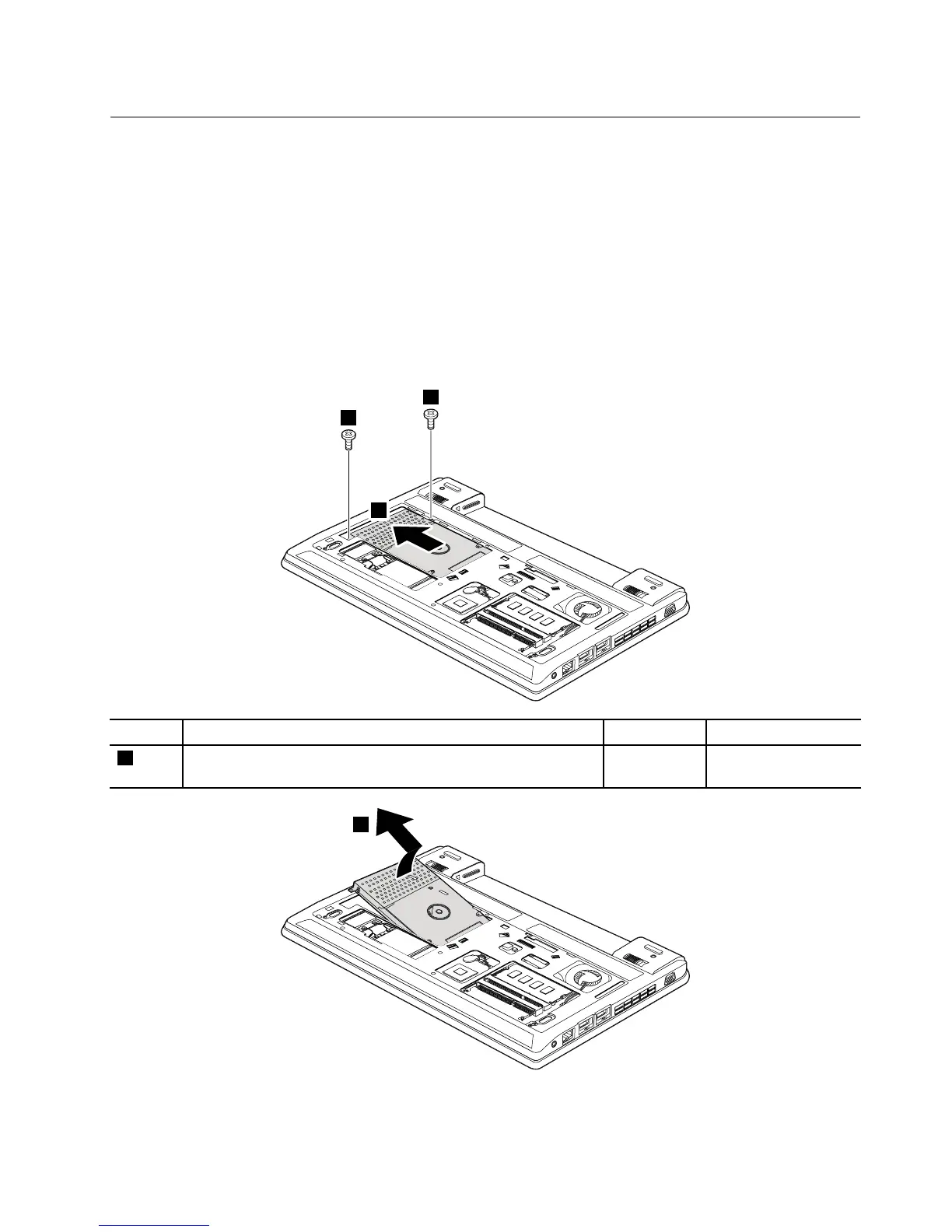
1040Harddiskdriveorsolid-statedriveassembly
Foraccess,removetheseFRUsinorder:
•“1010Batterypack”onpage56
•“1020Bottomslotcover”onpage57
Attention:
•Donotdropthedriveorapplyanyphysicalshocktoit.Thedriveissensitivetophysicalshock.Improper
handlingcancausedamageandpermanentlossofdata.
•Beforeremovingthedrive,havetheusermakeabackupcopyofalltheinformationonitifpossible.
•Neverremovethedrivewhilethecomputerisoperatingorinsuspendmode.
Removalstepsofharddiskdriveorsolid-statedrive
Wheninstalling:Ensurethattheharddiskdriveorsolid-statedriveassemblyisattachedrmly.
Chapter9.RemovingorreplacingaFRU59



 To Next Page