Product overview
7
1.2 Part names
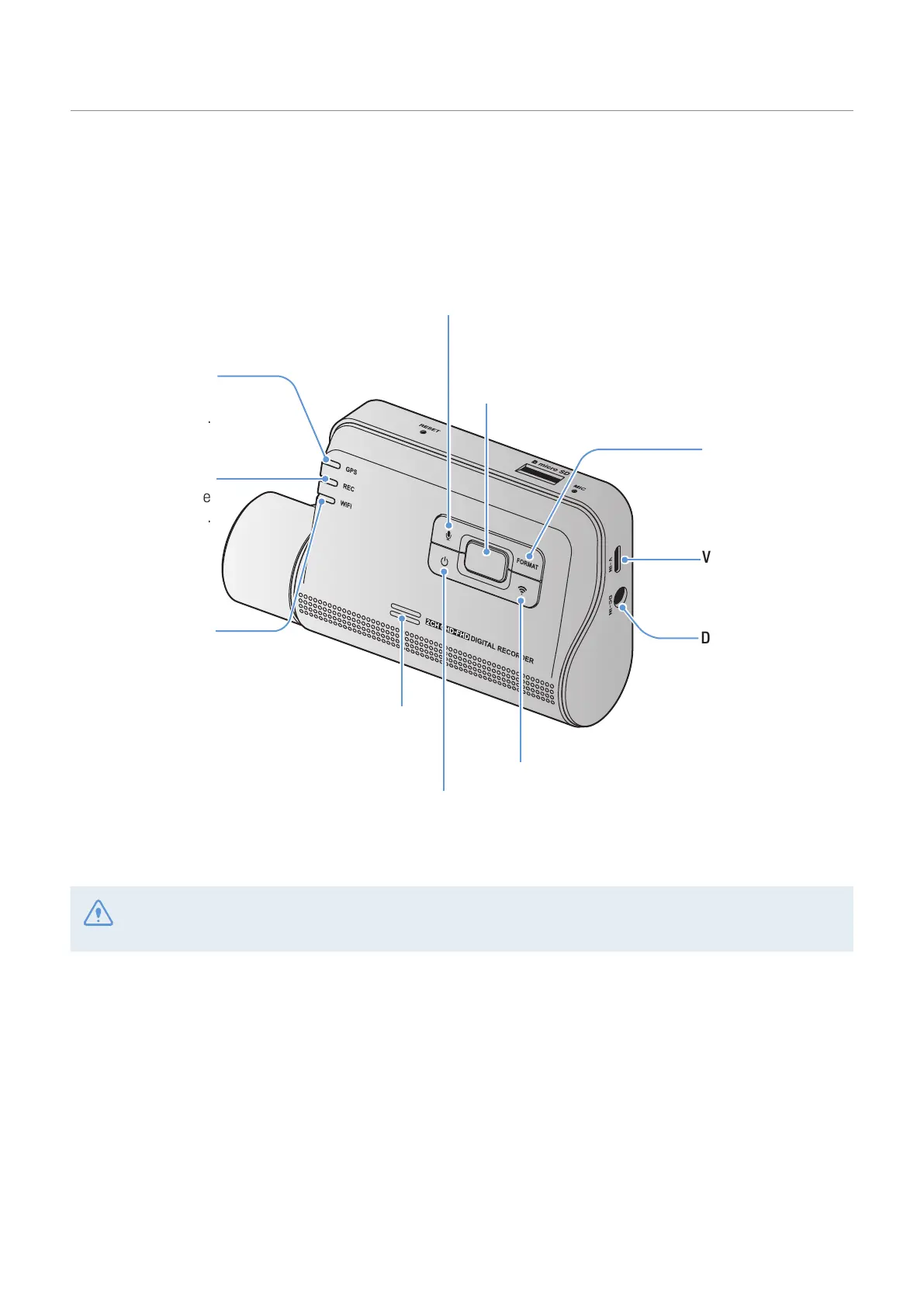
1.2.1 Front camera (main unit) - front view
DC-IN power port
Used to connect the
power cable.
V-IN input port
Used to connect the
rear camera.
Speaker
Outputs the voice guide and buzzer
sounds to indicate the product’s status.
GPS LED
Indicates the GPS
connection status.
Power button
Press and hold to turn off the product.
Press to turn on the product.
Format button
Press and hold to
format the memory
card.
Wi-Fi button
•
Short press: Resets Bluetooth and Wi-Fi.
• Press and hold for 3 seconds: Connects the
product to a smartphone via Wi-Fi network.
REC button
Press to start manual recording.
V
oice recording button
Press to enable or disable voice recording.
Recording LED
Indicates the
recording status.
Wi-Fi LED
Indicates the Wi-Fi
connection status.
In high temperature environments, Bluetooth and Wi-Fi connections may not be available to protect the
dashcam. If the connection fails, try reconnecting at a normal temperature.



 To Next Page