-
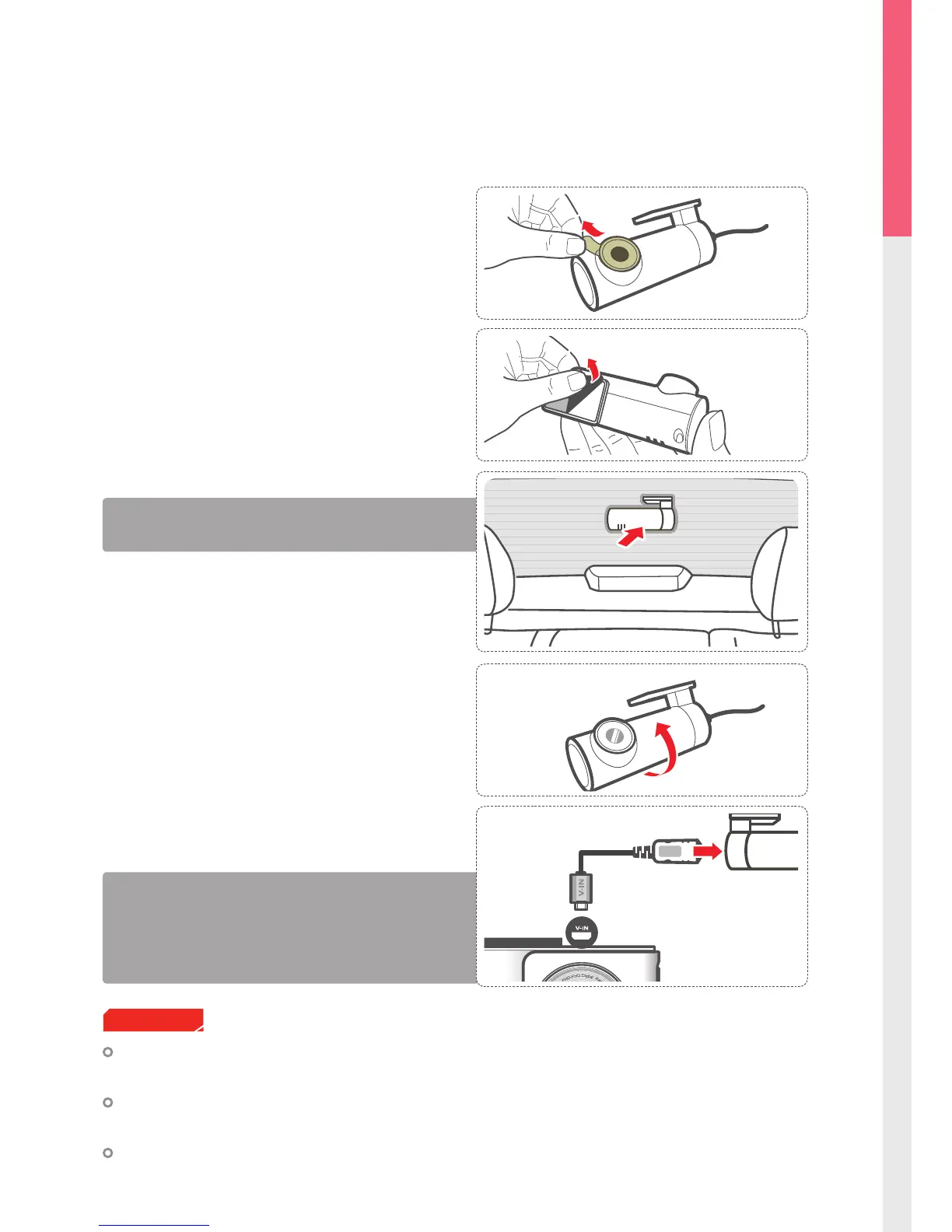
After installation, connect the rear view camera to the main
dash cam unit and record sample videos to adjust video angle
and orientation.
- The rear view camera will operate only when the cable is
correctly connected and the power for the main unit is ON.
- With camera facing outwards, ensure the mount is on the right
side.
④
Using the cable included in the package, connect
the rear view camera to the V-IN port of the main
dash cam unit.
③
Adjust the rear view camera so that it is facing back-
ward on the rear window and level with the vehicle
and the road.
Thinkware hompage (www.thinkware.com) provides various guides to assist with the rear view camera
installation. Please refer to the detailed product guide before installing the rear view camera.
Thinkware is not responsible for damages to the main unit and / or any attached accessories due to
improper user installations.
Thinkware strongly recommends installing all accessories with a certied vehicle technician to avoid
damages.
Cautions
1-4-4. Connecting the Rear View Camera
Do not connect / disconnect rear view camera while the main dash cam unit is in operation. Turn the device
o completely before connecting or disconnecting the rear view camera.
①
Remove the protective film from the camera.
②
Clean the area on the rear windshield where the rear
view camera will be installed. Remove the protective
tape from the adhesive mount and attach the camera
at the center of rear window where it can capture the
full view of the road.



 To Next Page