EasyManua.ls Logo

THOMSON MEC 2 - V1.4 - User Manual

THOMSON MEC 2 - V1.4
90 pages
Print Icon
To Next Page IconTo Next Page
Loading...
9087A – 198
th
Street, Langley, BC Canada V1M 3B1 Telephone (604) 888-0110
Telefax (604) 888-3381 E-Mail: info@thomsontechnology.com www.thomsontechnology.com
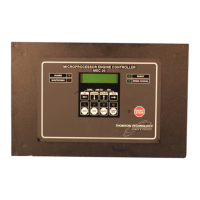
MEC 2
MICROPROCESSOR
ENGINE/GENERATOR CONTROLLER
(WITH EAP 110 REMOTE ANNUNCIATOR OPTIONS)
INSTALLATION, OPERATING &
SERVICE MANUAL
Software Version 1.4
PM056 Rev 6 05/10/15

Questions and Answers

  • J
    Jennifer MckayAug 14, 2025
    Why is the voltage or current metering reading incorrectly on my THOMSON MEC 2 - V1.4?
    • A
      Andrea LinAug 14, 2025
      Incorrect readings in voltage or current metering on your THOMSON Controller can stem from several factors. First, ensure the controller is programmed with the correct values for the voltage sensing PT ratio and/or current sensing CT ratio. Also, check that the battery supply DC negative conductor is properly grounded to the engine block. Verify that the controller’s analog input has been properly calibrated as per manual instructions. Finally, confirm the voltage sensing wiring connection to the controller matches the power distribution type, noting that standard direct voltage connection requires the generator's neutral to be solidly grounded.
  • M
    Matthew OwenAug 17, 2025
    What to do if engine alarms on high engine temperature or low oil pressure when engine is operating within normal limits on THOMSON Controller?
    • T
      Tyler DavidsonAug 17, 2025
      If your THOMSON Controller triggers engine alarms for high temperature or low oil pressure despite the engine operating normally, check the wiring from the controller terminals #37 & #38 to the engine mounted senders to ensure it is correct (i.e., the wiring is not open or shorted). Also, verify that the engine mounted senders have the correct resistance reading for the corresponding input temperature or pressure, consulting the Analog Temperature and Pressure Calibration table for values.
  • M
    Michael ThompsonAug 20, 2025
    What to do if engine temperature or oil pressure displays 9999 on THOMSON MEC 2 - V1.4?
    • R
      Richard BishopAug 21, 2025
      If your THOMSON Controller displays '9999' for engine temperature or oil pressure, first check the wiring from the controller terminal #37 & #38 to the engine mounted sender to ensure it is correct (i.e., wiring is not open or shorted). Next, verify that the engine mounted senders have the correct resistance reading for the corresponding input temperature or pressure. Finally, verify calibration.
  • R
    rhondahurstAug 25, 2025
    Why is the LCD display not operational on my THOMSON MEC 2 - V1.4 Controller?
    • V
      Victoria BautistaAug 25, 2025
      If the LCD display on your THOMSON Controller isn't working, you can take a few steps to troubleshoot. First, check that the controller’s microprocessor is running by observing the red flashing “watchdog” LED on the rear of the PCB. Next, ensure there is sufficient DC supply voltage to input terminals B+ & B- (10-30Vdc). Finally, verify that the LCD contrast potentiometer (R115) on the rear of the PCB is adjusted for good pixel resolution, considering the unit's operating temperature.
  • M
    Mandy WashingtonAug 27, 2025
    What to do if my THOMSON MEC 2 - V1.4 Controller does not power up?
    • J
      jason61Aug 28, 2025
      If your THOMSON Controller fails to power up despite correct DC power being applied, check for any wiring errors or short circuits connected to the controller. Note that the controller contains an electronic fuse that triggers upon an overload. It will not reset until the supply voltage is removed and the overload condition is corrected.
  • A
    Ann MezaAug 31, 2025
    Why does over speed shutdown occurs at normal speed on THOMSON Controller?
    • P
      Pamela NguyenAug 31, 2025
      If your THOMSON Controller experiences an over speed shutdown at normal speed, verify that the controller has been programmed with the correct values for the number of flywheel teeth, nominal RPM, and over speed setpoint percentage.
  • R
    Rick EscobarSep 3, 2025
    Why is the engine temperature or oil pressure display reading incorrectly on my THOMSON MEC 2 - V1.4?
    • K
      Kimberly LeeSep 3, 2025
      If the engine temperature or oil pressure display on your THOMSON Controller is reading incorrectly, verify that the controller’s analog input has been properly calibrated as per manual instructions. Also, verify that the engine sensor wiring is correct.
  • K
    kimethanSep 6, 2025
    What to do if there is no “RUN” output signal on THOMSON MEC 2 - V1.4?
    • D
      Debbie RichardsonSep 7, 2025
      If there is no “RUN” output signal from your THOMSON Controller, check that all shutdown circuits are reset (the red shutdown LED must be off). If the “run-output fail safe” feature is enabled, the engine speed signal must be detected (speed signal green LED on) during cranking; verify the correct magnetic pick-up signal at cranking (2.0VAC min.). Finally, check that the RUN output LED (on the rear of the PCB) is on; if it is, verify relay contact operation on terminals #18 & #19.
  • A
    Angel AndersonSep 10, 2025
    What to do if key presses on the lexan faceplate do not operate on THOMSON MEC 2 - V1.4 Controller?
    • A
      Amber WilsonSep 10, 2025
      If key presses on the lexan faceplate of your THOMSON Controller are not working, verify that the interconnecting ribbon cable between the lexan faceplate and the main printed circuit board is correctly connected.

Summary

Introduction to MEC 2 Controller

General Description of MEC 2

Overview of the MEC 2 controller's features and capabilities.

Installation of MEC 2 Controller

Fault Circuit Descriptions

MEC 2 Functional Block Diagram

Shows the functional blocks and fault circuit organization.

Control Output Contact Descriptions

Operating Instructions

Sequence of Operation

Describes manual, automatic, and AMF start/stop sequences.

Programming Instructions

Security Passwords for Access

Outlines the three security password levels for accessing parameters.

Basic Programming Operation Guide

Guides on navigating programming menus and changing parameters.

Main Programming Menu Items

Details system configuration prompts like voltage, frequency, and phase.

Analog Fault Programming Menu

Describes programming for analog fault circuits like level, action, and latch.

Digital Fault Programming Menu

Explains programming for digital fault circuits like label, action, and polarity.

Calibration Menu Procedures

Covers calibration procedures for voltage, current, battery, temp, and oil pressure.

Programming Sheets

Main Configuration Settings

Analog Fault Programming Menu Defaults

Displays typical factory default settings for analog faults.

Calibration Menu Options

Lists calibration menu items for voltage and current.

Specifications

Connection Diagram

Trouble Shooting

THOMSON MEC 2 - V1.4 Specifications

General IconGeneral
CategoryController
Infrared Frequency38KHz
ModelMEC 2 - V1.4
CompatibilityTV
Power Source2 x AAA batteries
Operating Range8m

Related product manuals