Receiver Descrambler - User Manual (release 7.3.1)
5.3.2 Service / Source ID Setup
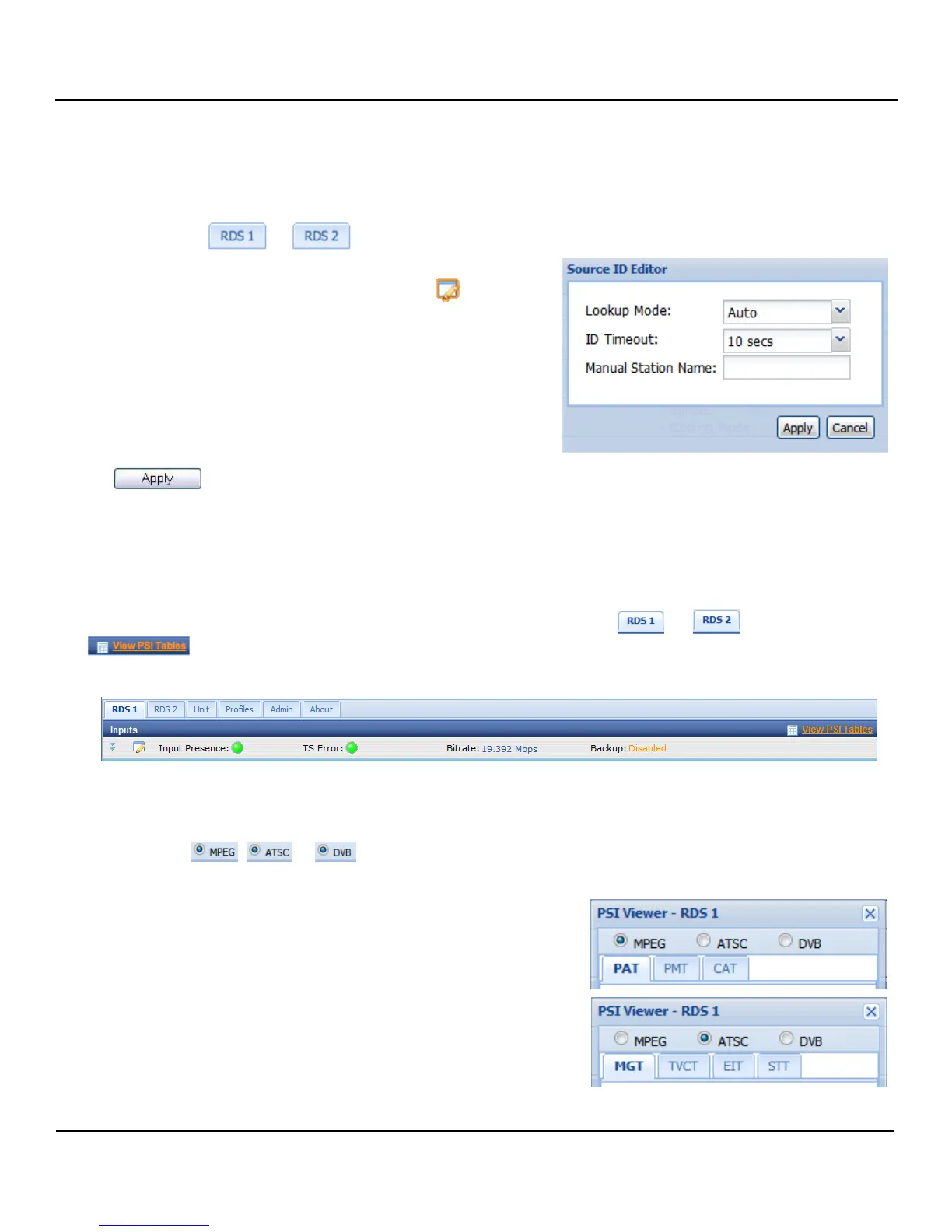
To setup the Source ID, use the following steps:
1. Click on the or tab of the corresponding
RDS that needs to be configured.
2. Under the “Services” heading, click on the button
next to the Source ID option.
3. A new window will pop up in the middle of the screen.
Use the drop down menu at the top to choose the
“Lookup Mode.”
4. Then use the next drop down box to choose the desired
“ID Timeout” (in seconds).
5. Enter a “Manual Station Name:” and then click the
button to save the changes.
Note: If no source is found in the allotted time the “Manual Station Name:” is displayed.
5.3.3 PSIP Information
To view the PSIP information for the applied TS, select the RDS ( or ) and then click the
button which is located right next to the “Inputs” heading towards the top of the page.
This will open a new window that displays all of the PSIP information for the applied TS. The PSIP Tables
are grouped into “MPEG”, “ATSC” and “DVB” tables. The table groups are selected using the selection
radial buttons , or .
The MPEG table grouping includes displaying the PAT, PMT
or CAT. Click the tabs at the top of the window to view the
corresponding table.
The ATSC table grouping includes displaying the MGT, TVCT,
EIT or STT. Click the tabs at the top of the window to view the
corresponding table.



 To Next Page