Chapter 3
Internet Connectivity Dial-In Clients
E-DOC-CTC-20050429-0103 v1.0
35
3.1 SpeedTouch™ Web Pages
Introduction As the SpeedTouch™ web pages are controllable from any Operating System with an
installed web browser, the method to establish PPP sessions described below you
can use on any computer system.
For more information on Internet connection setup, see the provided Installation and
Setup Guide.
Starting an Internet
session
Proceed as follows:
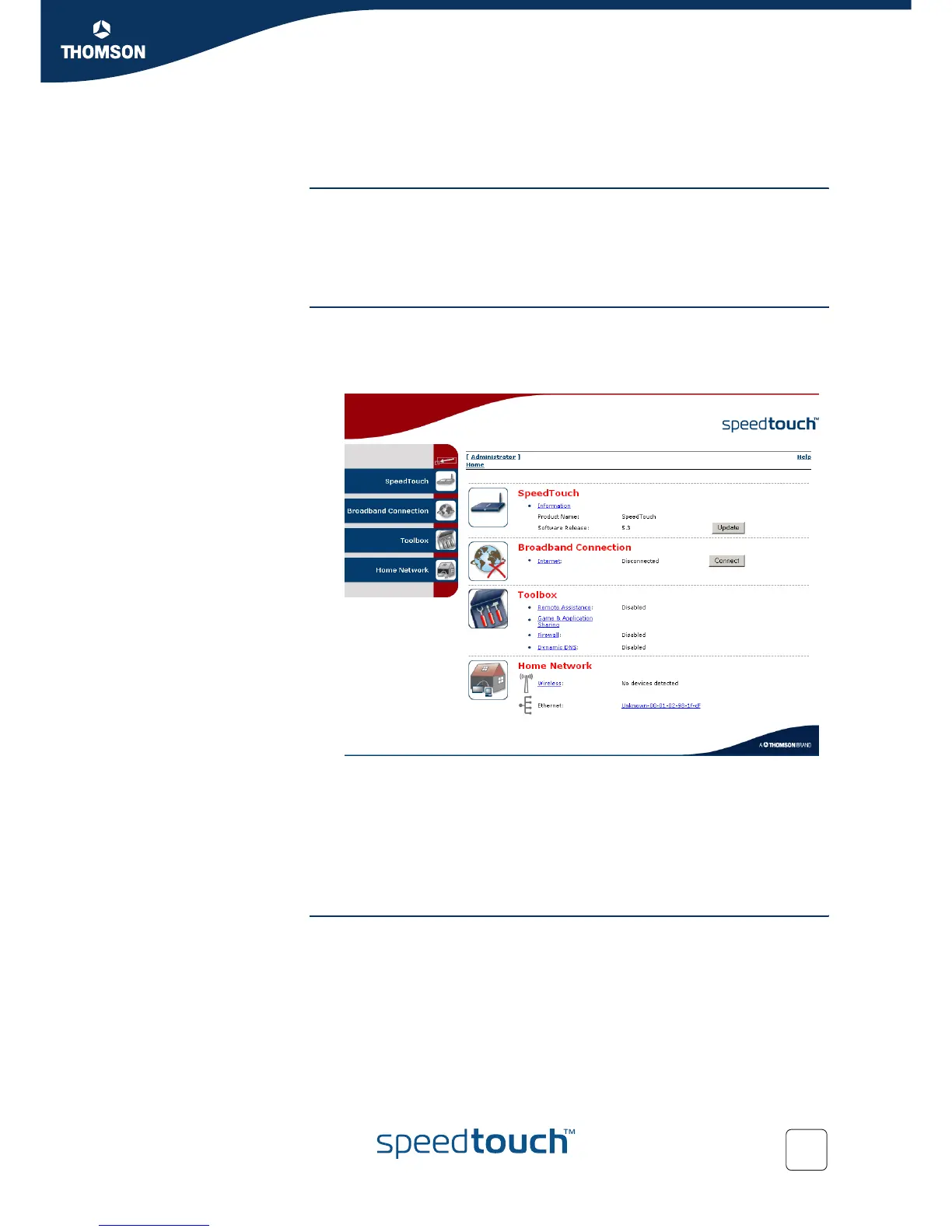
1 Open a web browser on your computer and browse to the SpeedTouch™ web
pages (see “1.3.1 Access via the Web Interface” on page 11 for more
information):
By default the SpeedTouch™ shows you the Home page.
2 Click Connect at the appropriate broadband connection.
You might be requested to enter your user name and password.
As a result SpeedTouch™’s embedded PPP dial-in client establishes the Internet
connection.
3 Now you can surf the Internet.
Monitoring your
Internet connection
You are able to overview and monitor your Internet connectivity as long as the
session is running via:
The SpeedTouch™ System Information page: see “4.3.1 Information” on
page 54.
The SpeedTouch™ Diagnostics task: see “4.4.1 Connectivity Check” on
page 63.















 To Next Page