16
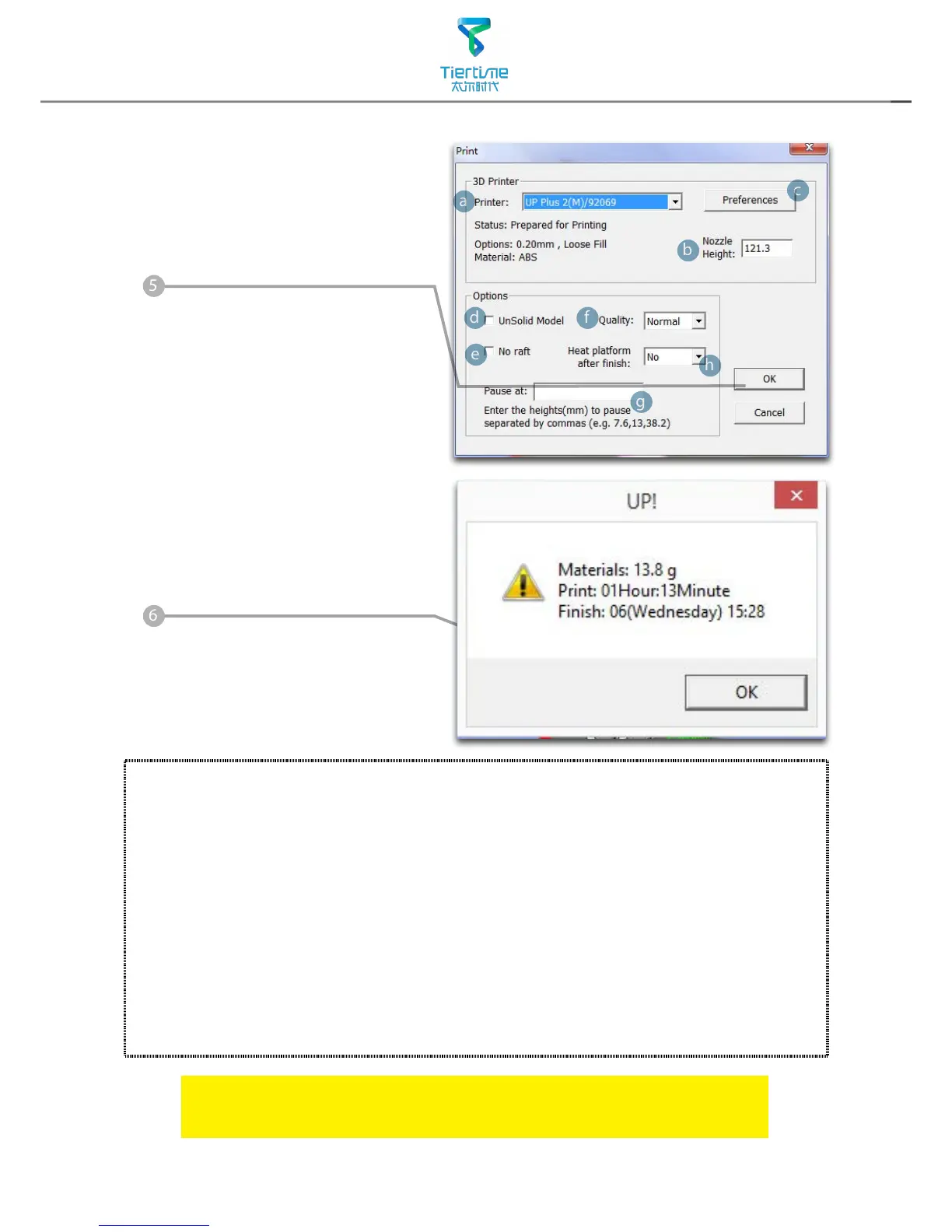
Click "OK" to start printing.
The program will rst slice
the model into Gcode and
then transfer the data to
the printer.
Annotation of Print Preview Interface
:
After sending the data, the
program will suggest the amount
of material and time needed for
the model in a pop up window.
At the same time, the nozzle
will start to heat up. The print
job will start automatically after
clicking"OK"
When printier nished receiving the print data, user could disconnect
it from computer for untethered printing.
a. Display the printer model.
b. Dispaly the noozle height.
c. Click to enter printer preference to set printing parameters.
d. If you model is not solid (defective), turn on this option.
e. No raft will be printed if this is turned on, print bed leveling will be disabled
as well.
f. Print Quality: the better the print quality the slower the print speed.
g. Set the pause height, the printer will pause at indicated heightness for
changing laments.
h. Continuous heating of platform after printing, save heating time for
consective printing and preventing breakage due to rapid cooling in cold
weather.



 To Next Page