29
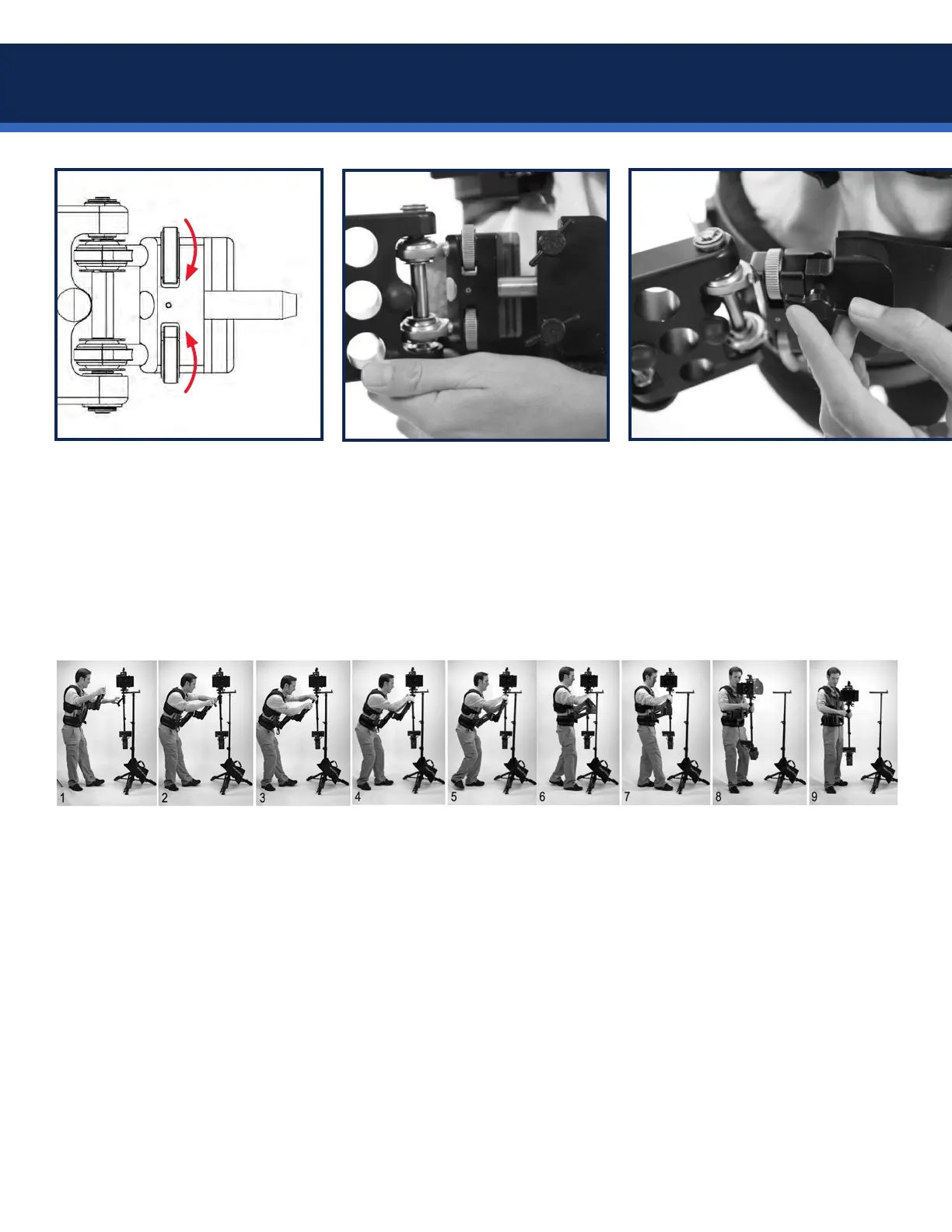
Conrmthatthesidetoside
adjustment wheels are set:
The bottom knob should be
turned all the way in.
The top knob is turned all the way
in, and then TWO turns out.
Insert the arm pin into the vest
socket block fully.
IMPORTANT: always maintain
control of the arm with at least one
hand, so nobody gets hurt.
Secure the arm to the vest
by tightening both fore-aft
adjustment knobs equally, so the
sockets are parallel.
The knobs must be snug, but they
do not need to be overly tight.
Lifting and docking the sled takes some practice. It’s best to adjust the stand high enough so the gimbal is
slightly below your shoulders, and have an assistant secure the stand. Don’t bend your knees while docking
orun-docking,especiallyifyouhavetroublendingthatsweetspotwherethearmpostandhandlerelease.
• With the vest on and arm attached, face the rig and bow at the waist to connect the arm post to the
gimbal receiver. Right hand should be in control of the arm while the left hand aligns the gimbal handle.
• Rotate the gimbal handle over the battery (behind the post) and insert the arm post.
• Once the gimbal handle is fully seated onto the arm post, switch your grip so your right hand is on the
gimbal handle and your left hand is on the post grip.
• Step towards the rig while standing up so the arm takes the weight of the sled, but remains secured to
the dock with the aircraft pin. Relax a moment and feel the weight. If the arm lift isn’t adjusted yet, you
may need to press down on the gimbal handle to load the arm as you step in.
• Remove the pin from the dock and step back from the stand. Move the sled to a position about 45º off
your left hip as shown. We call this missionary and it’s your optimal static starting position.
Socket pin
Arm socket
Two turns out
Turn in
Lifting the Steadicam


 To Next Page