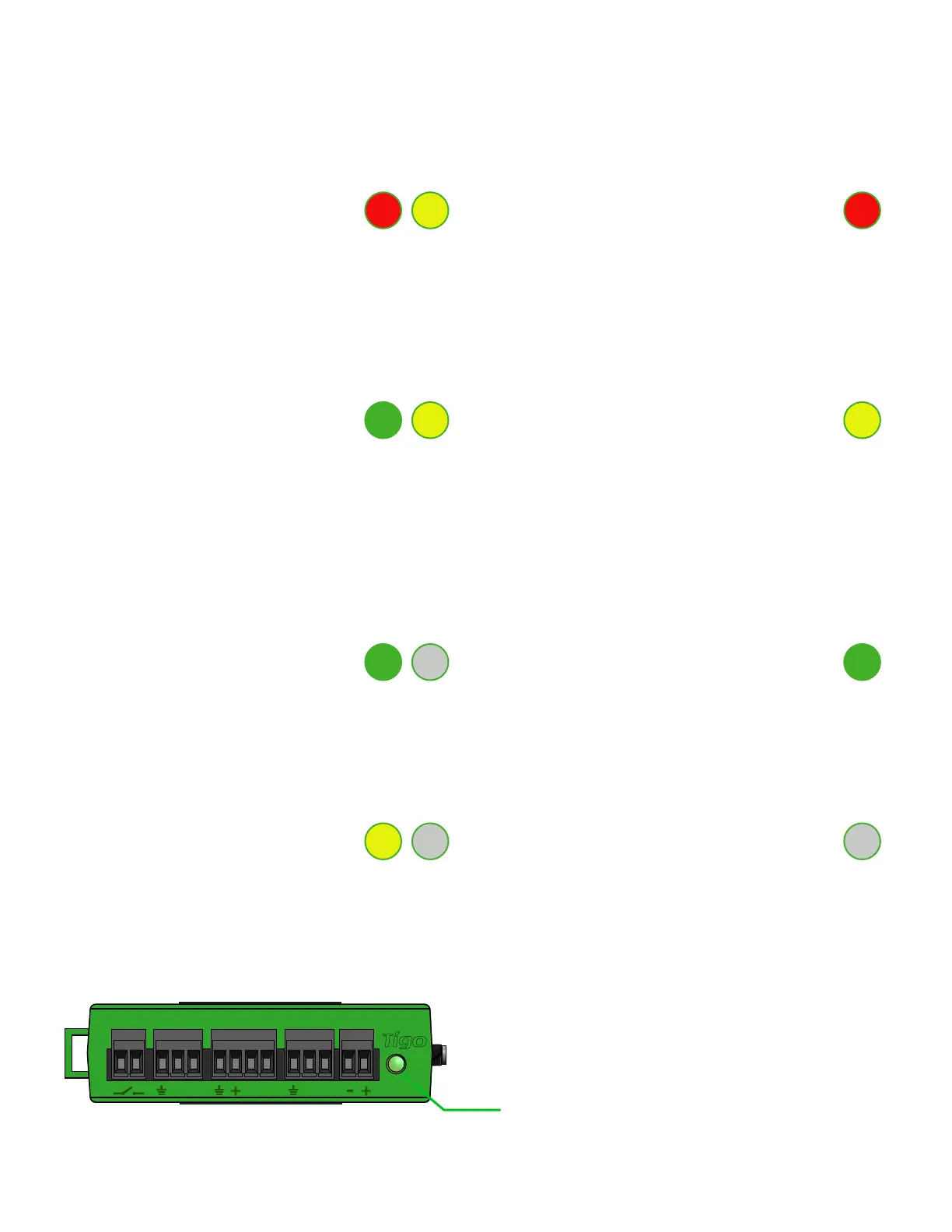
Auto PV-Off Error
• A blinking red and yellow LED
indicates that the system
automatically entered PV-Off mode.
• A solid red LED indicates that the
Discovery process failed or that the
CCA is not able to connect to the
Tigo server. In case of errors,
connect to the CCA using the
mobile app for more details.
User PV-Off Warning
• A blinking green and yellow LED
indicates that PV-Off mode was
activated manually.
• A solid yellow LED indicates that:
Discovery has not been run,
Discovery completed but did not
nd all expected TAPs or TS4 units, or
CCA is not able to upload data.
Connect to the CCA using the Tigo
SMART app for more details.
SMART App Activity System OK
• A blinking green LED indicates that
the mobile app is connected to the
CCA and is actively in use.
• A solid green LED indicates that
Discovery is complete and found all
expected TAPs and TS4 units, and
CCA is able to connect to the Tigo
server.
Discovery Power Off / No Status
• A blinking yellow LED indicates that
the CCA is scanning for TAPs and TS4
units (part of the commissioning
process).
• An unlit LED indicates that the CCA
is powered off.
CCA LED STATUS GUIDE
15
B A B A B A
AUX RS485-1 RS485-2GATEWAY POWER
Status LED


 To Next Page