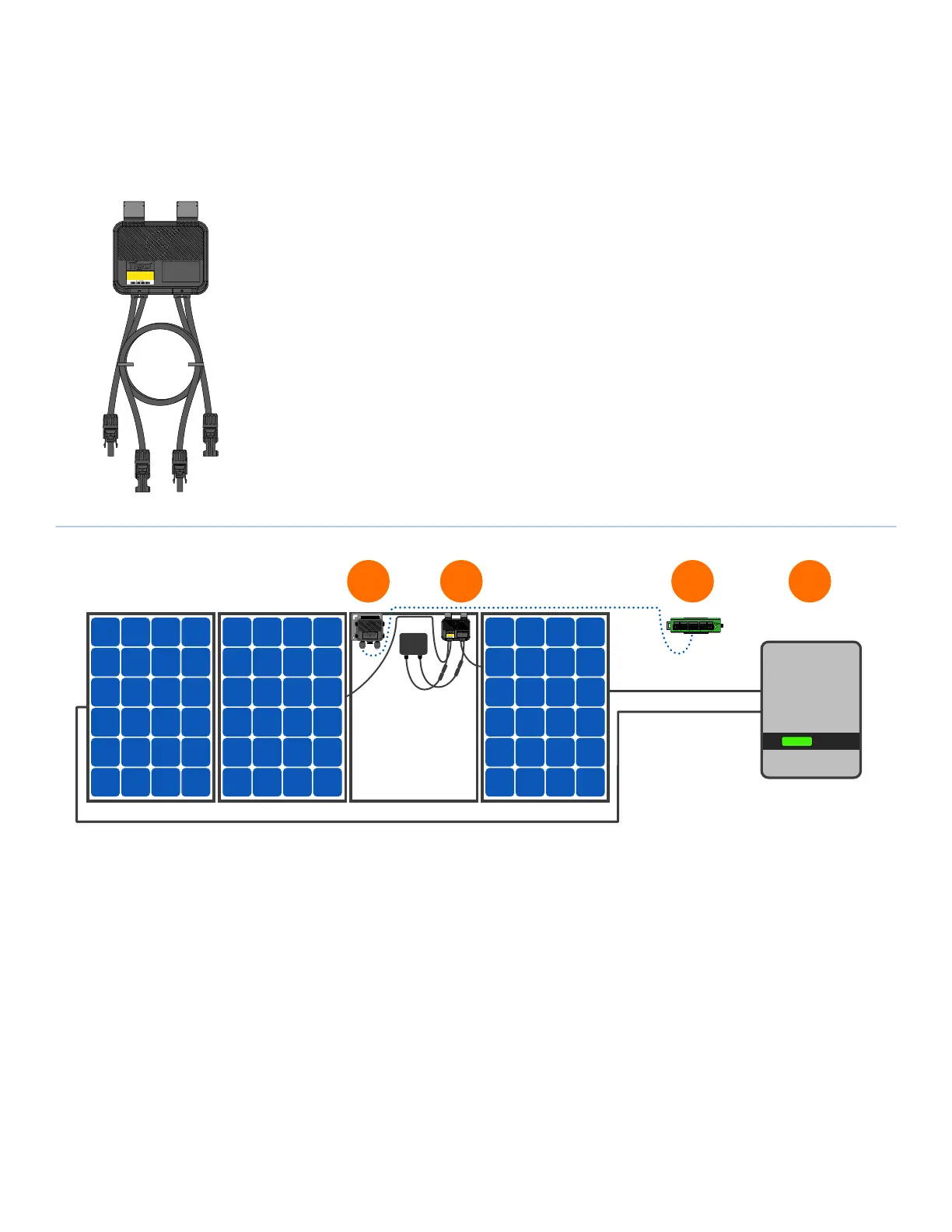
SYSTEM OVERVIEW: TS4-A
7
• TS4-A mounting is recommended on the upper right as shown, but can be placed on upper left
if needed (due to racking constraints, etc.)
• TS4-A cable glands must not be facing up
• Allow clearance between PV module and mounting surface for air circulation around TS4-A
• Do not drill additional mounting holes in the frame or metal bracket
Note: connect modules to TS4-A inputs before connecting outputs
TigoRapidShutdown
DONOTDISCONNECT
UNDERLOAD
4-123A
TS4-A-O
access point
B A B A B A
AUX RS485-1 RS485-2GATEWAY POWER
1. Tigo Access Point (TAP)
2. TS4-A installed on standard module
3. Cloud Connect Advanced (CCA)
4. Inverter
1 2 43
• Bracket clips to module frame without tools
• TS4-A inputs connect to module junction box,
TS4-A outputs are connected in series to form a string
• No additional grounding required
TS4-A
TS4-A-O


 To Next Page