INTRODUCTION
GENERAL DESCRIPTION
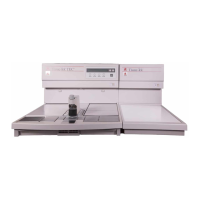
The Tissue-Tek
®
TEC™ 5 Tissue
Embedding Console System is used to
embed processed tissue in paraffin, form-
ing paraffin blocks ready for sectioning.
The System consists of:
Q
Embedding Module
Q
Cryo Module
Q
Tampers (1 large and 1 small)
Q
Transfer Tray
Q
Plastic Scraper
Q
Foot Pedal (sold separately, see Section 8)
Q
Magnifying Lens (sold separately, see Section 8)
Q
Electric Forceps (sold separately, see Section 8)
Q
Base Molds (sold separately, see Section 8)
Q
Tissue Cassettes (sold separately, see Section 8)
FEATURES
Q
A large insulated work space (allows you to
manipulate more samples comfortably and effi-
ciently)
Q
Individual temperature control in six areas (hot
plate, paraffin chamber, left and right chambers,
Cryo Module, optional electric forceps)
Q
Up-front keypad and LCD display (for easy
access)
Q
Two 3-hole forceps holders located on each side
of the paraffin dispenser (for right or left hand
operations)
Q
Menu-driven software simplifies setup of the
Automatic Timer (you specify the time you
require paraffin to be ready. The instrument cal-
culates the time it should automatically turn the
heaters on)
Q
Embedding and Cryo Modules work areas of
the same height (so modules can be placed side
by side, in any order to facilitate your choice of
“right-to-left” or “left-to-right” work flow)
Q
Large capacity (4L) paraffin reservoir with
optimized paraffin dispensing rates (do more
work, faster)
Q
Larger cold spot (accepts larger base molds)
Q
Hinged, thermal chamber doors move com-
pletely out of the way (allows full access to both
thermal chambers)
Q
Optional magnifying lens (enhances visibility
while positioning tissue specimen)
Q
Optional foot pedal (for hand-free operation)
Q
Optional electric forceps (always at the right
temperature to allow for more efficient workflow)
Section 1


 To Next Page