22
8.3.4 Setting CAN Bitrate (Advanced)
A more user defined bus bitrate can be configured with the command
sXXXXXXXXX[CR]. As with the standard bus timing command above, you can only use
this command when the CAN bus channel is closed.
sXXXXXXXXX [CR] sets the bitrate registers of the CAN controller. Users can set non-
standard bitrates which are not supported by the "SX" command.
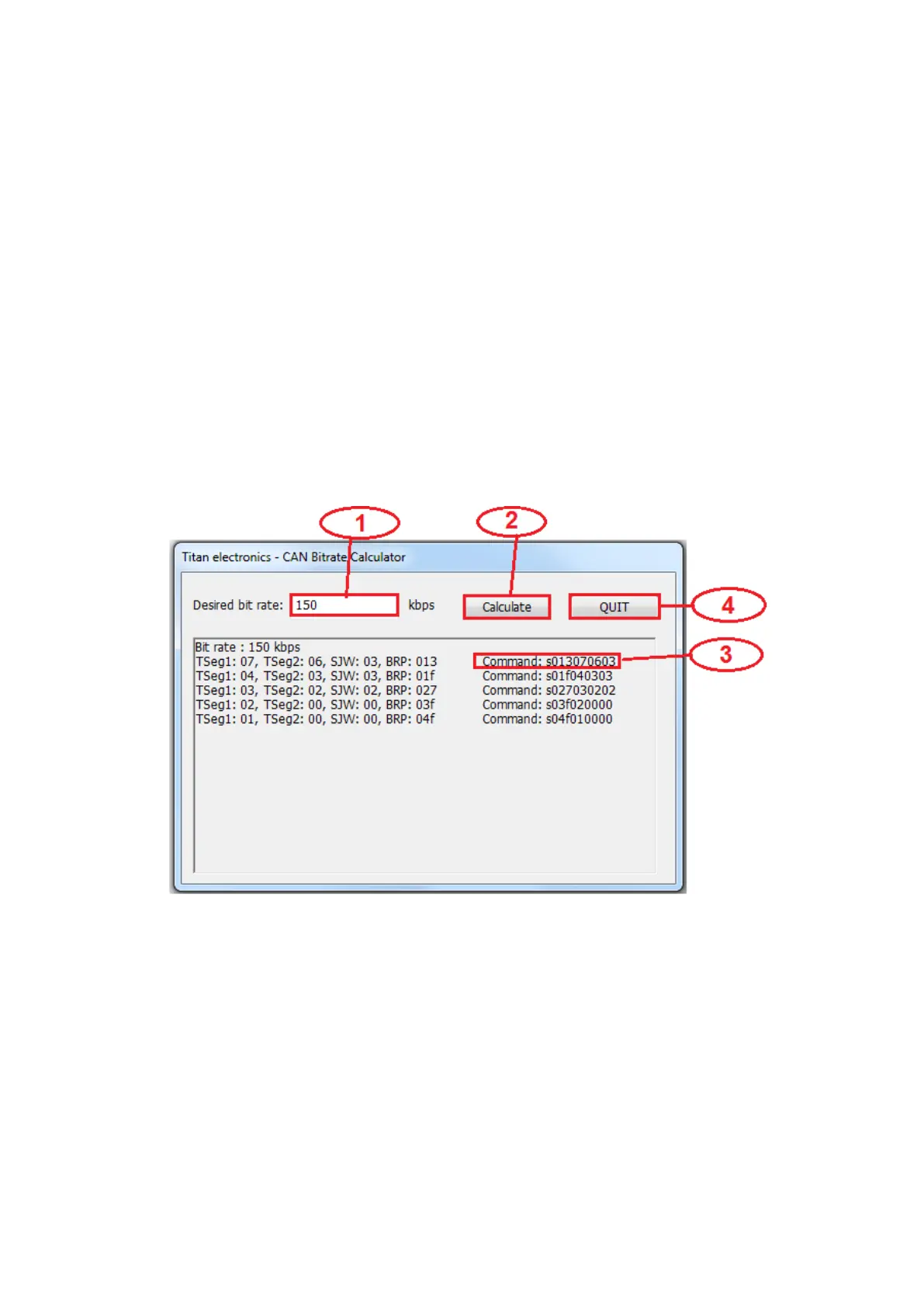
The USB to CAN adapter provides a CAN Bitrate Calculator program to calculate the
value of CAN bitrate registers for setting non-standard bitrates. Follow these steps to
calculate and set non-standard bitrates for the USB to CAN adapter:
1. Open the CAN Bitrate Calculator program.
2. Enter CAN Bitrate (“150” for 150Kbps CAN Bitrate) in the field “Desired bitrate:”.
3. Click “Calculate” to calculate the value of CAN bitrate registers.
4. Remember the topmost value of CAN bitrate registers.
5. e.g. Command: s013070603 for 150 kbps CAN Bitrate.
6. Click “Quit” to exit the CAN Bitrate Calculator program.
Example: s013070603[CR] will be set the bitrate to 150Kbps.



 To Next Page