43
9.4.2 Receiving CAN frames
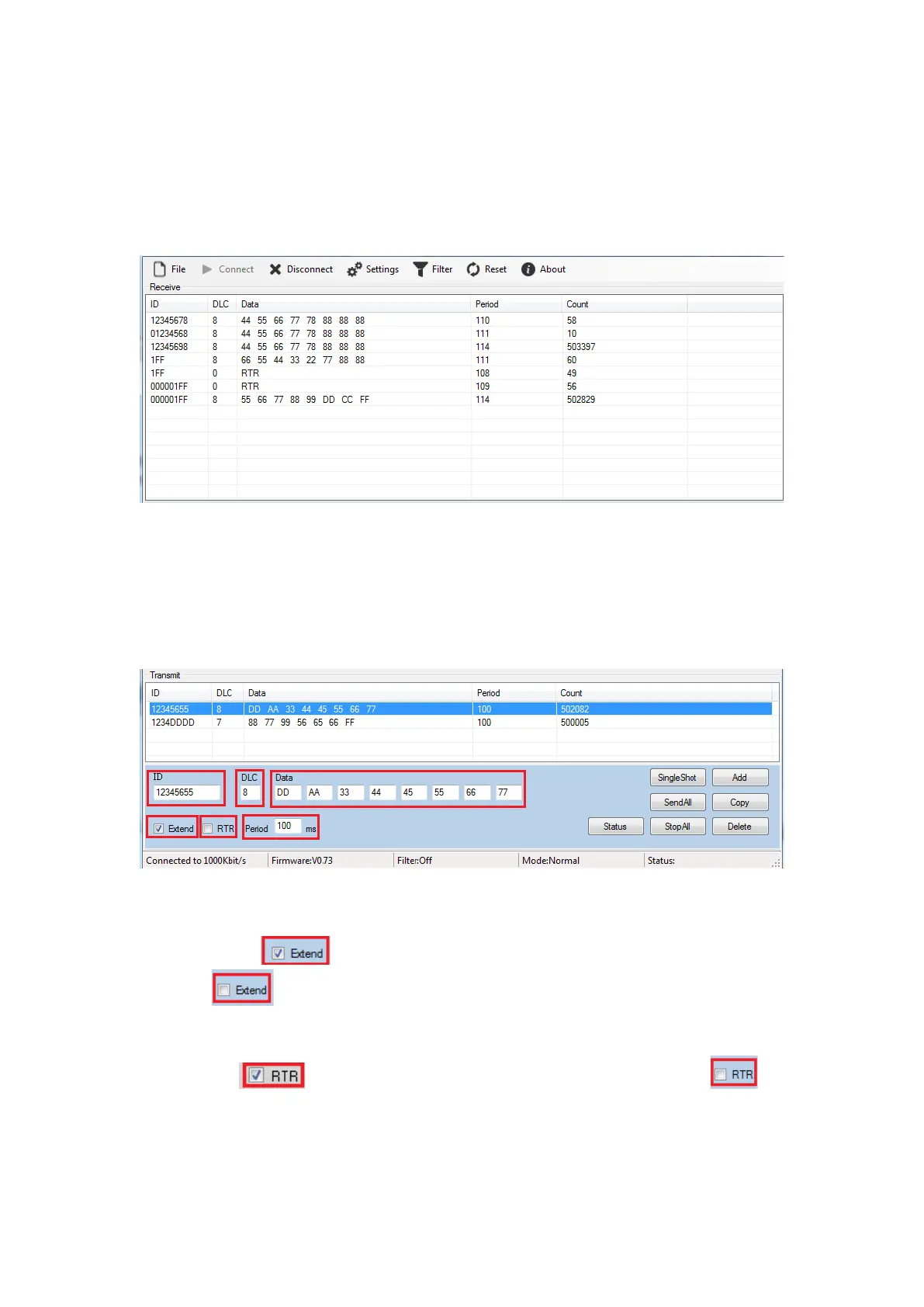
When Titan CAN test program receives CAN frames from another CAN node, it will
show all CAN frame messages in middle of main panel. The CAN frame messages
includes ID, DLC, Data, Period, Count.
9.4.3 Sending CAN frames
Titan CAN test program provides many parameters for sending CAN frames to another
CAN node, you can set the following parameters on the bottom of the main panel for
CAN data transmission:
Select transmit an extended CAN frame (29 bits ID) or a standard CAN frame (11 bits
ID).
Check “Extend” to transmit an extended CAN Frame (29 bits ID) and uncheck
“Extend” to transmit a standard CAN frame (11 bits ID).
Select remote request frame mode or transmit CAN frame mode.
Check “RTR” for a remote request frame mode or uncheck “RTR” for
transmit CAN frame mode.
Enter CAN frame messages in the respective fields, including ID, DLC, Data.


 To Next Page