Compact IP Codec User's Manual
25
Techno Mathematical Co., Ltd.
2140P
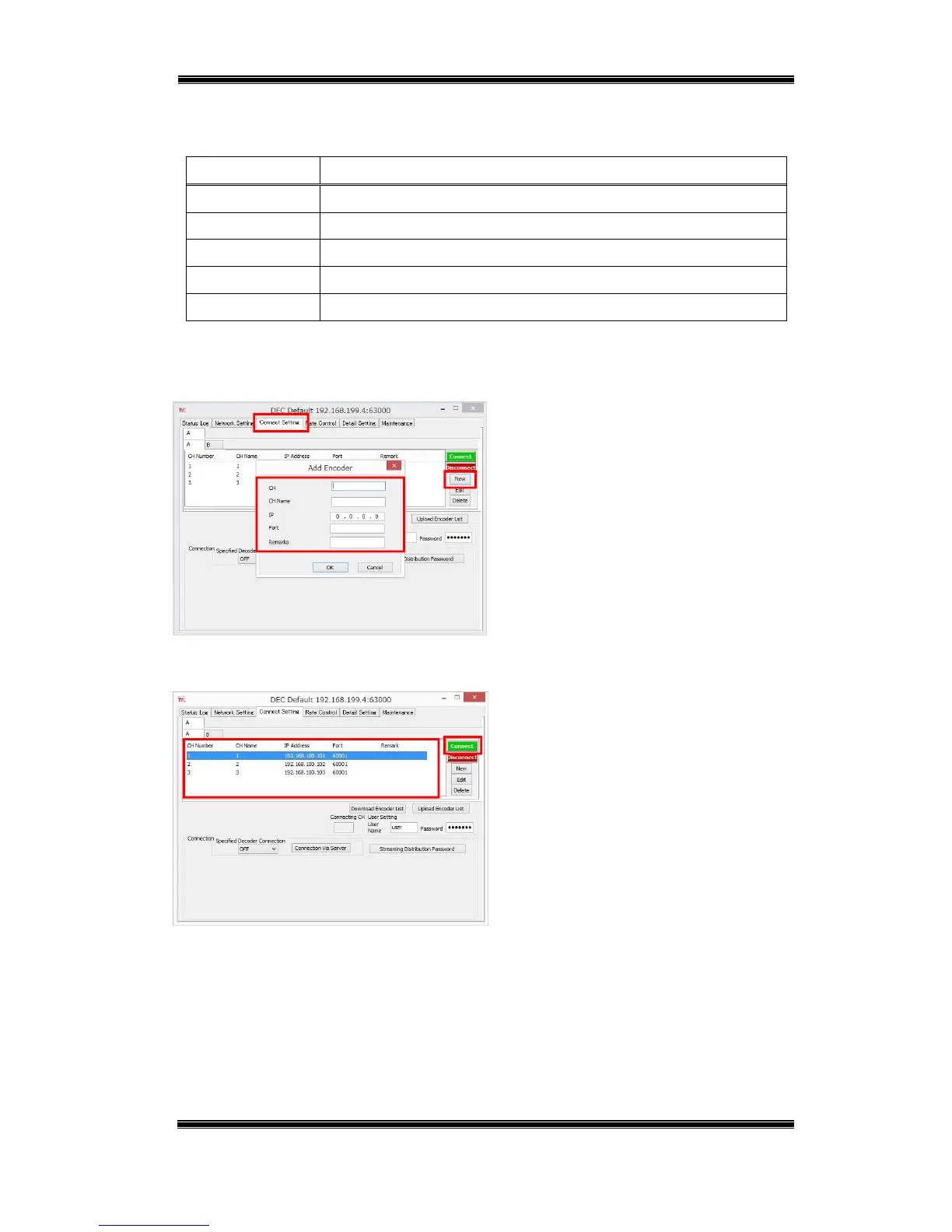
Next, in the encoder list, register information about the encoder to which you want to connect.
Table 5-3 Encoder List Settings
Setting Description
CH Sets the encoder channel number. (1 to 9999)
CH Name Sets the encoder channel name. (Up to 10 single-byte characters)
IP Sets the encoder IP address.
Port Sets the encoder port number. (0 to 65535)
Remarks Remarks text (Up to 128 single-byte or 64 double-byte characters)
*The channel number (CH) and channel name (CH Name) are used by the decoder to
distinguish between encoders. These settings are not configured on an encoder.
Figure 5-4 Decoder – Add Encoder
■ On the Connect Setting tab, click
[New].
■ Enter the encoder information of the
encoder you want to connect and then
click [OK].
*Remarks can be left blank.
Figure 5-5 Decoder – Connect
■ Select the encoder you want to connect
and then click [Connect].
If the encoder and decoder passwords
match, connection will start.



 To Next Page