Chapter 7: PC SOFTWARE OFFLINE SETTINGS
9. OPERATION SETTING MODE
7-40
Step 1. Select the control output to be activated in emergency situations.
•Double-clickontheleftmostblueareaofthecontroloutputlist,causingaticktoappearintheselected
area.
•Clickingonthe[SelectALL]buttonwillcausetickstoappearforallcontroloutputs.
•Clickingonthe[ClearALL]buttonwillcausealltickstodisappearfromallcontroloutputs.
Step 2. Click on the [Apply] button after setting completion to save the settings and click on the [OK] button to
close the [Emergency Settings] window.
Note
When no EV units are used, sequence setting and emergency broadcast pattern setting cannot be performed.
Whichever the [Post Emergency Microphone Operation] is set for "Continue" or "Silent," broadcast is terminated
after the Fireman's Microphone announcement because there is no basic EV broadcast.
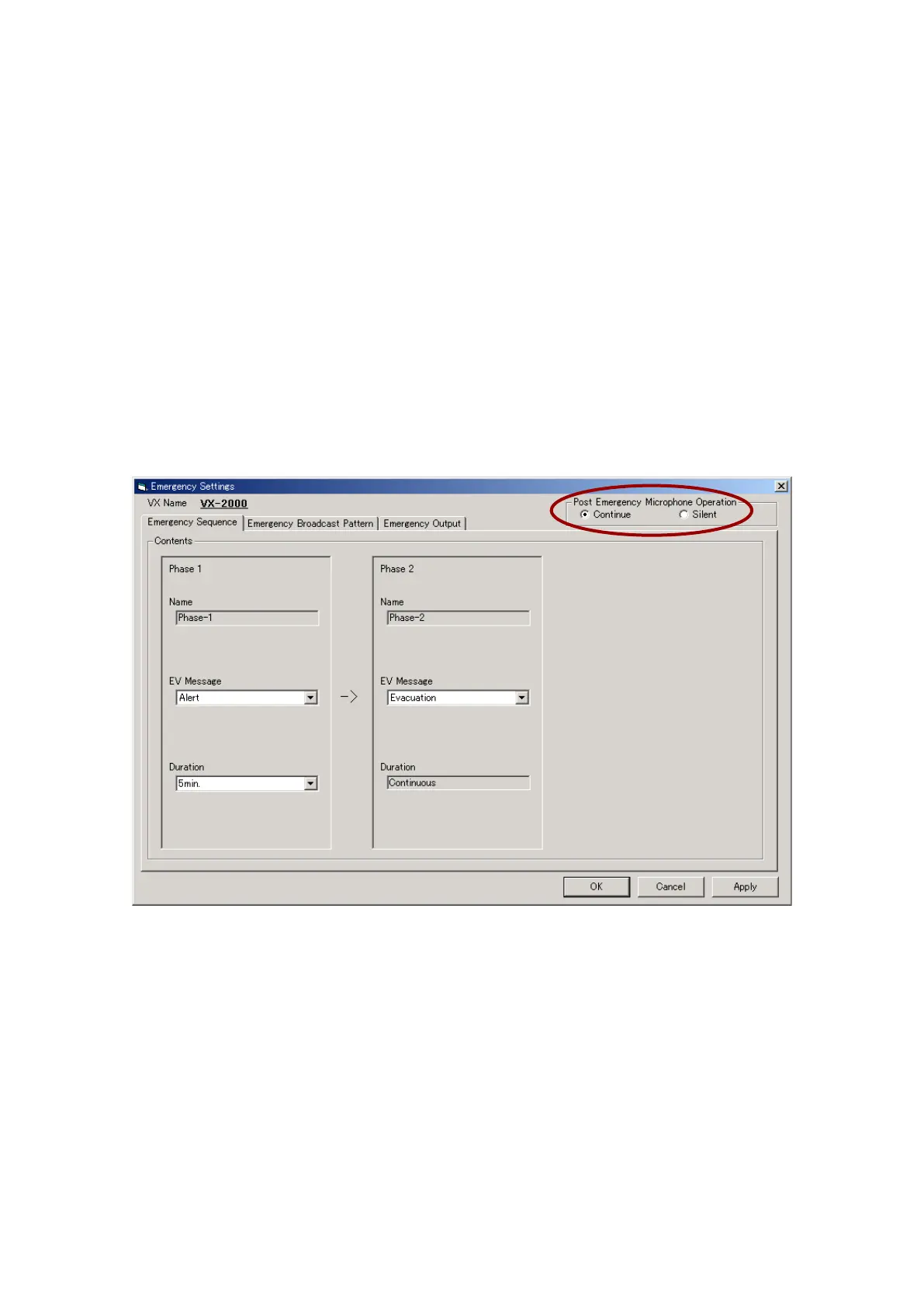
9.1.2. When using a single EV unit
The [Emergency Settings] window opens, permitting up to 50 emergency broadcast patterns to be created and
used.
Step 1. Set the [Post Emergency Microphone Operation].
•[Continue]: TheoriginalEVbroadcasttothedesignatedzone(s)isrestoredaftercompletionofthe
Fireman's Microphone announcement.
•[Silent]: TheoriginalEVbroadcastisnotrestoredaftercompletionoftheFireman'sMicrophone
announcement.
Step 2. Set the [Emergency Sequence].
2-1. Select either the "Alert" or "Evacuation" message for Phase 1 EV message.
2-2. Select the message broadcast duration for Phase 1 (1 – 20 minutes in 1-minute increments or
continuous).
2-3. Select either the "Alert" or "Evacuation" message for Phase 2 EV message.
Note: If the broadcast duration for Phase 1 is set for "Continuous," Phase 2 cannot be set.
Continued on next page



 To Next Page