Chapter 8: INSTALLATION AND SETTING PROCEDURES (HARDWARE)
3. VX-2000SF, VX-200SZ , VX-200SP, VX-200SI , VX-200SO, AND VX-200SE
8-33
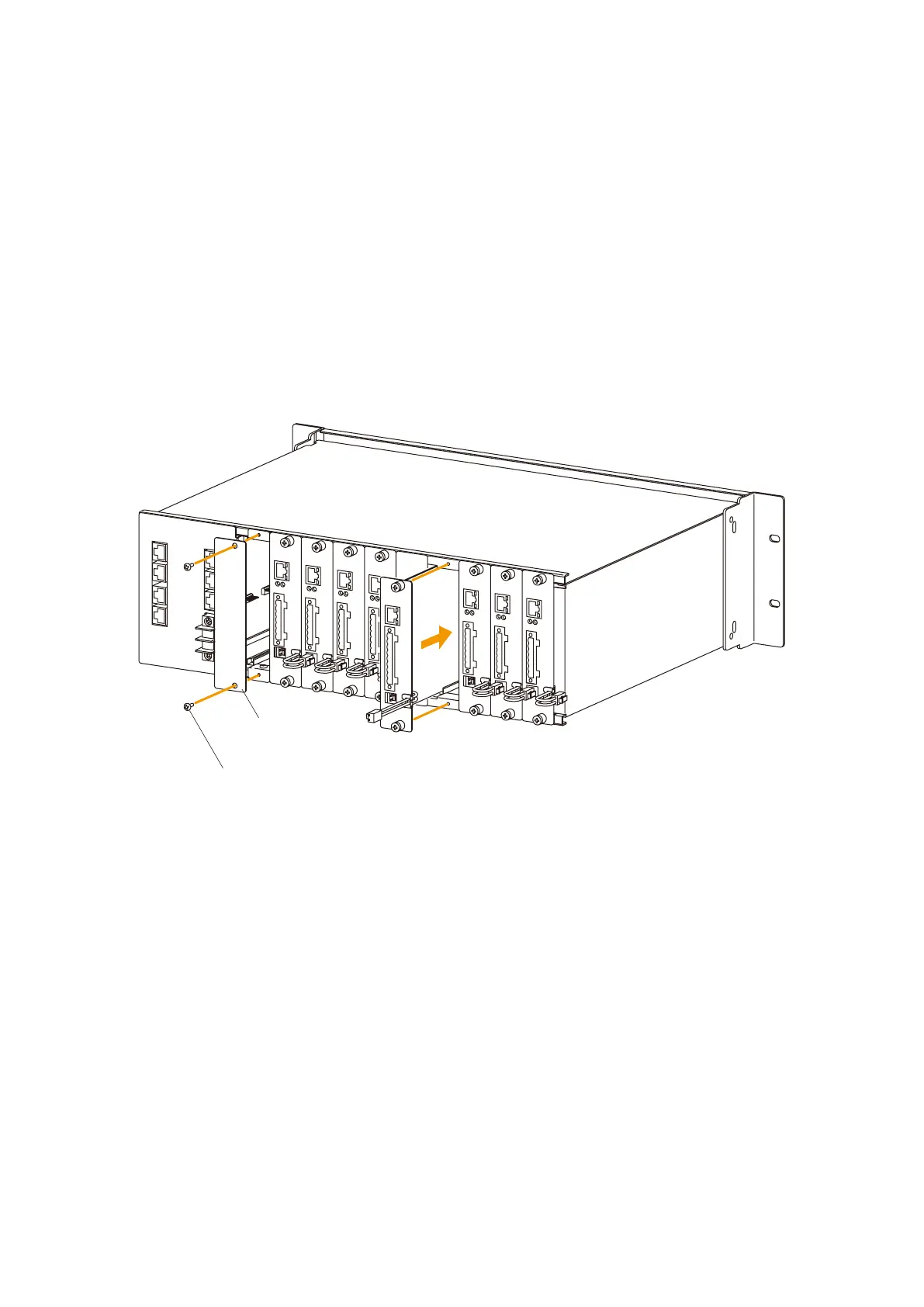
3.7. Installing Modules (VX-200SZ, VX-200SP, VX-200SI, and VX-200SO)
in the VX-2000SF Frame
Notes
• The slot number and module type to be installed must be identical to those designated by the PC software.
• Cover idle slots with the supplied blank panels to prevent dust from getting into the equipment.
Step 1. Align the module with the rails inside the VX-2000SF Frame, then push the module in to plug its
connector strip securely into the VX-2000SF's internal connector.
Step 2. Tighten both the top and bottom screws.
Blank panel
(supplied with the VX-2000SF)
Machine screw M3 x 6
(supplied with the VX-2000SF)



 To Next Page