Chapter 5: OPERATION
2. EMERGENCY BROADCASTS
5-13
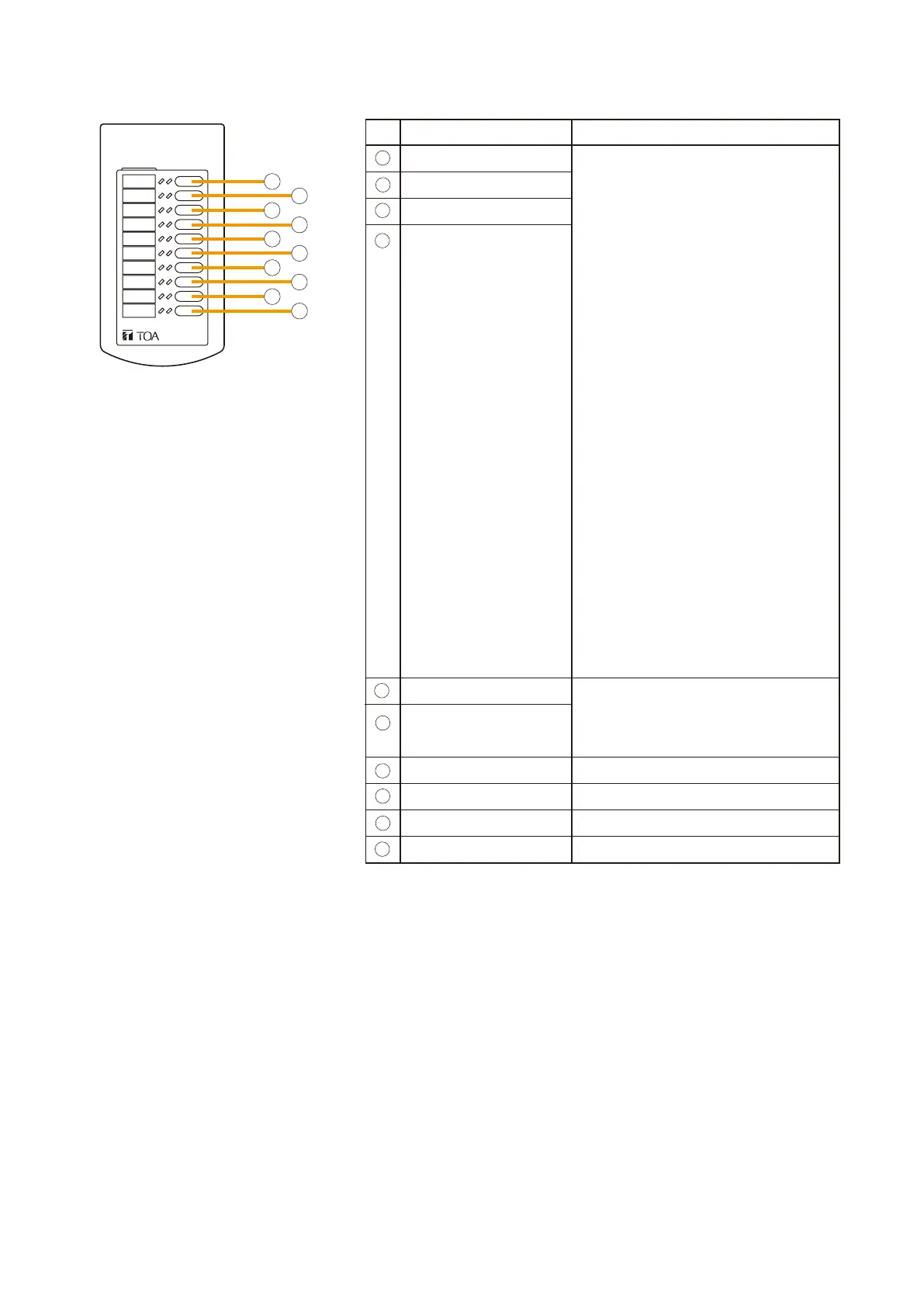
Key Setting Function
Zone selection
[General-purpose broadcast mode]
•The left-side LEDs are used to
monitor zones.
·
OFF: The zone not used or
broadcasting BGM.
·
Green: Remote Microphone in use
·
Flashing Green:
Other connected equipment
(Remote Microphone, EV unit,
chime, etc.) in use
•The right-side LEDs light green
during zone pre-selection.
[Emergency broadcast mode]
•The left-side LEDs indicate the
type of EV message.
·
OFF: No broadcast output
·
Green: Microphone announcement
·
Red: Evacuation message broadcast
·
Flashing Red: Alert message
broadcast
·
Flashing Green:
Other Remote Microphone
in use
•The right-side LEDs light green
during zone pre-selection.
GF Zone Select
1F Zone Select
2F Zone Select
3F Zone Select
Alert Message
Emergency Reset
Message
Clear
None
None
Emergency EV message call
Cancels all zone selections.
No function assigned.
No function assigned.
None No function assigned.
RM-210
RM-210
6
7
8
9
10
11
12
13
14
15



 To Next Page