Chapter 5: OPERATION
3. GENERAL-PURPOSE BROADCAST
5-27
[Example 1]
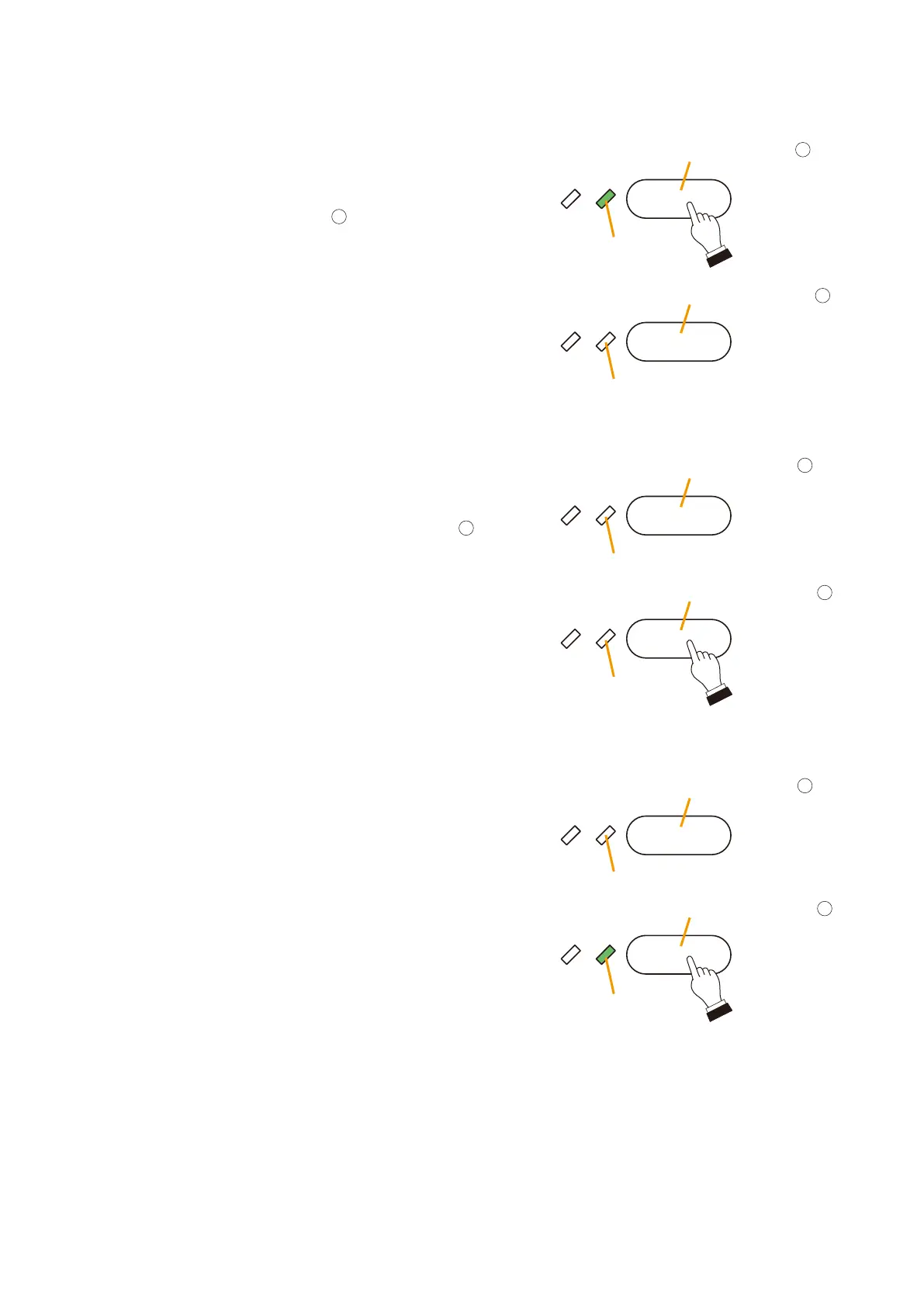
Adjusting the BGM Input Level to Compensate for Changes in Music Dynamics.
Step 1. To increase the sound volume when the music changes
from a more dynamic selection to a quieter tune, press
the BGM 1 Volume Up key
.
The input level increases by 3 dB each time the key is
pressed.
The Volume Up LED lights green to indicate that the
input level is higher than the initially set value.
Step 2. To decrease the sound volume when the music seems
too loud, press the BGM 1 Volume Down key
.
The input level decreases by 3 dB each time the key is
pressed.
The Volume Up LED extinguishes when the input level
returns to the initially set value.
The Volume Down LED lights green when the input level
drops below the initial setting.
Lights
Lights
BGM 1 Volume Up key
BGM 1 Volume Down key
BGM 1 Volume Up key
BGM 1 Volume Down key
Volume Up LED
Volume Down LED
Volume Down LED
Volume Down LED
Volume Up LED
Volume Up LED
18
18
BGM 1 Volume Up key
18
19
BGM 1 Volume Down key
19
19



 To Next Page