18
Production tightening mode (MODE-P)
(1) Basic operation and display
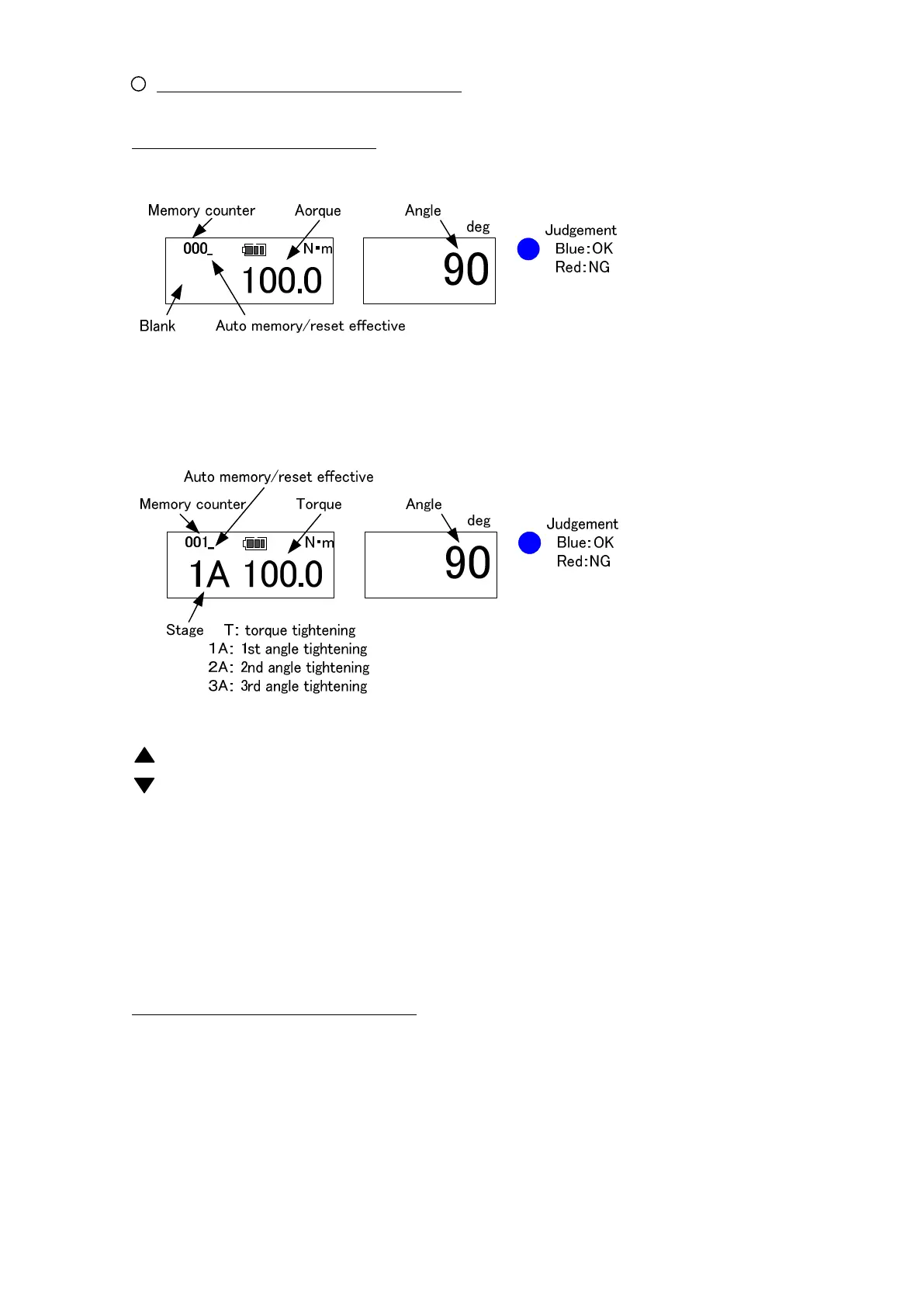
● RUN mode (memory counter: 000)
Press the reset switch or unplug the discharge plug to reset and it starts in RUN mode.
● PEAK mode(memory counter: 001~999)
key: Use this key to change setting digit in setting.
key: Use this key to lower the value in setting.
MD key: Press this key in the tightening mode, then it changes to external output display
Keep this key pressed in RUN mode to change to setting mode.
MEM key: Saves the measured data and proceed to the next.
If you press this key in RUN mode, then it changes to the measurement mode.
C key: Deletes the measured data.
POWER key: Turn ON/OFF the power. When it turns ON, it conducts the angle speed check.
(2) Torque/Angle calibration method
Press reset key (or plug in the charger plug and unplug it) to set it to RUN mode.
Use a torque wrench tester for torque calibration, and the angle calibration machine for
angle calibration.


 To Next Page