44
10.Transferring the tightening data to PC
Transfer the tightening data to PC for management.
○Single Spindle Tightening mode
①Preparation
Install the enclosed application software and the USB driver to PC (Refer to the instruction
manual on the CD for installing method). Connect CTA2-G and PC with the dedicated
communication cable (No.584). Make the same communication settings (baud rate, data
length, parity) on CTA2-G and the PC at parameter setting.
②Turning on CTA2-G and start application software, communication will be established. In
case of connection troubles, check followings.
-Installation of USB driver
-Connecting cable
-Power status of CTA2-G
-Parameter settings of CTA2-G and application software
③Setting the data range to transfer
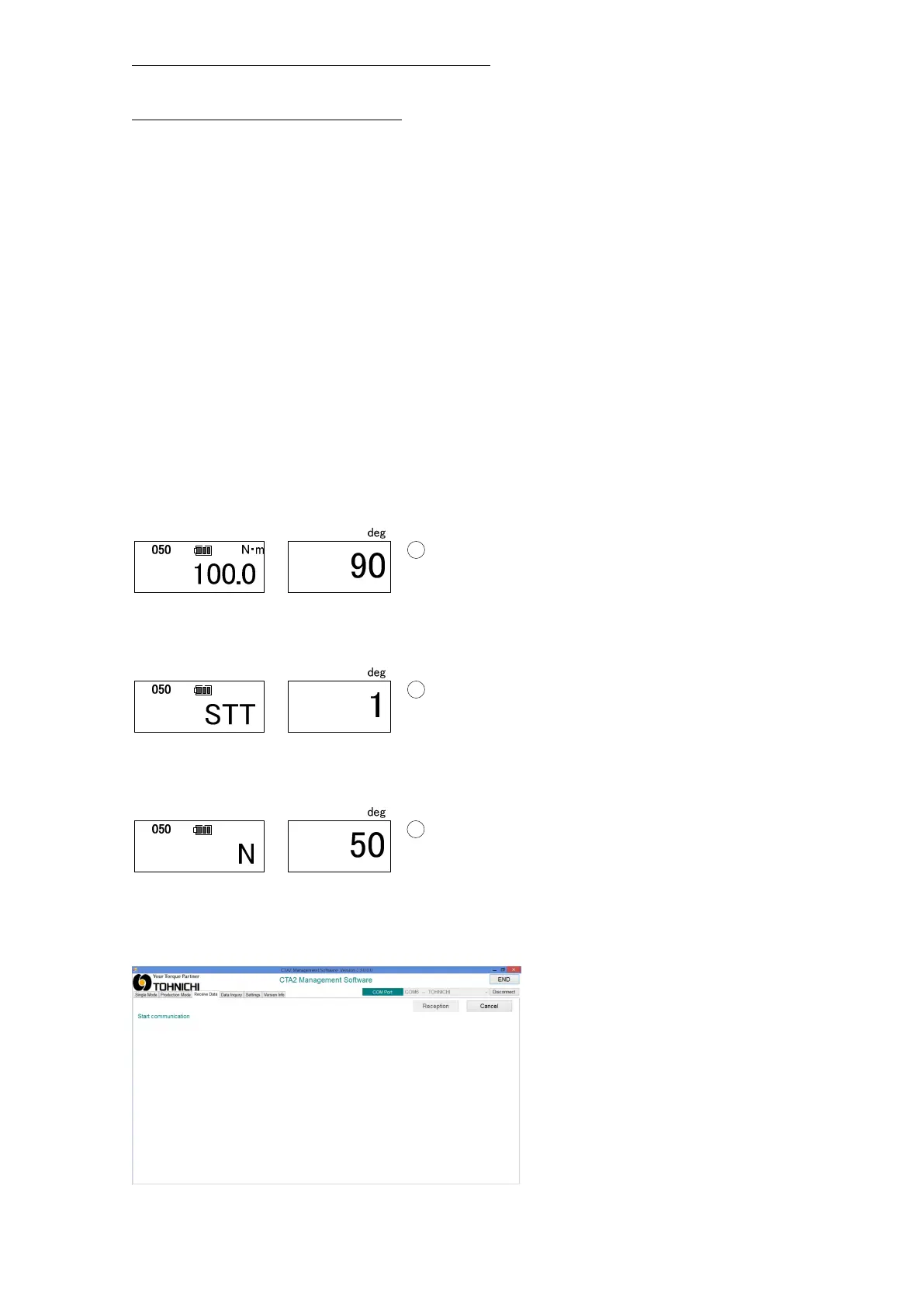
Use ▲▼key to set the memory counter to the upper maximum value of the data range you
would like to transfer and press MD key
Use ▲▼key to set the memory counter to the lower minimum value of the data range you
want to transfer and press MD. The display turns to the following (sample quantity display).
④Receiving data
・Select "Receive data" and click “Reception”. It starts communication(Waiting).


 To Next Page