11
10.Measurement Data Memory Clear
0200
60. 0
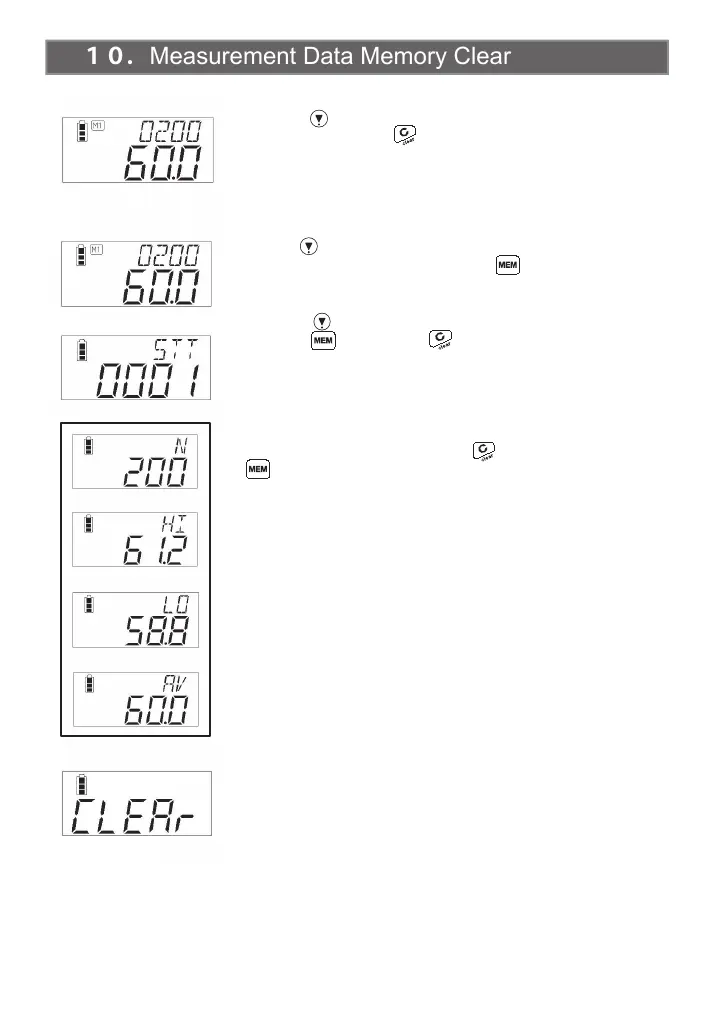
■Data Range Specified Clearing
■Clearing 1 data value
Press the key to display the counter measurement data that you
want to clear. Press the key to clear the counter measurement
data that is being displayed.
Use the key to set the counter value to the upper limit of the data
range you want to clear. Hold down the key for 2 seconds or
longer to display the computation screen.
Press the key to set the starting counter value you want to clear.
Press the key. Press the key to cancel.
In the condition where either of the displays shown in the box in the
figure at left are displayed, press the key while holding down the
key, then remove your fingers from both keys.
Measurement data memory clearing is carried out.
The LCD will return to the start counter measurement screen
that was cleared.


 To Next Page