14
■Error Displays
■Reset Operation
While the STC2-G is in the power OFF condition, press the key while
holding down the key, then remove your fingers from both keys
immediately afterwards.
If an error is displayed on the LCD display, implement the corrective actions
described below or carry out the reset operation.
If the error display is not cleared even after implementing these actions,
it can be expected that there is a defect in the keys, circuit boards, or in the
memory. You should therefore stop using the STC2-G and contact the
distributor where you purchased the product or TOHNICHI MFG. CO., LTD.
for more information.
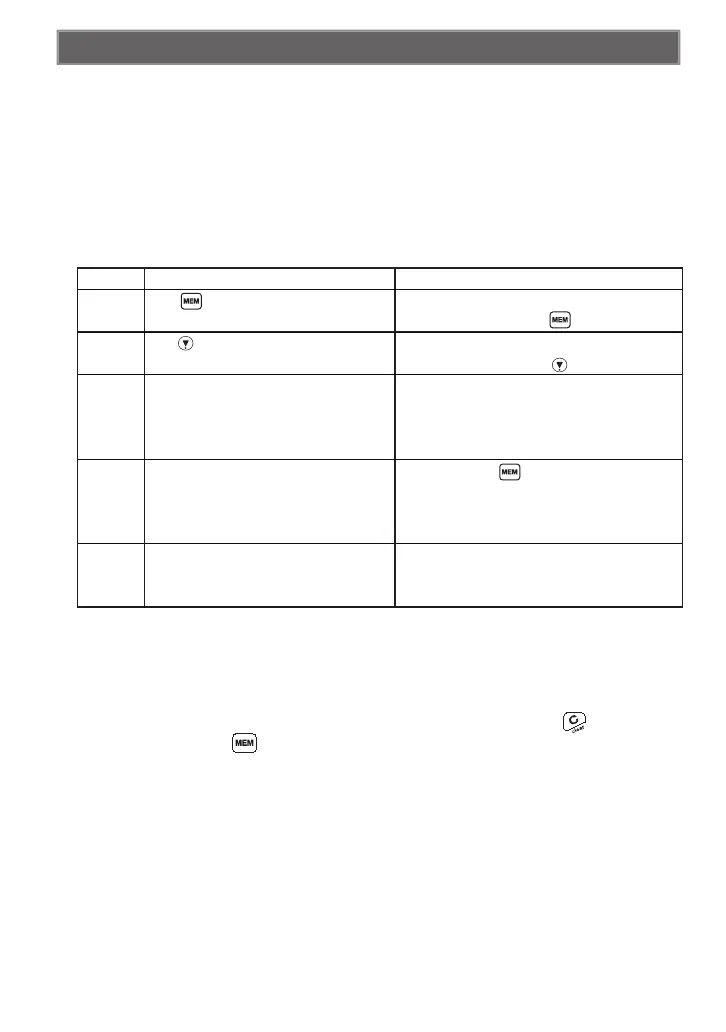
Display Error Description Corrective Action
Err1
The key is in the constantly pressed
condition.
Switch OFF the power, then switch the power ON
again without touching the key.
Err2
The key is in the constantly pressed
condition.
Switch OFF the power, then switch the power ON
again without touching the key.
Err6 Upper/lower limit setting problem
Because it will be possible that the setting values
are outside the torque measurement range or that
the lower limit setting is higher than the upper limit
setting, carry out the setting again.
Err8 Memory abnormality
Holding down the key for 2 seconds or longer
in the condition where Err8 is displayed will change
the display to the setting screen, so carry out the
settings again.
Err9 Torque sensor abnormality
Switch the power OFF, set the STC2-G to the
torque unloaded condition, then switch the power
ON again.


 To Next Page