3.3. Setting up the sensors
12
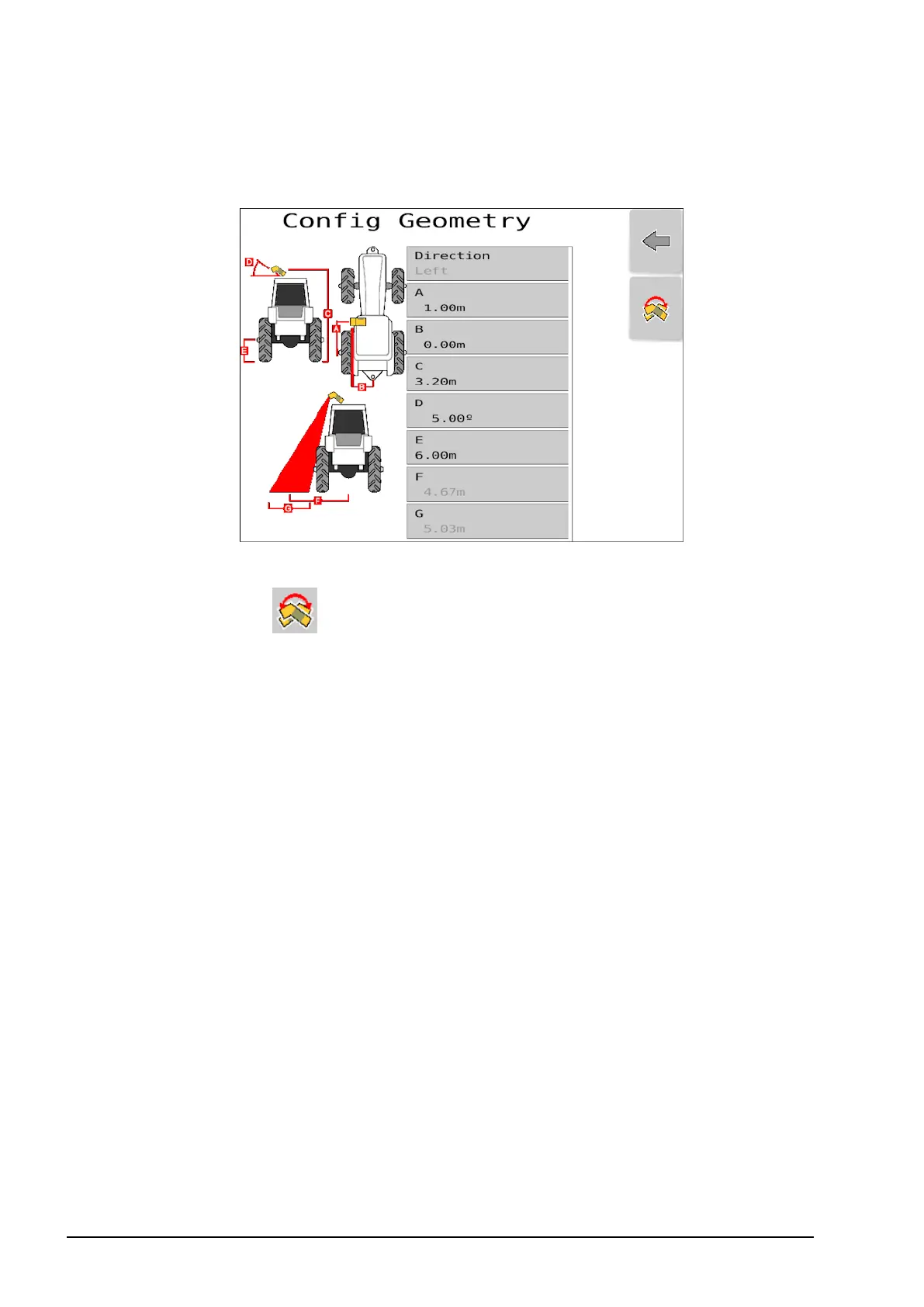
Configure geometry
1. Select Config Geometry.
Note: Ensure geometry is defined for both sensors if two sensors are
installed. Select to switch the sensor between left hand side and
right hand side.
l A: Distance from the center of the rear axle to the CropSpec
sensor.
l B: Distance from the center of the tractor to the CropSpec sensor.
l C: Height of the CropSpec sensor from the ground.
l D: Angle of the CropSpec sensor.
Note: The angle for D is recommended to be 5 degrees. This
angle determines a suitable footprint area for the CropSpec
sensors.
l E: Height of the center of the wheel from the ground.
l F: Distance from the center of the tractor to the approximate
center of the sensor footprint.
l G: Approximate width of the sensor footprint.
Note: Approximate width of footprint (G) depends on the height
of the sensor from the ground (C).



 To Next Page